


Safer appliance visibility for aging eyes
How to Make Stove, Furnace, and Thermostat ControlsEasier to Read
A control panel can look perfectly ordinary until changing eyesight turns a silver pointer, pale label, or dim display into a small daily negotiation. The user leans closer. A caregiver adds another sticker. Soon the appliance resembles a crowded bulletin board, yet the important setting is still difficult to identify.
The safest fixes are rarely about making everything bigger. They are about making the right information unmistakable: the off position, the selected burner, the current thermostat mode, the filter direction, and the warning light that should never be covered.
This guide shows older adults, people with low vision, caregivers, and homeowners how to improve contrast, reduce glare, simplify choices, test labels, compare accessible controls, and recognize the moment when a technician or occupational therapist should take over.
One clear “Off” marker can be more useful than twenty enlarged labels. Start with the setting whose misreading carries the greatest risk. 🔎
Snapshot
This guide is for older adults, low-vision users, family caregivers, and homeowners who need safer, easier-to-read appliance controls. You will learn how to identify the actual visibility problem, make restrained external improvements, compare DIY and professional options, and test whether the change works from the user’s normal standing position.
Table of Contents
Before You Act: Keep Every Modification External
This article covers visibility, labeling, lighting, and usability improvements. It cannot confirm that a particular adhesive, accessory, thermostat, or shutoff device is compatible with your appliance.
Do not open panels, change wiring, bypass locks or safety devices, reposition knobs, cover warnings or sensors, or attach material where it may melt, ignite, obstruct ventilation, or interfere with operation. Check the appliance manual and ask the manufacturer or a qualified technician when compatibility is uncertain.
The 60-Second Control Audit That Reveals the Real Problem
Before buying magnifiers, labels, lamps, or a replacement thermostat, watch the primary user operate the appliance from beginning to end. The goal is not to test the person. It is to discover where the information chain breaks.
A label may be readable while the pointer remains invisible. A thermostat temperature may be large while the tiny Heat, Cool, or Hold indicator causes the actual confusion. Fixing the wrong element adds clutter without reducing risk.
Check the Normal Viewing Position
Ask the user to stand where they normally stand. Do not begin by encouraging them to bend closer, remove their glasses, shine a phone flashlight at the panel, or memorize a workaround.
- Can the setting be identified from a comfortable posture?
- Does the user have to tilt their head to escape glare?
- Is the control hidden by a counter edge, pan handle, cabinet, or appliance door?
- Can the pointer be distinguished from the printed scale?
- Does evening lighting make the problem noticeably worse?
- Can the user confirm that the appliance is off without touching every control?
Photograph the Controls in Daylight and at Night
Take one photograph from the user’s eye level during the day and another under normal evening lighting. Photographs often reveal pale-on-silver labels, reflections, washed-out digital displays, and shadows that the household has gradually stopped noticing.
Keep these photographs. They document the original layout, help you restore removed labels, and give a technician useful context if the problem later turns out to involve worn parts or a failing display.
Sort the Problem Into Four Buckets
| Problem | What the user may say | First response to test |
|---|---|---|
| Tiny text | “I cannot read the words.” | Add a separate large-print reference card. |
| Weak contrast | “Everything blends together.” | Use a matte high-contrast marker or overlay where permitted. |
| Glare | “I can see it only from the side.” | Reposition lighting and reduce reflected light. |
| Complex sequence | “I can read it, but I forget what to press next.” | Create a short numbered operating sequence. |
The O-S-M-T Readability Check
A change passes the audit only when the primary user can identify the control accurately, comfortably, and repeatedly. A caregiver saying, “It looks much clearer to me,” is not the test that matters.
Contrast Before Magnification: The Upgrade That Often Works First
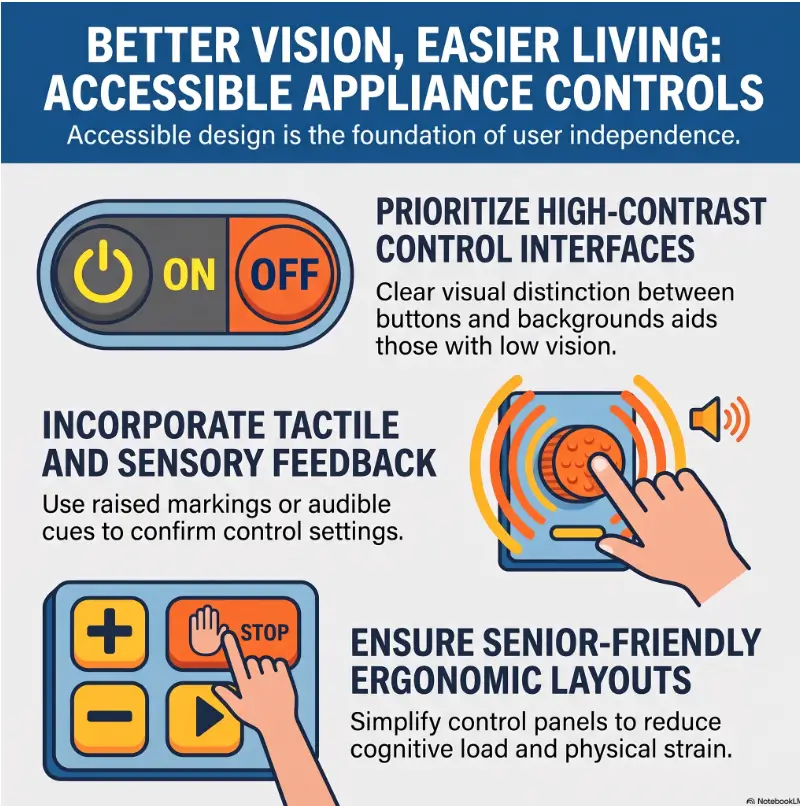
Large print helps when characters are truly too small. Contrast helps when a label, pointer, or button disappears into its surroundings. Many glossy black, stainless steel, and pale-gray control panels have adequate letter size but poor visual separation.
Make the Important Element Stand Apart
Use a dark mark on a light background or a light mark on a dark background. Avoid decorative color combinations, translucent tape, metallic finishes, and patterned labels that become visual confetti at arm’s length.
- Keep essential words short: Off, Heat, Cool, Fan, Front, Rear.
- Use one consistent type style rather than several fonts.
- Choose matte surfaces where reflected light is a problem.
- Leave space around each important label.
- Use color as reinforcement, not as the only clue.
Key Takeaway
A larger gray label on a silver panel may still disappear. A smaller, matte, high-contrast cue can be easier to recognize because its edges remain distinct.
Use Tactile Cues With Restraint
A tactile dot can help identify a frequently used position without requiring close visual inspection. It should not change how the control moves, prevent cleaning, cover printed information, or create a false impression that the appliance is off.
Before attaching anything, compare the surface, shape, removability, and intended use. The guide to bump dots versus tactile tape explains why a raised marker that works well on a remote control may be unsuitable near heat or on a tightly spaced dial.
Fix Lighting Without Creating a New Reflection
More light is not automatically better. A bare bulb or bright ceiling fixture can produce a white reflection directly across a glass thermostat or polished control panel.
- Move the light source to the side rather than aiming it straight at the panel.
- Use diffuse task lighting instead of a harsh spotlight.
- Check whether cabinet doors or pale countertops are reflecting light upward.
- Clean greasy film and fingerprints, which scatter light and soften contrast.
- Test the setup while wearing the glasses normally used for the task.
For kitchens, the placement principles in this glare-free under-cabinet lighting guide can help you improve visibility without turning a glossy backsplash into a small indoor sunrise.
Show me the nerdy details
Readability depends on more than letter height. Edge contrast, stroke thickness, spacing, glare, viewing distance, visual field, and adaptation to light all influence whether a person recognizes a control quickly.
This is why enlarging every label can fail. Larger elements may crowd one another, reduce white space, conceal factory information, and require more eye movement. The better design usually creates a strong hierarchy: one unmistakable safety position, a few essential operating cues, and a separate reference sheet for everything else.

Stove Controls: Make “Off” Impossible to Guess
Stove controls combine heat, timing, multiple burners, and controls that often look identical. A readable temperature scale does not solve the problem if the user cannot tell which knob operates the front-left burner.
Mark the Exact Off Position First
The off position deserves priority because it answers the highest-risk question: is heat still being produced? Use only an external method permitted by the manufacturer and suitable for the surface and expected temperature.
- Photograph the original knob and factory markings.
- Confirm the true off position using the appliance manual.
- Choose a small, high-contrast cue on a cool, non-obstructive surface.
- Check that the cue does not restrict rotation or cover an indicator.
- Test it after the stove has been used and fully cooled.
- Ask the primary user to confirm the off position without prompting.
Key Takeaway
Do not begin by labeling Low, Medium, Medium-High, High, Simmer, and every number. First make Off and burner location unmistakable. Add more only when testing shows a genuine need.
Map Knobs to Burners Without Creating a Puzzle
Factory burner diagrams are often tiny. A separate large-print reference card placed away from the cooktop can be safer than attaching several labels to the hot control area.
| Control problem | Restrained solution | What to avoid |
|---|---|---|
| Front and rear burners look identical | Use a simple FRONT or REAR reference beside the appliance. | Four unrelated colors with no text or shape cue. |
| Left and right are confused | Use a burner diagram matching the user’s viewpoint. | A diagram copied from a manual at a different orientation. |
| Knob pointer is faint | Ask about an approved replacement knob or overlay. | Painting, cutting, or reshaping the original knob. |
| Settings require close inspection | Mark one routine setting only after Off is clear. | Covering the full factory scale with homemade material. |
Short Story: One Dot Too Many
A daughter added raised dots to her father’s stove after he began squinting at the burner controls. One dot meant the front burner, two meant the rear, and three meant his usual heat setting.
The system made sense while she explained it. Two evenings later, he could feel the dots but could not remember whether the count described burner location or temperature. He turned the correct knob in the wrong direction and assumed the burner was off.
They removed the extra markers, kept one unmistakable cue for Off, and placed a large burner diagram on the nearby cabinet door. His common cooking sequence was printed on a separate card.
The lesson was quiet but important: tactile information must reduce decisions, not create a second code that the user has to decode.
Handle Digital Stove Displays Carefully
Digital panels may combine clock, timer, oven temperature, error messages, child locks, and start confirmation in the same small display. Do not place instructions over the panel or assume a flashing display is merely difficult to read.
- Adjust brightness only through documented appliance settings.
- Keep warning symbols, error codes, sensors, and indicator lights visible.
- Place a numbered instruction card beside the appliance.
- Use exact button names that match the panel.
- Include a final confirmation step: verify the oven started or the burner turned off.
For a more focused stove review, see the stove knob safety guide for seniors. The broader kitchen appliance safety checklist can help identify related risks involving cords, lighting, hot surfaces, and appliance placement.
Furnace Controls: Label the User-Safe Parts Only
A furnace is not an oversized thermostat. Access panels may conceal ignition systems, electrical components, burners, diagnostic lights, switches, and moving parts that are intended for trained service personnel.
Separate Household Tasks From Service Tasks
| Area or task | Possible external aid | Boundary |
|---|---|---|
| Nearby service switch | Clear identification if permitted and already intended for household use. | Do not encourage routine switching or cover the wall plate. |
| Filter replacement | Large-print note with approved filter size and change date. | Do not guess airflow direction or force an incompatible filter. |
| Access panel | Leave factory warnings and seams visible. | Do not turn internal diagnostics into homeowner controls. |
| Seasonal setting | Document only settings identified in the manual for user adjustment. | Do not alter gas valves, ignition controls, wiring, or limit switches. |
Key Takeaway
A furnace label should help someone complete an approved household task. It should never make an internal service component appear safe for routine use.
Make the Filter Note Useful, Not Decorative
A large-print filter note can prevent repeated measuring and reduce the chance of buying the wrong size. Record only verified information from the existing filter, appliance documentation, or technician.
- Filter dimensions and approved type
- Airflow direction as confirmed for the installation
- Date installed
- Recommended inspection schedule from the manufacturer or technician
- Who to call if the filter compartment is difficult to access safely
Place the note in a visible, dry location away from burners, vents, hot surfaces, and panel seams. A note attached to a nearby wall or maintenance folder is often better than one stuck directly to the furnace.
Treat Carbon Monoxide Protection Separately
Easier-to-read controls do not prevent carbon monoxide exposure caused by a malfunctioning, improperly installed, or poorly maintained fuel-burning appliance. Working alarms and qualified inspection remain separate safety layers.
Do not rely on a handwritten label to interpret furnace warning lights, repeated shutdowns, unusual odors, soot, ignition problems, or unfamiliar diagnostic codes. Record what you observe and contact an HVAC professional.
Thermostat Controls: Reduce Choices Before Enlarging Everything
A thermostat can display large numbers and still be difficult to operate. Mode changes, schedules, temporary holds, permanent holds, fan settings, account logins, touchscreen gestures, and energy prompts may all compete with the simple task of making the room warmer.
Simplify the Daily Path
Identify the two or three actions the user actually needs. For many households, these are checking the current temperature, raising or lowering the target, and confirming whether the system is in Heat, Cool, Fan, or Off mode.
- Remove unnecessary schedules if they create surprise changes.
- Pin or favorite commonly used temperatures when the thermostat supports it.
- Increase text size, brightness, or screen timeout through documented settings.
- Use plain-language mode labels on a nearby reference card.
- Write down how to cancel a temporary hold.
- Keep account recovery information secure and available to a trusted person.
The tactile thermostat labeling guide offers additional ideas for distinguishing frequently used physical controls without crowding the device.
Compare Accessible Thermostat Options Before Buying
| Option | May suit | Questions to check |
|---|---|---|
| Simple physical-button thermostat | A user who prefers direct controls and few modes. | Are buttons distinct? Is the display readable? Can schedules be disabled? |
| Large-display programmable thermostat | A household that wants basic scheduling without a phone app. | Is manual override obvious? Does the screen remain visible long enough? |
| Smart thermostat | A caregiver-supported home needing remote monitoring or adjustment. | Does it work manually without internet? Can permissions be limited? |
| Thermostat with voice or spoken feedback | A user who benefits from auditory confirmation. | Does speech confirm mode and target temperature? Is volume adjustable? |
Compatibility matters more than screen size. Before paying for a replacement, confirm the HVAC system type, wiring, power requirements, installation method, outage behavior, manual operation, accessibility settings, and return policy.
Set Caregiver Access With Boundaries
Remote access can be helpful when a trusted caregiver needs to confirm that heating is operating during cold weather. It can also create confusion when several people change settings from different phones.
- Choose one primary household administrator.
- Limit access to trusted people who understand the system.
- Agree on temperature ranges and when remote changes are appropriate.
- Document who receives alerts and what each alert means.
- Keep a visible manual method available for outages or account problems.
Key Takeaway
The best thermostat for an older adult is not necessarily the one with the largest feature list. It is the one whose essential controls remain understandable during an ordinary Tuesday, a Wi-Fi outage, and a stressful cold night.
Voice, Remote, and Smart Controls: Backup or New Failure Point?
Voice and app controls can reduce the need to read small screens. They can also fail because of weak internet service, drained batteries, account lockouts, software changes, unclear speech recognition, or an unnoticed change in device permissions.
Keep One Manual Control Path
A smart control should supplement a visible manual method, not erase it. The user should know how to adjust or stop the appliance locally when the app, router, voice assistant, or cloud service is unavailable.
For a thermostat, test whether the wall unit still provides basic temperature control without internet access. For an appliance app, confirm what functions remain available at the physical panel and whether remote status accurately reflects the appliance’s actual state.
Test Voice Commands for Confusion
Test commands in the room where they will be used, with the user’s normal speaking volume and background noise. Similar-sounding numbers, device names, or room names deserve extra attention.
- Ask for the current setting before changing it.
- Use short device names that do not sound alike.
- Require spoken confirmation for important changes when available.
- Test likely number pairs, including sixty and seventy.
- Avoid using voice alone to determine whether a stove burner is physically off.
Write a Control Recovery Card
| Failure | First check | Fallback |
|---|---|---|
| Internet outage | Confirm router and service status. | Use the physical control panel. |
| Phone battery dead | Charge the phone safely. | Use the wall control or designated backup device. |
| Account locked | Use the documented recovery method. | Operate locally and contact the account administrator. |
| Voice command misunderstood | Check the displayed setting. | Adjust manually and rename the device later. |
| Smart control shows an error | Record the exact message. | Follow the manual or call qualified support. |
Common Mistakes That Make Controls Less Safe
Readability projects often begin with good intentions and end with too many labels, too many colors, or an adhesive chosen for a desk drawer rather than an appliance. A safer setup is restrained, testable, and reversible.
Avoid the Rainbow Control Panel
Assigning a different color to every function creates a memory task: the user must see the color, distinguish it, remember its meaning, and apply it to the correct control. That is too many steps when the person is tired, hurried, or cooking.
| Common mistake | Safer alternative |
|---|---|
| Marking every temperature and mode | Emphasize Off and one or two routine settings. |
| Using red and green as the only distinction | Add words, shapes, positions, or tactile differences. |
| Covering factory text with larger homemade text | Place a separate reference card beside the appliance. |
| Adding a bright light directly above glossy glass | Use diffuse side lighting and test for reflections. |
| Attaching household paper labels near heat | Confirm material suitability or keep the reference away from the hot area. |
| Assuming a difficult control is merely a vision problem | Check for worn parts, incorrect response, sticking, or display failure. |
Do Not Rely on Color Alone
Color perception and contrast sensitivity vary. A red mark beside a green mark may be clear to one user and nearly identical to another, especially under warm or dim lighting.
Pair color with a second cue: text, position, shape, border thickness, or tactile information. For example, Off may have a bold outline and a tactile cue, not merely a red sticker.
Clean, Test, and Recheck Adhesives
Grease, cleaning residue, dust, steam, and temperature changes can loosen labels. A small piece that slides beside a control can become more dangerous than the original visibility problem.
- Check the appliance instructions before attaching anything.
- Clean only with methods approved for the surface.
- Test material on a discreet, cool area when permitted.
- Inspect edges for lifting after routine use and cleaning.
- Remove any marker that softens, curls, discolors, interferes with movement, or becomes difficult to clean.
When Bigger Labels Still Do Not Solve the Problem
Persistent difficulty may point to worn equipment, a poorly placed appliance, unsuitable lighting, reduced visual field, cognitive overload, hand weakness, tremor, or a mismatch between the person and the control design.
Replace Worn or Faded Parts With Approved Parts
A faded overlay, loose knob, dim display, sticky switch, or misaligned pointer should not be disguised with more labels. Ask the manufacturer, authorized service provider, electrician, or HVAC technician whether an approved replacement part is available.
When comparing repair cost with replacement cost, include installation, compatibility, warranty, ease of daily operation, manual backup, expected service life, and the user’s ability to operate the new design independently.
Compare Good, Better, and Best Options
| Level | Typical approach | Best fit | Verify before spending |
|---|---|---|---|
| Good | Improve lighting, clean the panel, and add one removable reference card. | A mild glare, text, or sequence problem. | The card does not cover or touch a hot or ventilated area. |
| Better | Add restrained approved visual or tactile cues and replace worn external parts. | A stable appliance with recurring control-identification problems. | Material, part, and surface compatibility. |
| Best | Arrange professional equipment review plus a low-vision or occupational-therapy home assessment. | Several appliances are confusing or independent use is becoming uncertain. | Provider qualifications, scope, recommendations, and follow-up plan. |
Know When an Occupational Therapist Can Help
An occupational therapist with low-vision experience can observe the complete task: approaching the appliance, reading the display, reaching controls, remembering the sequence, handling cookware, responding to alarms, and recovering from an error.
This can be particularly useful after a major vision change, cataract surgery with ongoing difficulty, stroke-related visual field loss, reduced hand sensation, tremor, or repeated appliance mistakes. A home assessment may reveal that the best fix is not a bigger label but a different control location, better lighting, a simplified routine, or supervised use.
Before booking, ask whether the therapist evaluates kitchen and HVAC tasks in the home, has experience with low vision, can coordinate with eye-care or rehabilitation professionals, and provides written recommendations that family caregivers can follow.
When to Stop and Seek Professional Help
A readability problem becomes a service problem when the control does not behave reliably, equipment shows signs of damage, or safe operation depends on opening panels or changing internal components.
Respond to Gas and Carbon Monoxide Warnings Immediately
If a carbon monoxide alarm sounds, move outside to fresh air and contact emergency services. Do not remain inside trying to identify which control or appliance caused the alarm.
If you smell gas, leave the building promptly. Avoid operating electrical switches or creating a flame inside. Contact the gas utility or emergency services from a safe location and follow their instructions.
Stop Using Malfunctioning Controls
- A knob sticks, turns loosely, or no longer aligns with the selected setting.
- A control sparks, becomes unusually hot, or smells burned.
- A burner, oven, furnace, or fan responds to the wrong control.
- A digital display flickers, dims unpredictably, or shows recurring errors.
- A breaker trips repeatedly.
- The furnace cycles abnormally, fails to ignite reliably, or produces soot.
- A thermostat reports a temperature that appears inconsistent with the room.
Record the model information, photograph the control from a safe distance, note what happened, and stop using the affected function until it has been assessed. Do not test a suspected malfunction repeatedly to produce a better video.
Questions to Ask a Technician Before Paying
- Is the control operating correctly, or is the problem limited to readability?
- Is an approved replacement knob, overlay, display, or thermostat available?
- Will the proposed change preserve all safety features and warnings?
- Can the appliance be operated manually during an internet or power-related failure?
- Does the replacement require new wiring or system configuration?
- What parts, labor, testing, and follow-up are included?
- Will the technician demonstrate the final controls to the primary user?
A careful provider should be willing to explain the difference between a cosmetic visibility issue and a mechanical, electrical, combustion, or compatibility problem. Written estimates also make repair-versus-replacement comparisons less foggy.

FAQ: Making Appliance Controls Easier to Read
Can I Put Large-Print Stickers on Stove Knobs?
Only when the appliance manufacturer permits external labeling and the material is suitable for the specific cool surface and expected conditions. Do not cover the pointer, printed setting scale, indicator light, warning, or area needed for safe grip and rotation. A separate large-print reference card may be safer.
What Type of Label Is Safest Near a Hot Stove?
There is no universal label that is safe for every stove. Surface temperature, distance from burners, cleaning products, panel material, and manufacturer instructions all matter. When compatibility is uncertain, keep the label on a nearby wall, cabinet, or removable reference card away from heat.
How Can I Mark the Off Position for Someone With Low Vision?
Begin by verifying the true off position in the manual. Then consider one high-contrast visual cue, one restrained tactile cue, or an approved replacement knob. Test the marker from the user’s normal position and confirm that it does not move, melt, cover information, or interfere with operation.
Are Tactile Dots Safe to Use on Appliance Controls?
They may be useful on some cool external controls, but suitability depends on heat, spacing, material, movement, and manufacturer guidance. Avoid placing them where they can loosen, interfere with a knob, block a warning, or be mistaken for confirmation that the appliance is off.
Can a Smart Thermostat Be Simplified for an Older Adult?
Often, yes. Unnecessary schedules, alerts, screens, and permissions may be reduced through documented settings. Keep basic manual control available, write down recovery steps, and make sure the primary user can identify the current mode and target temperature without relying entirely on a phone.
What Lighting Works Best for Glossy Control Panels?
Diffuse lighting positioned to the side usually creates less reflection than a bright light aimed directly at the panel. Test the light at the user’s eye level during the times the appliance is normally used.
Should Furnace Switches and Panels Be Labeled?
A nearby service switch or filter note may be identified when it is clearly intended for household use and the label does not cover required information. Internal switches, gas controls, ignition parts, diagnostic components, sensors, wiring, and access-panel areas should remain technician territory.
When Should an Old Thermostat Be Replaced Instead of Relabeled?
Consider professional assessment when the display is failing, buttons stick, settings change unpredictably, the temperature appears inaccurate, or the interface remains confusing after lighting and simplification improvements. Confirm HVAC compatibility and manual operation before buying a replacement.
Create One Safe Marker in the Next 15 Minutes
Choose the appliance that is misread most often, but do not attach anything yet. Begin with observation rather than supplies.
- Photograph the original controls. Capture the full panel and a close view in daylight and evening lighting.
- Name the single failure point. Is the problem Off, burner location, thermostat mode, filter direction, glare, or a confusing sequence?
- Test the smallest safe change. Reposition a light, create a separate reference card, or plan one approved cue. Ask the primary user to identify the setting without hints.
Do not measure success by how impressive the new label looks. Measure it by whether the person can operate the control with less bending, less guessing, fewer steps, and a reliable way to stop.
When one restrained change works, keep it. When it does not, remove it and reassess. Good accessibility is not decoration layered onto an appliance. It is uncertainty quietly leaving the room.
Last reviewed: 2026-08