

Organize your questions and next steps, then save your worksheet.
Summary and next steps
Test one familiar passage with light, page support and usual glasses before buying a new aid.
- Compare print layout and page contrast.
- Support the book at a comfortable working position.
- Record what still limits reading and discuss it with the eye-care team.
Editorial maintenance: October 24, 2026. Summary layout, related links and technical metadata updated. This is not a full clinical review.

Comfortable reading after 50
Bible Reading Setup for Seniors With Presbyopia: Read Comfortably Again
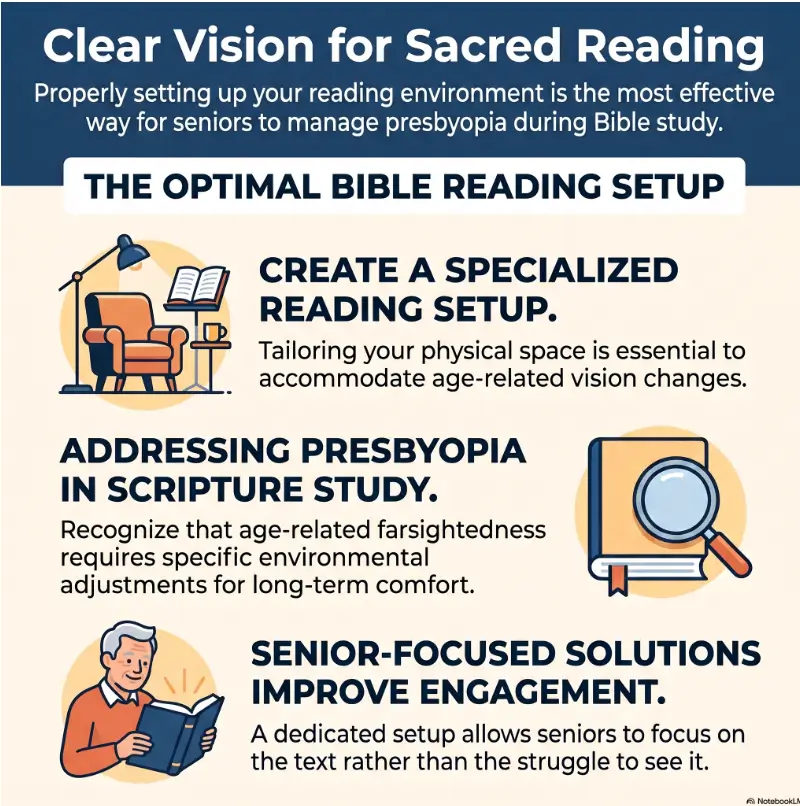
When small verse numbers begin to blur and the Bible keeps moving farther down the arm, the problem is rarely a lack of devotion. Presbyopia changes how the eyes focus at close range, and a once-comfortable reading chair can quietly become a stage for squinting, neck bending, glare, and fatigue.
The answer is not automatically the largest Bible or the strongest magnifier. Comfortable reading comes from matching the page, glasses, lighting, distance, posture, and support. Each part is modest on its own. Together, they turn a frustrating setup into a place where attention can return to the words rather than wrestling with them.
This guide will help seniors and caregivers test those variables without overspending. You will learn how to compare large-print formats, position a lamp, choose between readers and magnifiers, build a hands-free station, and recognize when changing equipment is not the right next step.
The best setup makes the page quieter, the body steadier, and the reading session longer. 📖
Snapshot
Who it is for: Adults age 50 and older, family members, and caregivers arranging a comfortable devotional space. What it solves: Blurry near text, glare, poor page support, awkward posture, and confusing magnifier choices. What comes next: You will be able to test a Bible, lamp, glasses, and stand as one complete reading system.
Table of Contents
Before You Change Your Reading Setup
Before you act
This article offers general setup and shopping guidance. It cannot determine why a particular person has blurry, distorted, painful, or changing vision, and it cannot replace an eye examination. Continue using prescribed lenses as directed, confirm persistent symptoms with an optometrist or ophthalmologist, and seek prompt care for sudden vision loss, new flashes or floaters, a curtain-like shadow, severe eye pain, or new double vision.
Presbyopia is the gradual loss of close focusing ability that usually becomes noticeable in middle age. Common clues include holding reading material farther away, needing brighter light, experiencing tired eyes, or developing headaches during near work.
Those clues can be ordinary, but “I am getting older” should not become a blanket explanation for every change. Presbyopia usually develops gradually. Sudden, uneven, painful, dim, distorted, or doubled vision deserves a different conversation.
Separate a comfort problem from a vision change
A reading setup problem tends to improve when you alter one practical variable. The words become clearer when the lamp moves, the Bible is raised, or the correct glasses are worn. A medical vision problem may remain despite those changes or may cause missing areas, waviness, unequal clarity, pain, flashes, or double vision.
- Likely setup clue: Text improves with better lighting or a more comfortable distance.
- Likely prescription clue: The Bible must be held increasingly farther away, even in good light.
- Needs professional review: One eye is noticeably worse, lines look bent, or symptoms persist with current glasses.
- Needs prompt attention: Vision changes suddenly or arrives with flashes, many new floaters, a shadow, pain, or new double vision.
For a broader look at symptoms that may be more than an inconvenient page, review this guide to near-vision problems in seniors.
Key takeaway
Change equipment for a comfort problem. Arrange an eye examination for a persistent vision problem. Treat sudden warning signs as a reason to seek prompt care, not as a reason to order a stronger lamp.

Start With the Bible, Not the Magnifier
When reading becomes difficult, the natural impulse is to buy something that enlarges the page. Yet the Bible itself determines how much assistance will be needed. Thin type, narrow columns, crowded notes, low contrast, and visible print from the reverse side can make an otherwise generous font feel surprisingly small.
Large print and giant print are not standard sizes
Publisher labels are useful starting points, not measurements you can trust blindly. One edition described as large print may appear smaller than another because the letters are thinner, the lines are tighter, or the paper allows more show-through.
Some publishers place type-size information in the product description or on sample pages. Check it, but still inspect the page as a whole. A clean, dark, well-spaced typeface can outperform a nominally larger typeface that feels pale and crowded.
Larger type creates a weight problem
Increasing the type size usually requires more pages, a larger page, fewer notes, multiple volumes, or some combination of the four. That tradeoff matters for readers with arthritis, hand weakness, tremor, shoulder pain, or limited lap space.
A giant-print Bible may be wonderful on a stable table and awkward in a recliner. A lighter large-print edition may be easier to manage but demand slightly better lighting. The best choice is not the edition with the most impressive number. It is the edition the reader can use safely for the intended session.
Layout can matter more than an extra point
Traditional double-column pages place a great deal of information in a compact space. They are familiar and efficient, but some readers lose their place when moving from the bottom of one narrow column to the top of the next.
| Page layout | May work well for | Possible drawback |
|---|---|---|
| Single column | Readers who prefer a natural book-like flow | The line may be long on a wide page |
| Double column | Readers accustomed to traditional Bible formatting | Eyes may jump columns or lose position |
| Verse by verse | Reference work and locating individual verses | Frequent line breaks can interrupt narrative flow |
| Paragraph format | Longer reading sessions and comprehension | Verse numbers may be less visually prominent |
| Wide margin | Notes, journaling, and study | Larger, heavier book with less text per page |
A reader who frequently loses position may benefit from single-column text, bold verse numbers, a reading window, or a simple line guide. Someone with more significant central vision difficulty may need options beyond ordinary presbyopia support; this guide to choosing a giant-print Bible for macular degeneration explains that different use case.
Short Story: The Bible That Won the First Minute
Margaret chose the largest Bible on the shelf. The first verse looked magnificent, dark and generous beneath the store lights. She bought it before testing anything beyond the opening page.
At home, the book sank heavily into her lap. To reach the lower lines, she lowered her chin and rounded her shoulders. The print was clear, but after ten minutes her neck hurt and her hands were tired from keeping the pages open.
Her daughter placed the Bible on a tilted stand and moved the floor lamp behind Margaret’s shoulder. The improvement was immediate. Later, Margaret compared it with a slightly smaller edition that had darker type and wider spacing. That lighter Bible became her daily reader; the giant edition remained on the study table.
The lesson was simple: the first minute tested the letters. The next nine minutes tested the whole setup.
The Font Test Most Shoppers Skip
Shoppers often open to a beloved psalm, recognize half the sentence from memory, and decide the page is easy to read. Familiarity can fill in details the eyes did not fully capture. That is comforting during worship, but unhelpful during a readability test.
Read an unfamiliar paragraph for two minutes
Choose a passage the reader does not know by heart. Read continuously for at least two minutes using the normal chair, glasses, and reading distance whenever possible.
- Can punctuation marks be identified without guessing?
- Are small verse numbers visible without leaning closer?
- Can the reader move to the next line without using a finger every time?
- Do thin letters such as lowercase “i,” “l,” and punctuation disappear?
- Does the reverse-side printing compete with the current line?
- Does clarity remain stable, or begin to fade after several sentences?
Check spacing, weight, and contrast
A typeface is not merely a collection of letters. Its stroke thickness, shape, spacing, and contrast determine how much work the eyes must perform. Generous line spacing helps prevent accidental line skipping. Strong contrast helps letters remain distinct when the reader is tired or the illumination is imperfect.
Paper matters too. Very thin paper keeps a Bible portable, but heavy show-through can create a gray visual haze. Glossy maps and inserts may reflect a concentrated lamp even when the main pages look comfortable.
For a deeper explanation of why nominal size is only part of readability, see this guide to the best font size for seniors.
Key takeaway
Do not ask only, “How large are the letters?” Ask, “Can this person follow an unfamiliar paragraph for ten minutes without guessing, leaning, or losing position?”
Show me the nerdy details
Print comfort depends partly on angular size, which describes how large the letters appear from the reader’s viewing distance. Moving a page closer makes the letters appear larger, but presbyopia may prevent them from remaining in focus. Stronger reading lenses can restore close focus, yet they also tend to create a shorter preferred working distance.
Magnification also changes field of view. As optical power rises, the reader may see fewer words at once and must move the lens more carefully. That is why stronger magnification can improve letter recognition while making paragraph navigation slower. Contrast, illumination, spacing, focal distance, and field of view must be considered together.
Lighting and Reading Distance Must Work Together
Better lighting can make print seem darker, edges more distinct, and spacing easier to follow. Poorly positioned lighting can produce glare, hard shadows, and a brilliant patch that forces the reader to keep shifting the page.
Aim light across the page, not into the eyes
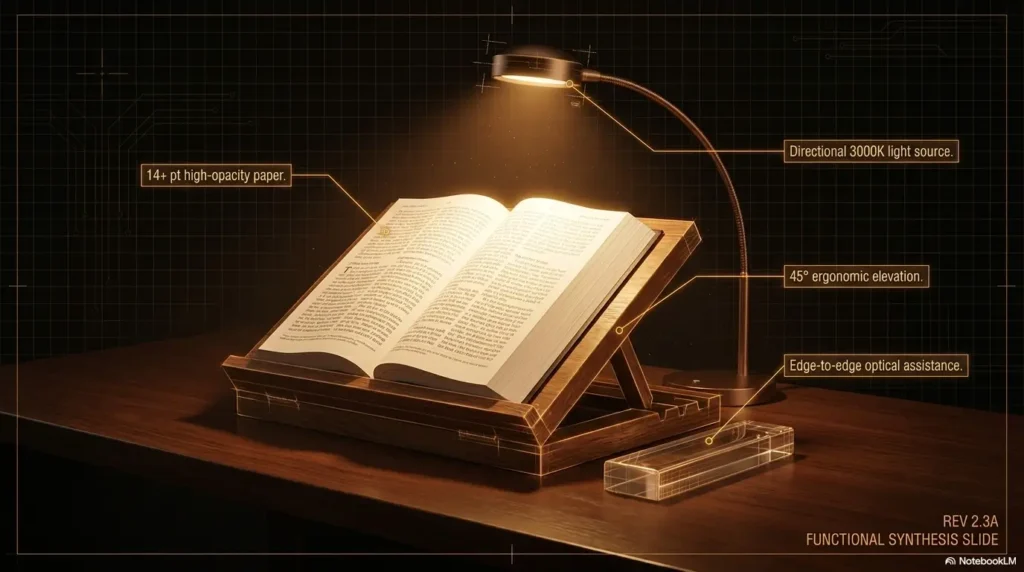
Place an adjustable lamp slightly behind and to the side of the reader so light falls onto the page. Test both sides. The better position is the one that avoids a hand shadow, prevents direct view of the bulb, and reduces reflections from glossy sections.
A broad, adjustable light source is often easier to manage than a tiny, intense beam. The switch should be reachable without standing, twisting, or reaching behind furniture.
Avoid the bright-page, dark-room effect
A bright task lamp in an otherwise dark room creates a sharp contrast between the page and the surroundings. Some readers find this tiring, especially when glancing up, finding a bookmark, or moving between the Bible and a notebook.
Use modest ambient lighting in the room, then add task lighting at the chair. The goal is not stadium brightness. It is an evenly readable page without a glowing bulb, reflective hotspot, or cave-like room around it.
Find the natural focal distance
Ask the reader to sit in a relaxed posture and hold the Bible upright. Move it slowly until the text first becomes comfortably clear without squinting, lifting the chin, or pulling the head backward.
That distance should guide the stand and lens choice. A pair of readers may work beautifully at sixteen inches and feel awkward at a desk positioned much farther away. A progressive-lens wearer may need to raise or tilt the page to use the intended near zone without dropping the chin.
If the reader repeatedly pushes the page farther away or develops strain with an older pair of glasses, review the signs that reading glasses may no longer be working well.
The CLEAR Reading Framework
Reading Glasses, Magnifiers, or Both?
Reading glasses and magnifiers are often placed in the same mental drawer, but they perform different jobs. Reading glasses help the eyes focus at a chosen near distance. A magnifier enlarges the image of the text.
Prescription readers fit the person
Prescription reading lenses can account for unequal prescriptions between the eyes, astigmatism, preferred working distance, and other visual needs. They may be especially useful when drugstore readers produce headaches, one eye remains blurry, or the reader needs a specific distance for a stand or desk.
Drugstore readers fit simpler situations
Over-the-counter readers use the same power in both lenses and may suit uncomplicated presbyopia when the eyes have similar needs. They are convenient for keeping a pair by a favorite chair, but convenience should not become a ladder toward ever-stronger lenses.
Excessive strength may bring the clear point uncomfortably close. That can encourage neck bending, a cramped arm position, and a tiny useful range. Learn how to recognize when reading glasses are too strong before replacing one uncomfortable pair with an even stronger one.
Magnifiers fit enlargement needs
A handheld magnifier is portable and useful for verse numbers, footnotes, maps, and brief checks. It is less ideal for long continuous reading when the hand tires or the lens must be held at a precise height.
A stand magnifier maintains its distance from the page and may suit readers with tremor, arthritis, or limited steadiness. Bar magnifiers and reading windows can help track one line. Electronic magnifiers offer adjustable size, contrast modes, and a broader viewing area, but they cost more and require charging and basic device confidence.
For a direct decision guide, compare reading glasses versus magnifiers. Caregivers assembling a broader toolkit can also review these magnifier options for seniors.
| Option | Best use | Main advantage | Watch for |
|---|---|---|---|
| Prescription readers | Regular Bible study at a known distance | Individualized correction | May need updating as needs change |
| Drugstore readers | Simple, occasional near reading | Low cost and easy availability | Same power in both eyes |
| Handheld magnifier | Verse numbers, notes, maps, brief reading | Portable and quick | Hand fatigue and reduced field of view |
| Stand magnifier | Readers with tremor or limited steadiness | Stable lens-to-page distance | Must be matched to posture and page surface |
| Electronic magnifier | Adjustable enlargement and contrast | Flexible display settings | Higher cost, charging, and controls |
Key takeaway
Use glasses to establish comfortable focus. Add a magnifier when the text itself still needs enlargement. More power is not automatically more comfort, especially when it shrinks the visible reading area.
Build a Hands-Free Bible Reading Station
Holding a Bible in the air asks the hands, wrists, shoulders, neck, and eyes to negotiate continuously. A stand removes much of that negotiation. It also keeps the page at a predictable distance, which helps reading glasses and magnifiers work more consistently.
Stabilize the Bible before adding accessories
Look for a stand with a broad base, nonslip contact points, several tilt positions, and page supports that do not cover verse numbers. A flimsy stand that rocks when a page turns can create more frustration than it removes.
For a recliner, a firm lap desk may work better than a narrow side table. At a dining table, a simple angled bookstand may be enough. A reader with one weaker arm may need a stand that stays open without strong clips or stiff controls.
Arrange a single reach zone
Place the most frequently used items within a comfortable arm’s reach: glasses, bookmark, pen, tissues, water, notebook, magnifier, and lamp control. Keep the arrangement consistent so the reader does not search through visual clutter at the beginning of every session.
- Bible supported at the tested focal distance
- Lamp switch reachable from the seated position
- Glasses stored in the same high-contrast case
- Bookmark or line guide resting beside the Bible
- Pen with dark ink and an easy-grip barrel
- Water placed away from electrical controls and page edges
- Phone available for audio reading or emergency contact
Protect the walking path
Route lamp cords behind furniture or along a wall rather than across a path used by feet, canes, walkers, or pets. Avoid unstable folding tables, top-heavy lamps, and extension cords crowded with several devices.
The reading station should support devotion without becoming a small obstacle course. A caregiver can perform a useful test by walking from the doorway to the chair in ordinary evening light while carrying a book or cup.
Paper, tablet, or e-reader?
A printed Bible offers familiar page navigation, handwritten annotation, no charging, and fewer distractions. A tablet or e-reader offers adjustable text size, line spacing, contrast, screen brightness, search, bookmarks, and sometimes text-to-speech.
Digital reading is not automatically easier. Complex menus, notifications, touch gestures, glare, forgotten passwords, and accidental page changes may disrupt the experience. A tablet is most useful when it is simplified before the reading session: enlarge the interface, silence notifications, open the chosen translation, and place the device on a stable stand.
Caregiver check
Sit in the reader’s chair rather than arranging the station from a standing position. A lamp switch, page clip, or tablet control that looks accessible from above may be awkward from the actual seated angle.
Compare Cost and Comfort Without Overspending
A comfortable Bible reading setup can be assembled at several budget levels. The useful question is not, “What is the premium setup?” It is, “Which limitation remains after the simplest changes?”
Begin with what is already available. Reposition the lamp, add room lighting, support the Bible with a firm cushion or existing stand, clean current lenses, and test the normal focal distance. Those free adjustments may reveal whether the remaining problem is print, correction, stability, or sustained visual fatigue.
Good, better, and best should describe fit, not status
| Setup level | What it may include | Best for | Verify before paying |
|---|---|---|---|
| Good: simple reset | Existing Bible, cleaned glasses, repositioned lamp, firm page support | Mild fatigue caused mainly by posture or poor lighting | Clarity remains comfortable for ten minutes |
| Better: targeted upgrade | Readable large-print Bible, adjustable task lamp, stable stand | Regular readers who need improved type, lighting, and support | Actual page sample, book weight, switch access, stand stability |
| Best fit: individualized system | Updated prescription, task-specific Bible, hands-free magnification or accessible digital device | Unequal vision, longer sessions, low vision, tremor, or complex needs | Professional assessment, return policy, training, charging, and field of view |
What to ask before buying
- Can I see a full-size sample page rather than a cropped product photo?
- What is the actual type size, and how dark is the print?
- How much does the Bible weigh?
- Does it remain open without forceful clips?
- Can the lamp head move without exposing the bulb to the reader?
- Is the switch easy to see and operate?
- Does the stand remain steady while pages turn?
- Can a magnifier be returned after a home reading test?
- Will the device work at the reader’s prescribed focal distance?
- Who will teach the reader to use digital controls or electronic magnification?
When paid help is worth considering
A do-it-yourself adjustment may be enough when clarity improves predictably with better light, support, and existing correction. Professional input becomes more valuable when the eyes differ, ordinary readers cause discomfort, the reader has diagnosed eye disease, magnification needs are high, or several devices have already been purchased without success.
An eye-care professional can review correction and eye health. A low-vision specialist may assess task lighting, magnification, contrast, posture, and reading technique together. Occupational therapy may help when vision difficulty overlaps with tremor, arthritis, stroke effects, memory changes, or home-safety concerns.
Before booking specialized support, prepare a short description of the task: the Bible edition, normal reading chair, preferred session length, current glasses, comfortable distance, and the exact point at which blur or fatigue begins. A vague complaint produces a vague shopping list. A specific task produces better questions.
Run the Ten-Minute Comfort Test
A page can look clear for a moment and still be unsuitable for a full devotional reading. The ten-minute test checks clarity, posture, navigation, and fatigue under realistic conditions.
Use the complete setup
Test the actual Bible, chair, glasses, lamp, stand, and reading distance together. Choose an unfamiliar passage and read aloud if possible. Reading aloud slows the pace enough to expose missed punctuation, guessed words, and line-navigation problems.
- Minutes 1 to 2, immediate clarity: Identify punctuation, verse numbers, and small reference marks without squinting.
- Minutes 3 to 5, posture: Notice leaning, chin lifting, shoulder tension, repeated page movement, or holding the text unusually far away.
- Minutes 6 to 8, navigation: Move between lines, columns, notes, and nearby verses without repeatedly losing position.
- Minutes 9 to 10, fatigue: Notice blur, watering, rubbing, headache, dryness, closing one eye, or a strong desire to stop.
Change one variable at a time
If the setup fails, resist rebuilding everything at once. Change the lamp position, then retest. Change the page angle, then retest. Adjust the distance, then retest. This reveals which change actually helped.
Start with free variables before buying anything: lighting direction, room illumination, page angle, chair position, and lens cleanliness. Then test print size, stand design, or magnification.
Five common mistakes and safer alternatives
| Common mistake | Why it fails | Safer alternative |
|---|---|---|
| Buying by the words “large print” | Labels do not reveal spacing, weight, contrast, or layout | Inspect a full page and complete a ten-minute test |
| Choosing stronger readers automatically | The clear distance may become too short | Match lens power to a relaxed working distance |
| Using one intense lamp in a dark room | Sharp brightness contrast may feel tiring | Add modest room light and aim task light across the page |
| Holding a heavy Bible for long sessions | Hands, shoulders, and neck fatigue before the eyes do | Use a stable stand or lap desk |
| Calling every change normal aging | Important symptoms may be overlooked | Arrange professional review for persistent, uneven, painful, or distorted vision |
Key takeaway
A successful Bible-reading setup should survive the final minutes of the test. Instant clarity sells equipment. Sustained clarity supports actual reading.
When Better Equipment Is Not Enough
Reading that steadily becomes more difficult deserves routine eye care even when the change feels gradual. An examination can review the prescription and look for other contributors such as cataracts, retinal changes, glaucoma, dry-eye problems, or difficulty coordinating the eyes.
Schedule routine care for persistent change
- Current glasses no longer provide stable clarity
- Headaches or eye strain occur repeatedly during reading
- One eye seems clearer than the other
- Words blur after a few minutes despite good light
- The reader closes or covers one eye
- Glare has become much more troublesome
- More magnification is needed for ordinary text
- Reading difficulty interferes with medication labels, bills, or daily tasks
Seek prompt care for warning signs
Sudden vision loss, a sudden increase in floaters, flashes of light, a dark curtain or shadow, severe eye pain, or new double vision should not be tested with another lamp or magnifier. Contact an eye-care professional promptly or use urgent medical services appropriate to the severity and local instructions.
Distorted lines, missing areas of print, or a new dark or blurred patch also deserve professional evaluation. These experiences are different from ordinary presbyopia, which primarily affects close focusing and usually changes gradually.
Ask about low-vision support when ordinary correction falls short
Low-vision care focuses on using remaining vision more effectively for specific tasks. The plan may include task lighting, optical magnifiers, electronic enlargement, contrast changes, reading guides, device training, or techniques for finding the clearest part of the visual field.
Bring the Bible or a clear photograph of its pages to the appointment. State the desired task plainly: “I want to read this edition for twenty minutes in my recliner.” That is more actionable than asking for a general magnifier recommendation.
Bible Reading Setup FAQ
What Bible print size is usually comfortable for presbyopia?
There is no universal point size. Comfort depends on the typeface, letter weight, spacing, contrast, page show-through, glasses prescription, lighting, and reading distance. Many editions marketed as large print begin around the low double-digit point-size range, while giant-print editions are generally larger, but publisher labels and measurements vary. Test a full unfamiliar paragraph instead of relying on the label.
Is giant print always easier than large print?
No. Giant print can improve letter recognition, but the Bible may be heavier, less portable, and more difficult to hold. It may include fewer notes or require more page turning. A slightly smaller, darker, well-spaced edition on a stable stand may be more comfortable for long sessions.
Are drugstore reading glasses safe for Bible reading?
They may be suitable for uncomplicated presbyopia when both eyes need similar correction. They are less likely to fit well when the eyes differ, astigmatism is present, headaches occur, or the preferred reading distance is unusual. An eye examination can confirm whether individualized lenses would be more appropriate.
What kind of lamp works best beside a recliner?
Prioritize an adjustable head, stable base, shielded light source, reachable switch, and safe cord route. The lamp should cast light across the page without exposing the reader directly to the bulb. Test both sides of the chair because shadows, handedness, furniture, and glare differ.
Can a tablet replace a large-print Bible?
It can for some readers. Tablets allow adjustable font size, spacing, contrast, brightness, search, and audio reading. They also require charging and may introduce notifications, touch errors, glare, and confusing navigation. Simplifying the device before each session makes digital reading more practical.
Why do the words blur after several minutes?
Possible contributors include inadequate lighting, an unsuitable lens strength, dry eyes, reduced blinking, eye fatigue, poor page contrast, or difficulty coordinating the eyes. Take a brief visual break and note whether blinking or changing the setup helps. Arrange professional evaluation when the pattern persists or worsens.
Should the Bible be held close or farther away?
Use the distance that matches the reader’s correction and allows clear text with relaxed shoulders, a neutral neck, and no squinting. Holding the Bible very close may enlarge the letters but place them outside the focal range. Holding it too far away can make the print appear smaller and strain the arms.
What layout helps a reader who loses position?
Single-column pages, generous line spacing, darker type, bold verse numbers, and clear paragraph breaks often help. A reading window, index card, line guide, or movable bookmark can isolate the current line. Test navigation between columns, footnotes, and cross-references before purchasing a study Bible.
Optional video: Open the video on YouTube (external site).
Try One Passage in Fifteen Minutes
Choose one unfamiliar page and place the Bible where it is normally read. Put on the usual glasses, turn on both task and room lighting, and support the book at a relaxed angle. Read for ten minutes, then spend five minutes changing only the weakest part of the setup.
- Clean the lenses and page surface.
- Move the lamp until shadows and reflections are reduced.
- Adjust the Bible to the clearest relaxed distance.
- Raise the page until the neck feels neutral.
- Mark the first moment when blur, fatigue, or lost position appears.
- Choose one next action: test a different Bible layout, update the prescription, add a stable stand, compare a magnifier, or arrange professional care.
Do not judge the setup by how impressive it looks beside the chair. Judge it by what happens after the first few verses. When the light is quiet, the page is steady, and the body is no longer bargaining with the print, reading can become reading again.
Your next step
Run one passage through the complete setup today. Begin with lighting, distance, and page support before buying stronger magnification. The smallest useful change is often the one that restores the longest peaceful reading session.
Last reviewed: 2026-08
PUT THIS GUIDE TO WORK · INTERACTIVE WORKSHEET
Bible-page enlargement planner
Use this worksheet alongside the article: Bible Reading Setup for Seniors With Presbyopia: Read Comfortably Again. Use the fields provided to organize your notes and next actions, then save your worksheet.
Your entries stay in this page and are cleared when you reload. No account is needed. Saved files are downloaded only to your device.
How to use your result
Save the worksheet before leaving this page. Recheck any quote, date, or instruction with the relevant provider, pharmacist, manufacturer, or official organization. A completed checklist means you recorded the steps, not that an outcome is guaranteed.
Worksheet added October 20, 2026. Read the article above for context and its stated review scope.