
Organize your questions and next steps, then save your worksheet.
Summary and next steps
Confirm route and direction from a safe waiting position rather than moving toward traffic to read better.
- Save the route number and destination in readable form.
- Stay behind the curb while checking arrival information.
- Ask the driver to confirm route and direction before boarding.
Editorial maintenance: October 24, 2026. Summary layout, related links and technical metadata updated. This is not a full clinical review.
Safer, calmer public transit
How to Read Bus Numbers
with Aging Eyes
An approaching bus gives you a surprisingly difficult visual puzzle: small glowing numbers, changing distance, vehicle motion, sunlight, reflections, and a curb you should not step toward. The problem is not simply that the number is “too small.” Several ordinary visual challenges arrive at once.
The safest answer is not to stare harder or lean into traffic. It is to build a layered identification system using your position, the shape of the route number, a phone camera or transit alert, and one spoken confirmation. Each clue removes a little uncertainty until the correct bus becomes clear.
This guide shows older riders, people with reduced contrast sensitivity, and caregivers how to make that system practical. You will also learn which visual aids are worth considering, which mistakes waste precious seconds, and when a bus-reading problem deserves an eye examination rather than another gadget.
The goal is not perfect distance vision. It is reliable route confirmation from a safe position. 🚌
Snapshot
Who this is for: independent older riders, adults with mild distance-vision or contrast difficulties, and caregivers practicing a transit route. What it solves: uncertainty when reading an approaching bus number. What you can do next: build a four-part confirmation routine and test it at one familiar stop in daylight.
Table of Contents
Before You Act
This article offers general visibility and transit-safety strategies. It cannot identify the cause of a vision change or determine whether a particular optical aid is right for you. Do not step into a traffic lane to improve your view. Seek prompt medical care for sudden vision loss, a curtain or shadow across your sight, new flashes with many floaters, severe eye pain, or a sudden major change in distortion or double vision.
Why Bus Numbers Blur Before Other Words Do
You may be able to read a newspaper, recognize a cereal box, and use a phone without difficulty, yet still struggle with a bus route display. That apparent contradiction makes sense once you separate near vision from distance vision.
A phone is close, steady, bright, and under your control. A bus is distant, moving, surrounded by visual clutter, and often approaching through glare. Your eyes must find the display, focus on it, separate the number from its background, and hold the image long enough for your brain to identify the digits.
Distance, motion, and contrast form a three-part problem
Distance reduces the apparent size of each digit. Motion shortens the time available to inspect it. Reduced contrast sensitivity can then make bright digits bleed into a dark display, or dark digits disappear against a sunlit vehicle.
The result may not look like ordinary blur. A number can appear washed out, doubled, fragmented, or strangely interchangeable with another digit. A route 38 may briefly look like 33, 36, or 88 as the bus moves through patches of light.
Why LED route displays can look broken or incomplete
Electronic route signs create characters from small illuminated elements. At a distance, gaps between those elements may become more noticeable, particularly when your eyes are dry, the bus is vibrating, or the display is viewed from the side.
Some phone cameras also record electronic displays with dark bands or missing-looking segments. That does not necessarily mean the sign is defective. It may be an interaction between the camera’s image capture and the sign’s rapid refresh pattern.
Aging eyes need useful light, not simply more light
Bright daylight can improve detail, but glare can erase edges. A white sky behind the bus may reduce the display to a dark rectangle. Reflections from a shelter panel can add a second ghost image over the first.
Before blaming the size of the number, notice whether the problem changes when you move a few feet within the safe waiting area. A better angle can sometimes outperform a stronger magnifier.
Key takeaway
Bus-number difficulty is usually a task problem before it is a willpower problem. Improve the viewing conditions, add a second information source, and confirm the route rather than trying to squeeze certainty from one blurry digit.
The 10-Second Reading Method Before the Bus Arrives
The best time to identify a bus is not when its doors are opening. Begin while it is still approaching, when you have time to gather several clues without rushing toward the curb.
Use four steps: angle, count, clue, confirm
- Angle: Move within the designated waiting area until you face the front display more directly and glare is reduced.
- Count: Decide whether the route has one, two, or three digits before trying to name every digit.
- Clue: Look for one distinctive feature, such as a 7 at the beginning, two matching digits, or a destination word you recognize.
- Confirm: Match the visual clue with an app alert, schedule, destination sign, driver response, or fellow rider.
Counting the number of digits sounds almost too simple, but it reduces the size of the puzzle. If you are waiting for route 42 and the display clearly contains three digits, you already know it is not your bus.
Read the shape before chasing detail
Instead of mentally shouting, “What number is that?” ask smaller questions. Is the first digit narrow or rounded? Are the two digits the same height? Is the last digit open, closed, or slanted?
This approach uses coarse visual information first. Your brain can often recognize a route pattern before every line of every digit becomes sharp.
Match the number with destination and direction
A route number alone may not be enough because the same route can travel in two directions. Look for a destination name, neighborhood, station, or directional label such as northbound or downtown.
For a frequently used trip, memorize one backup clue. “Route 42 toward Central Station” is safer than “route 42” because it gives you two details to confirm.
The A-C-C-C route check
Short Story: The bus that looked like 17
Elaine was waiting for route 71 outside a grocery store. Late-afternoon light bounced from the shelter glass, and the approaching display looked like 17. She stepped forward, stopped herself at the curb, and felt the familiar little flare of embarrassment.
Instead of guessing, she moved two paces behind the shelter panel. The glare weakened. She could now tell the first digit had a horizontal top, but the order was still uncertain.
Her phone alert said route 71 was due in one minute. When the doors opened, she asked, “Is this the 71 toward Lakeside?” The driver said yes before she reached for her fare card.
The useful part was not the app alone. Elaine used four clues: a safer angle, digit shape, arrival timing, and a spoken confirmation. No single clue had to carry the entire trip.
Where You Stand Changes What You See
A bus display is designed to be viewed from the front. When you watch from the side, the digits may compress, dim, or blend together. Your position also determines whether the display sits against open sky, trees, storefront lights, or a dark street.
Choose a safe viewing zone before the bus appears
Stand well back from the curb, but where the driver can see that you are waiting. Keep the route display within the central part of your view rather than twisting your head sharply as the bus passes.
- Avoid standing behind advertising panels, poles, or other waiting passengers.
- Move away from transparent shelter walls if they produce reflections.
- Use the shelter roof or a brimmed hat to block overhead glare.
- Keep bags, canes, and mobility devices arranged so you do not need a sudden last-second step.
- Signal your intention to board using the local transit system’s usual practice.
Do not chase the angle
If the bus is too close to identify safely, let it stop. Moving into the curb lane, leaning around a parked vehicle, or walking alongside a moving bus trades a route mistake for a physical hazard.
A missed bus is inconvenient. A fall near traffic is a different category of problem. Build your method so that route uncertainty triggers confirmation, not forward movement.
When two buses arrive together
Do not assume the first bus is yours. The second vehicle may be partially hidden, and drivers may stop in different positions depending on traffic and available space.
Remain visible, check both displays, and ask the first driver whether your route is behind. If a bus begins to depart before you can confirm it, avoid running beside it or stepping between vehicles.
The curb rule
When you cannot read the route, improve the information, not the risk. Zoom, listen, ask, or wait. Do not solve distance by stepping toward moving traffic.
Turn Your Phone into a Route-Reading Backup
A phone camera can act as a portable distance viewer, even when ordinary digital zoom does not create a beautifully sharp image. Enlarging the display may still make digit count, spacing, and general shape easier to recognize.
Open the camera before the bus reaches the stop
Waiting until the vehicle is directly in front of you creates a small technological opera: unlock the phone, find the camera, pinch the screen, lose the bus, find the bus again. Prepare early.
- Open the camera when the arrival alert shows the bus is a few minutes away.
- Hold the phone with both hands or brace your elbows against your body.
- Use a modest zoom level first. Extreme digital zoom can amplify hand movement and pixelation.
- Tap the route display on the screen to encourage focus and exposure adjustment.
- Take two or three quick photos if the live image is unstable.
- Return your attention to the physical stop area before walking or boarding.
Optical zoom, when available, usually preserves more detail than digital enlargement. Still, the best zoom level is the one you can hold steadily. A smaller stable image often reveals more than a giant trembling one.
Set up an accessibility shortcut at home
Many phones provide magnification, spoken text, display enlargement, high-contrast settings, or a dedicated magnifier. Configure the shortcut before leaving home so it does not require five menus and a small-font scavenger hunt at the stop.
Start by adjusting the phone itself. This guide to choosing the best phone font size for seniors can help make arrival alerts and route details easier to read outdoors.
Build a transit-app backup system
Save frequent stops and routes rather than searching from scratch on the sidewalk. Turn on arrival notifications, spoken alerts, or vibration when the local app supports them.
Arrival estimates are useful clues, not proof. Traffic, detours, GPS delays, and multiple buses on the same corridor can create mismatches. Confirm the route number and direction before boarding.
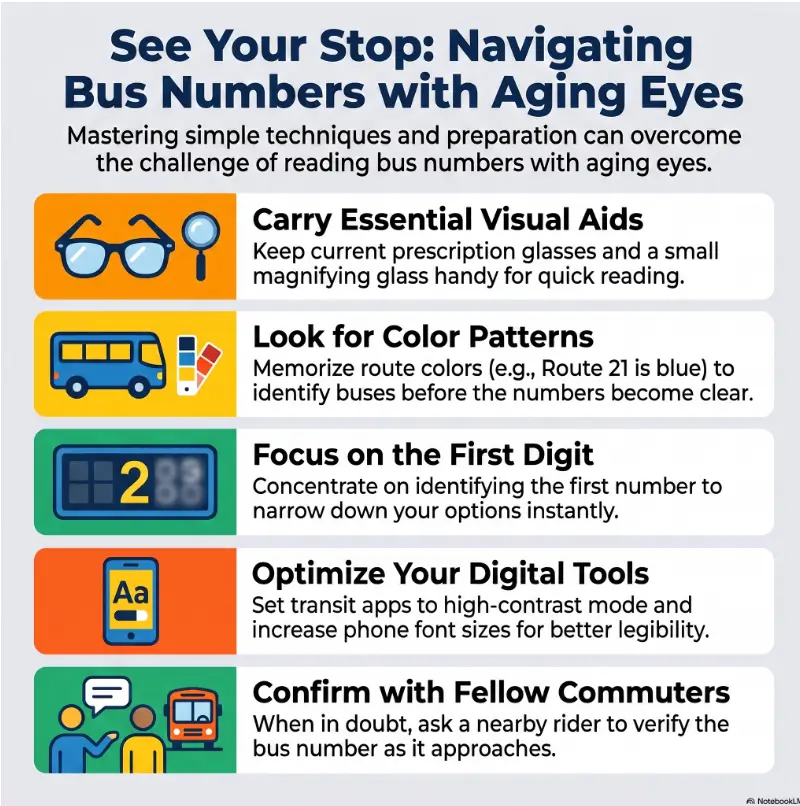
| Backup clue | What it does well | What can go wrong | Safer use |
|---|---|---|---|
| Arrival alert | Reduces surprise and helps you prepare early | Timing may shift | Match it with the vehicle display or driver |
| Phone camera | Enlarges distant shapes | Motion, glare, and electronic-sign banding | Take several images from a safe position |
| Route color | Quick recognition on familiar systems | Colors may repeat or look different in sunlight | Use color only as a supporting clue |
| Destination name | Confirms direction | Text may scroll or alternate | Wait for the correct screen or ask the driver |
| Another rider | Fast spoken confirmation | The person may also be uncertain | Ask a specific question using route and direction |
Which Visual Aids Actually Help at a Bus Stop?
The best aid depends on whether the problem is distance focus, glare, contrast, central detail, field loss, or a combination. Buying a stronger tool without understanding the task can produce an expensive object that lives permanently in a drawer.
Distance glasses and reading glasses solve different problems
Reading glasses are designed for close work. They generally do not improve an approaching bus number and may make distance vision less clear. Prescription distance glasses or the distance portion of multifocal lenses are usually the relevant part for route displays.
Progressive lenses can require careful head positioning because different zones serve different distances. Riders who feel unsteady or visually disoriented may find this guide to progressive lenses and dizziness useful before practicing at a busy stop.
Compare glare control before buying more magnification
A brimmed hat or visor can reduce overhead glare without darkening the entire scene. Sunglasses may help in strong sunlight, but lenses that are too dark can make shaded stops and dim route displays harder to read.
Polarized lenses reduce certain reflections, yet they can interact unpredictably with some electronic displays when viewed at particular angles. Test them with the displays you regularly encounter rather than assuming polarization will always help.
Compact monoculars: useful tool or awkward extra?
A compact monocular can enlarge distant signs and may be useful for a rider with stable hands who has received instruction in using it. The field of view can be narrow, however, and locating a moving bus through magnification takes practice.
A handheld reading magnifier is intended mainly for near tasks, so it is unlikely to help with an approaching bus. The broader comparison in reading glasses versus magnifiers explains why magnification distance matters.
| Setup | What it includes | Best for | Before spending money |
|---|---|---|---|
| Good: Free routine | Safer viewing angle, saved route, arrival alert, driver confirmation | Occasional mild difficulty | Test at a familiar stop in daylight |
| Better: Low-cost support | Brimmed hat, high-contrast phone setup, simple phone grip or strap | Glare and phone-handling problems | Confirm that the item remains comfortable and easy to carry |
| Best: Personalized plan | Updated prescription, low-vision evaluation, orientation or transit training, task-specific optical aid | Frequent mistakes, reduced independence, or diagnosed vision loss | Ask how the recommendation will be tested on real outdoor distance tasks |
Before buying an aid, ask:
- Is this designed for distance, near work, glare, or contrast?
- Can I use it while keeping both feet safely inside the waiting area?
- Can I locate a moving bus quickly through it?
- Will it fit into my normal coat pocket or travel bag?
- Can I test or return it if the real-world task is still difficult?
Show me the nerdy details
Visual acuity measures the smallest high-contrast detail you can resolve under test conditions. Reading a bus display also requires contrast sensitivity, glare tolerance, motion processing, visual attention, and enough time to inspect the target.
Electronic signs may refresh or pulse rapidly. Human vision usually blends this into a steady display, while a phone camera may sample the light differently and record bands, partial characters, or changing brightness. Taking several photos can capture a clearer phase of the display.
This is why a rider can score reasonably on a stationary eye chart yet struggle with a moving, low-contrast route sign outdoors. Describe the actual task to an eye-care or low-vision professional rather than reporting only that “distance is blurry.”
The Numbers People Confuse Most
Route signs use different fonts, dot patterns, and spacing. Instead of memorizing one universal digit design, learn what features to search for when two numbers look similar.
Use feature checks for common digit pairs
| Possible confusion | Feature to inspect | Backup check |
|---|---|---|
| 3 versus 8 | Look for a narrow open middle versus two enclosed spaces | Check the destination or second digit |
| 1 versus 7 | Look for a top bar, diagonal stroke, or wider upper shape | Compare the digit’s width with nearby digits |
| 5 versus 6 | Find whether the upper portion is open or the lower portion forms a closed loop | Wait for a straighter viewing angle |
| 0 versus 8 | Count enclosed spaces | Use a photo or route-arrival clue |
| 2 versus 7 | Look for a curved upper section and lower base on the 2 | Confirm the route verbally |
| 11, 17, and 71 | Check digit order and the width of the slanted digit | Match the destination and direction |
Confirm one distinctive digit first
Suppose your possible routes are 14, 42, and 71. You do not need perfect recognition of every display. First determine whether the route begins with a narrow vertical shape, a broad angular shape, or a slanted top-heavy shape.
Once one digit becomes likely, use the destination word or app to complete the identification. This reduces repeated guessing, especially when several buses use similar route colors.
Wait through one complete display cycle
Some signs alternate between the route number, destination, service note, and accessibility message. A single glance may catch only the middle of a scrolling word.
Begin watching early enough to see one full cycle. When the bus has already stopped, ask the driver rather than waiting outside for the sign to rotate again while boarding finishes.
Key takeaway
Do not demand a courtroom-level verdict from one distant digit. Identify the route family, find one distinctive feature, and use a second clue to finish the job.
When a Bus-Reading Problem May Be an Eye-Health Clue
Difficulty reading a bus number does not automatically indicate an eye disease. It may reflect an outdated prescription, dirty lenses, dry eyes, glare, fatigue, or unfamiliar electronic signage.
Still, a noticeable change in the ability to recognize signs, faces, steps, or traffic information deserves attention, particularly when it affects independence or safety.
Gradual blur that improves with updated distance correction
If the change has been slow and distant objects are generally less sharp, an eye examination can check refractive error and overall eye health. Bring your current glasses and describe the distance, lighting, and movement involved in the bus task.
Near-vision changes and distance-vision changes are not interchangeable. The article on near-vision problems in seniors can help you separate close-reading frustration from the distance task discussed here.
Increasing glare, halos, or washed-out contrast
Report whether headlights, sunlight, glossy surfaces, or bright signs have become harder to tolerate. Also mention whether the number appears clearer in shade, on cloudy days, or when one eye is covered.
These observations do not diagnose the cause, but they give the examiner more useful information than “my vision seems worse.” A brief symptom log can reveal patterns that are easy to forget in the examination room.
Wavy, missing, or doubled numbers
Make an appointment when straight strokes appear wavy, parts of digits seem missing, faces become harder to recognize, or persistent double vision affects route reading. Seek urgent assessment for sudden or severe changes, especially when accompanied by flashes, many new floaters, a curtain-like shadow, weakness, severe headache, or other new neurological symptoms.
For a broader overview of changes worth documenting, read the guide to senior vision warning signs.
What to tell the eye-care professional
- How long the problem has been noticeable
- Whether it affects one eye, both eyes, or only certain viewing angles
- Whether glare, dusk, rain, fatigue, or dry-eye symptoms make it worse
- Whether numbers look blurred, broken, doubled, wavy, faded, or partially missing
- Which glasses you wear at the bus stop
- Whether the difficulty has caused missed stops, wrong buses, falls, or reduced travel
Low-Stress Boarding Scripts and Caregiver Support
Asking for confirmation is not evidence that someone should stop traveling independently. It is a normal safety tool, much like checking a platform sign or asking whether a train is express.
Ask one specific question
A specific question is easier to answer and less likely to create confusion than “Where does this bus go?” Use the route number and direction together.
- “Is this the 42 toward downtown?”
- “Does this bus stop at Central Hospital?”
- “Is route 71 behind you?”
- “Could you tell me when we reach Pine Street?”
Ask before tapping the fare card when possible. After boarding, sit or hold a rail before checking your phone or reorganizing belongings.
Practice with a caregiver without taking over
Caregivers can support the rider by observing which clues work rather than calling out every number. On a practice trip, allow the rider to identify the bus, then confirm together before boarding.
Useful prompts include, “What is your backup clue?” and “Would a different standing position help?” Avoid testing language such as, “Can you really see that?” The goal is a repeatable system, not an impromptu eye chart with traffic.
The guide to offering help to someone with low vision includes additional ways to assist without removing choice or dignity.
When more support may be worth arranging
Consider low-vision rehabilitation, occupational therapy, orientation and mobility instruction, travel training, or local paratransit information when route-reading mistakes are frequent or the rider also struggles with curbs, crossings, peripheral awareness, or finding the correct stop.
Before paying for a private service, ask how it evaluates real-world travel tasks, whether family members can attend training, what follow-up is included, and whether the provider coordinates with local transit programs. A list of practical questions for a low-vision occupational therapist can help prepare the conversation.
| Situation | DIY steps may be enough when | Consider professional or transit support when |
|---|---|---|
| Occasional glare | A safer angle, hat, and alert solve the problem reliably | Glare affects many daily tasks or causes repeated route errors |
| Distance blur | Current distance glasses restore clear recognition | Blur persists despite correction or changes noticeably |
| Phone use | A shortcut and saved routes are easy to operate | The rider cannot manage the phone safely while traveling |
| Route confidence | The rider confirms independently using two clues | Disorientation, missed stops, or unsafe curb movement occurs |
| Field or mobility difficulty | The issue is limited to small route text | Curbs, obstacles, crossings, or side vision are also difficult |
Key takeaway
Independence does not require silent guessing. A rider who asks one precise question, uses an alert, or requests a stop announcement is actively managing the trip.

FAQ: Reading Bus Numbers with Aging Eyes
Why can I read my phone but not the number on a bus?
Your phone is close, stable, illuminated, and adjustable. A bus display is distant, moving, exposed to glare, and visible for a limited time. Near vision and distance vision also require different optical correction, so good phone reading does not guarantee clear route recognition.
Should I wear reading glasses or distance glasses at a bus stop?
Route displays are distance targets, so reading glasses generally are not the appropriate aid. Use the distance correction recommended for you. Multifocal wearers may need to look through the correct lens zone and avoid walking while peering through a narrow reading or intermediate area.
Can a phone camera help me see an approaching bus number?
Yes. Open the camera early, use a moderate zoom level, tap the display to focus, and take several quick photos when motion makes the live view unstable. Keep your feet safely inside the waiting area and look up before moving.
Why do LED bus signs look flickery or incomplete?
The sign may create characters from separated illuminated elements or refresh rapidly. Motion, dry eyes, viewing angle, and camera capture can make digits appear segmented, banded, or incomplete. Change the angle, blink normally, and use a second confirmation source.
Are polarized sunglasses helpful for reading transit displays?
They may reduce reflected glare, but some electronic displays can dim or change appearance through polarized lenses at certain angles. Test the lenses with your regular transit displays. Avoid sunglasses so dark that they reduce useful detail in shaded areas.
What should I do when two buses arrive at the same time?
Remain visible and safely back from the curb. Check both front displays, ask the first driver whether your route is behind, and do not step between buses or run alongside a departing vehicle.
How can I ride the bus safely if I have low vision?
Plan the route in advance, save the stop in your phone, use arrival alerts, memorize a destination clue, and ask for spoken confirmation. For unfamiliar trips, consider traveling first with a trusted person or requesting local travel training. The broader guide to low-vision travel tips covers preparation beyond the bus stop.
When should trouble reading bus numbers prompt an eye exam?
Arrange an examination when the change is new, worsening, affecting other distance tasks, or interfering with safe travel. Seek urgent care for sudden vision loss, severe eye pain, a curtain-like shadow, new flashes with many floaters, or a sudden major change in distortion or double vision.
Optional video: Open the video on YouTube (external site).
Test One Familiar Stop in 15 Minutes
The best system is not the one with the most equipment. It is the one you can repeat when the sun is bright, the sidewalk is busy, and the bus seems determined to arrive exactly when your phone screen locks.
Choose an easy practice setting
Pick a familiar route and practice in daylight when you are not under time pressure. Arrive at least five minutes early and bring the glasses, hat, phone, or optical aid you would normally use.
Run the three-tool test
- Position: Find the safest spot with the least glare and the clearest front-facing view.
- Technology: Open the camera and confirm that your route alert is large enough to read.
- Conversation: Practice saying, “Is this the 42 toward downtown?” before the bus arrives.
Keep the smallest system that works
After the trip, note which clue gave you confidence without requiring movement toward traffic. Keep that tool. Remove steps that were confusing or too slow, then repeat the test once at a different time of day.
Within 15 minutes, you can save the route, set one accessibility shortcut, and write a confirmation phrase in large high-contrast text. That small preparation turns the next approaching bus from a guessing game into a sequence you already know.
Your route-reading card
My route: Number + destination
My backup clue: Arrival alert, route color, landmark, or direction
My safe viewing spot: Behind the curb, away from reflective glass
My question: “Is this the ___ toward ___?”
Last reviewed: 2026-08
PUT THIS GUIDE TO WORK · INTERACTIVE WORKSHEET
Build your bus-trip reference card
Use this worksheet alongside the article: How to Read Bus Numbers with Aging Eyes. Use the fields provided to organize your notes and next actions, then save your worksheet.
Your entries stay in this page and are cleared when you reload. No account is needed. Saved files are downloaded only to your device.
This card organizes a discussion or task. It does not provide diagnosis, treatment, medication timing, driving clearance, or professional approval. Copy clinical instructions exactly and ask the professional about uncertainty.
How to use your result
Save the worksheet before leaving this page. Recheck any quote, date, or instruction with the relevant provider, pharmacist, manufacturer, or official organization. A completed checklist means you recorded the steps, not that an outcome is guaranteed.
Worksheet added October 20, 2026. Read the article above for context and its stated review scope.