

Organize your questions and next steps, then save your worksheet.
Summary and next steps
Build a route you can reverse, using a confirmed entrance, floor and recognizable landmark.
- Verify the department and accessible entrance before arrival.
- Ask staff for the next landmark and turn.
- Identify a staffed place to return to if directions become unclear.
Editorial maintenance: October 24, 2026. Summary layout, related links and technical metadata updated. This is not a full clinical review.

Practical wayfinding for real buildings
How to Navigate Public Buildings
When Signs Are Too Small
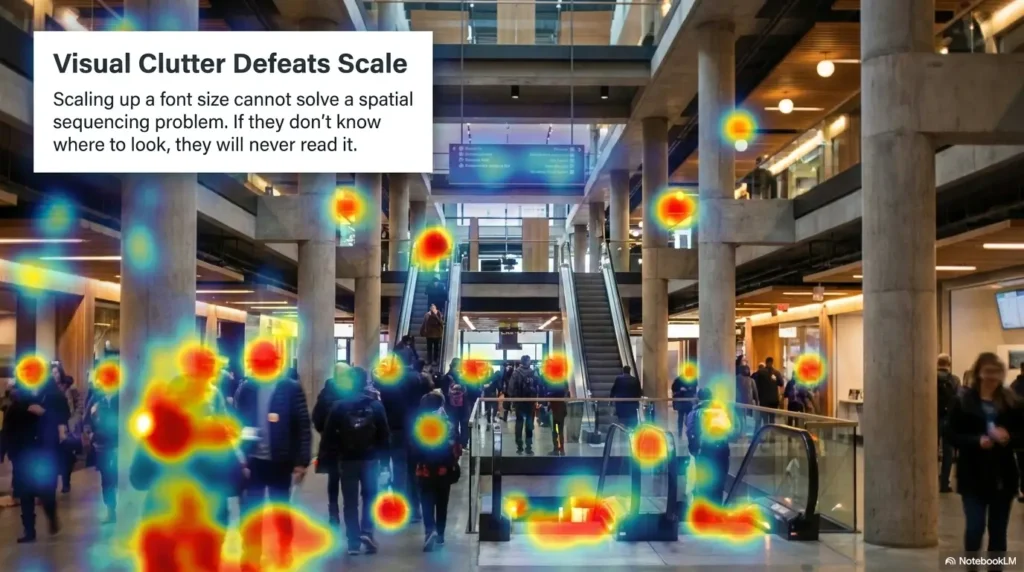
A small sign can turn a normal errand into a tiny indoor expedition. You enter the hospital, airport, courthouse, campus hall, library, or government office with one simple goal, then the building answers in pale arrows, glossy directories, dim corridors, and room numbers that seem designed for hawks.
The fix is not simply “read better” or “ask someone.” The better approach is layered wayfinding: pause, anchor yourself, use landmarks, confirm directions with a human, zoom with your phone, and build a route you can reverse. It is less about bravery and more about making the building stop bossing you around.
This guide is for older adults, caregivers, low-vision visitors, anxious first-timers, busy parents, patients, travelers, and anyone who has ever stared at a directory board while pretending they were absolutely fine.
Move with confidence
Use a repeatable reset before walking into confusing hallways.
Ask sharper questions
Get landmarks, turns, floors, and return-route clues instead of vague arrows.
Know when to get help
Use accessibility support early when vision, mobility, time, or stress matters.
Best promise: by the end, you will have a one-screen route card you can use before, during, and after your visit. 🧭
Snapshot
This article is for visitors who struggle with small, distant, low-contrast, or confusing signs in public buildings. You will learn how to plan before arrival, use phone tools, ask for better directions, avoid common wayfinding mistakes, request accessibility help, and make a one-screen route card before your next appointment.
Table of Contents

Before You Act: Safety, Access, and Common Sense
This guide gives practical wayfinding help. It is not a substitute for emergency instructions, legal accessibility advice, medical guidance, airport security instructions, court rules, or building-specific safety procedures.
If you are in an emergency, follow official alarms, evacuation routes, posted safety instructions, and directions from authorized staff. If you are in a hospital, courthouse, airport, school, or secure government building, do not enter restricted areas simply to “check.” The wrong hallway can become more than a wrong turn.
For visitors with low vision, mobility limits, cognitive fatigue, hearing difficulties, anxiety, or a time-sensitive appointment, the safest move is often to ask for help early. A calm request at the entrance beats a frantic rescue mission on the fourth floor.
Key takeaway
Small signs are not a personal failure. Treat poor wayfinding as a building problem, then use a layered method: pause, anchor, verify, zoom, ask, and reverse the route.
What this guide can and cannot do
This guide can help you prepare for public buildings, read small signs more effectively, ask better questions, reduce stress, and create a route you can remember.
It cannot tell you whether a particular building is legally compliant, whether staff must provide a specific accommodation in your exact situation, or whether a route is safe during construction, lockdown, severe weather, or an emergency.
When to get human help immediately
- You are late for a medical, legal, immigration, disability, or benefits appointment.
- You cannot clearly read room numbers, elevator signs, or restroom signs.
- You feel dizzy, panicked, unsafe, or physically tired.
- You are accompanying a child, older adult, patient, or person with mobility needs.
- You are in a secure building with badge-only areas, courtrooms, clinics, or staff corridors.
Start Here: The 30-Second Wayfinding Reset
The worst time to make a navigation plan is halfway down the wrong hallway. Public buildings reward one tiny habit: stop before the building starts pulling you forward.
Think of the entrance as your base camp. Before you leave it, identify three things: where you came in, where help lives, and where vertical movement happens. In plain English: entrance, information desk, elevator.
Stop before the hallway swallows you
When a sign is too small, the natural instinct is to walk closer. That can help, but it can also pull you into a decision before you understand the layout.
Instead, pause in a safe spot away from doorways, security lines, elevator doors, and foot traffic. Let your eyes adjust to the lighting. Look for the largest sign, not the nearest sign.
Find the big three first
- Entrance: the door, lobby, or checkpoint you can return to.
- Elevator or stairs: the fastest clue to floor-based navigation.
- Information desk or staffed counter: your human backup when signs fail.
Once you know those three points, the building becomes less like a maze and more like a map with corners.
Use the anchor point trick
Pick one fixed object near the entrance and name it in your head. It might be “the blue elevator wall,” “the bronze statue,” “the coffee kiosk,” or “the security desk with three lanes.”
This anchor point gives your brain a handle. If you get turned around, you are not trying to remember the entire building. You are trying to return to one named place.
The Small-Sign Survival Flow
1
Pause
Stand still before choosing a hallway.
2
Anchor
Name the entrance, desk, or elevator.
3
Confirm
Ask for floor, turn, and landmark.
4
Zoom
Use camera, magnifier, or text reading.
5
Reverse
Build the return route before leaving.
Build a Route Before You Walk
A few minutes of preparation can save twenty minutes of wandering. This is especially true in hospitals, airports, public campuses, large libraries, county offices, and older government buildings where additions have been stitched on over decades.
Your goal is not to memorize the whole building. Your goal is to collect enough clues to avoid starting blind.
Check the building website before arrival
Before leaving home, search the building name plus one of these phrases: “visitor map,” “floor map,” “directory,” “parking map,” “campus map,” “accessibility,” “department location,” or “where to check in.”
For medical visits, look for the exact clinic name, pavilion, wing, suite, floor, and check-in desk. A hospital may have three cardiology-related areas, and only one is yours. The same trick helps with court clerk offices, airport terminals, university departments, and public service counters.
Screenshot the details that matter
A browser tab is fragile. A screenshot is obedient. Save the appointment address, suite number, department name, parking note, check-in instruction, and phone number before you enter the building.
If you are helping an older parent, pair this with a simple phone setup. You may also find this guide useful: help seniors find hospital appointment texts.
Save the exit route too
Most people plan the route in, then forget the route out. The exit is when you may be tired, distracted, holding paperwork, pushing a wheelchair, or processing stressful news.
Before your appointment starts, note the path back to the lobby, elevator, parking garage, bus stop, rideshare pickup, or accessible entrance. The return trip deserves its own line on your route card.
Pre-visit route checklist
- Exact building name, not just the organization name
- Wing, tower, terminal, hall, or pavilion
- Floor and suite or room number
- Check-in desk or counter name
- Nearest accessible entrance, elevator, and restroom
- Parking, transit stop, rideshare zone, or pickup door
- Phone number to call if you get stuck
Use Your Phone Like a Pocket Telescope
Your phone can turn a distant sign into readable text, but only if you use it before you are irritated. The small miracle is not fancy. Open the camera, zoom in, take a photo, and read the photo while standing still.
This works for directory boards, elevator listings, wall signs, parking signs, kiosk instructions, office hours, and tiny arrows mounted far above eye level.
Camera zoom beats squinting
Squinting while walking is a poor bargain. It narrows your attention and can make you miss floor changes, doors, carts, stanchions, or people crossing your path.
Stand still first. Raise your phone. Zoom in enough to read. If the sign is still unclear, take a photo and enlarge the image with two fingers. It feels almost too simple, which is why people forget it.
Use Magnifier, Live Text, and read-aloud tools
Many phones include accessibility tools that can enlarge text, improve contrast, or read text aloud. On iPhone, Magnifier can help with real-world text. On Android, magnification and Select to Speak can help some users read screen text and instructions.
Practice these tools at home before you need them in a noisy lobby. Try them on a medicine label, microwave panel, restaurant menu, or apartment mailbox number. The first rehearsal should not happen while a security line sighs behind you.
Set up your phone before the building gets loud
Raise text size, increase contrast, and place your magnifier or camera shortcut where you can find it quickly. A clean home screen can matter more than a pricey accessory.
For more phone setup help, start with best phone font size for seniors or iPhone Back Tap Magnifier.
Key takeaway
Use your phone while standing still. Zoom first, photograph second, read third. Walking while decoding a tiny sign is where confusion starts wearing tap shoes.
Ask Better Questions Than “Where Is Room 402?”
“Where is Room 402?” often produces the least useful answer in public-building history: “Down the hall.” This phrase has sent many decent people into architectural fog.
Better questions force better directions. Ask for landmarks, floors, turns, and what you should see before the next decision point.
Ask for landmarks, not just room numbers
Room numbers are useful only when the numbering system makes sense. Many buildings have odd-numbered rooms on one side, new wings with old numbers, basement levels labeled strangely, and suites that live behind other suites.
Try this instead: “What landmark will I see right before I turn?” That one sentence can reveal the elevator bank, mural, vending machines, chapel, café, security desk, glass bridge, or waiting room you actually need.
Ask staff to point, walk, or write it down
Not all help has to be dramatic. You can ask, “Could you point to the hallway I should take?” or “Could you write the floor and first turn for me?”
If you have low vision, mobility limits, dizziness, heavy bags, or a caregiver role, you can ask whether someone can escort you or call the destination desk. You are not asking for a red carpet. You are asking for usable access.
Use this script when you feel rushed
Simple direction script
“I have trouble reading small signs from a distance. Could you please tell me the floor, the first turn, and one landmark I should see before I arrive?”
If needed, add: “Could you write that down or show me on a map?”
Short Story: The sign was not the problem
Marian arrived early for a courthouse appointment and still felt late. The directory board looked official, polished, and completely unreadable from where the security line released her. She walked toward the first arrow marked “Clerk,” then found herself outside a locked staff door.
For ten minutes she kept reading signs as if the next one would redeem the previous one. Finally, she returned to the entrance and asked a guard, “What will I see before I turn?”
The answer was simple: “Pass the blue benches, turn left at the portrait, then check in at Window 3 before the elevators.”
The route had not changed. Her question had. That was the hinge.
Mistakes That Make Small Signs Even Worse
Small signs are annoying. Small signs plus rushed decisions are a full indoor opera. The most expensive mistakes are not always financial. Sometimes the cost is missed appointments, extra walking, embarrassment, fatigue, or avoidable stress.
Mistake 1: Following the first arrow without confirming the destination
An arrow may point toward a wing, a department group, a bank of elevators, or a general service area. It may not point to your exact office.
Before committing, confirm the full label. “Radiology” is not always “MRI check-in.” “Civil” is not always “small claims filing.” “Terminal B” is not always your gate area.
Mistake 2: Ignoring floor numbers until you are already lost
In complex buildings, the floor is often the master clue. A room number beginning with 4 may be on the fourth floor, but not always. Some buildings use wing codes, department numbers, or legacy numbering systems.
Ask, “Is this on this floor?” before walking. It sounds small. It can save an elevator loop, a staircase mistake, or a long return through identical corridors.
Mistake 3: Trusting color zones without the legend
Color-coded zones can be helpful, but only if you know what the colors mean. If the legend is small, hidden, glossy, or placed at the wrong entrance, the system becomes a paint-swatch riddle.
When staff gives a color-coded direction, ask for a second clue: “Is the green zone near the café or near the elevators?” Color plus landmark is stronger than color alone.
| Common mistake | Why it causes trouble | Safer alternative |
|---|---|---|
| Following the first arrow | The arrow may point to a broad area, not your exact destination. | Confirm department, floor, and check-in desk before walking. |
| Reading signs while moving | You may miss steps, carts, doors, or people. | Step aside, zoom or photograph, then move. |
| Trusting “down the hall” | Hallways branch, bend, and repeat. | Ask for the next landmark and turn. |
| Waiting to ask for help | Small confusion grows into fatigue and lateness. | Ask near the entrance or first staffed counter. |
| Planning only the route in | You may be tired or distracted after the appointment. | Write a return route before the appointment begins. |
Hospitals, Courts, Airports, and Government Offices Need Extra Caution
Some buildings carry extra pressure. A confusing sign in a library may cost five minutes. A confusing sign in a courthouse, airport, clinic, or government benefits office can affect check-in time, security screening, privacy, or access to services.
Hospitals and clinics: check-in matters
Do not skip check-in because you think you are late. Many medical buildings need to verify your appointment, insurance, consent forms, imaging orders, lab labels, or room assignment before you go anywhere else.
If you cannot read the directory, ask at the first staffed desk: “I am here for this appointment. Where should I check in first?” If you have low vision, consider reviewing low vision walking guidance before the visit.
Courts and government buildings: do not wander
Courthouses and government offices may have restricted hallways, staff-only doors, clerk windows, security checkpoints, and separate public counters. If signs are too small or unclear, ask before entering a hallway that does not obviously serve visitors.
Use the office name, not just the room number: “I am looking for the clerk’s office for filing paperwork,” or “I need the public benefits check-in desk.” The function helps staff route you more accurately.
Airports and transit hubs: use confirmation loops
Airports, train stations, and bus hubs change by terminal, security zone, platform, gate, route, and time. A sign may be correct but incomplete for your next move.
Use a confirmation loop: check the sign, check your ticket or app, then ask staff if the next step is still correct. This is especially helpful after delays, gate changes, platform switches, or construction detours.
Key takeaway
In high-stress buildings, do not “just explore.” Ask early, confirm check-in, avoid restricted areas, and keep your destination name visible on your phone.
Create a Landmark Trail You Can Reverse
A route is easier to remember when it has scenes, not just instructions. “Turn left, right, right, elevator” is brittle. “Blue elevators, plant wall, children’s art, glass bridge” gives your memory something to hold.
Pick visual anchors that do not move
Choose fixed landmarks: elevators, large windows, murals, reception desks, vending machines, chapel doors, café counters, sculpture, restroom banks, escalators, or unusually colored walls.
Avoid using people, cleaning carts, open doors, or temporary signs as your main anchors. They can vanish, which is rude of them.
Count turns instead of reading every sign
If reading small signs tires your eyes, count major turns. “From the lobby: elevator to 3, left at the glass bridge, second right after the café.” This reduces the number of signs you must decode.
For some visitors, this works better than color zones or room-number sequences. It is also useful for caregivers guiding someone who becomes tired in long corridors.
Name the route in plain English
Give the route a phrase you can repeat: “Lobby to blue elevators to café corner to desk B.” This small act turns scattered clues into a simple story.
If you use a voice recorder or notes app, record that phrase before you move. For low-vision visitors, a voice note can be easier than typing while standing in a busy hallway.
Reverse-route template
- Destination back to nearest landmark: ____________________
- Landmark back to elevator or stairs: ____________________
- Elevator floor back to lobby: ____________________
- Lobby back to exit, parking, transit, or pickup: ____________________
Accessibility Help You Can Ask For Without Apologizing
If signs are too small because of low vision, eye strain, glare sensitivity, cataracts, macular degeneration, diabetic eye disease, medication effects, neurological changes, or simply aging eyes, you are allowed to ask for usable information.
You do not have to perform a courtroom speech about your condition. A brief, specific request is often enough: “I cannot read that sign from here. Can you give me large-print directions or walk me to the correct desk?”
Ask for large-print or readable directions
Depending on the building and situation, staff may be able to provide a printed map, write down directions in large letters, call the destination desk, or show you a clearer digital map.
In the United States, ADA resources explain that some covered entities may need to provide auxiliary aids or services for effective communication. The details depend on the building, service, and situation, so use official resources for general guidance and ask the specific location what support is available.
Ask whether staff can escort you
An escort does not always mean someone walks with you across the entire building. It may mean a volunteer brings you to the elevator, a clinic aide meets you at the entrance, or a front desk calls the destination office so someone can expect you.
If you are guiding someone else, use clear consent: “Would you like me to ask for someone to walk us to the clinic?” For respectful assistance language, see sighted guide assistance.
Ask about accessible entrances, elevators, and restrooms
The closest entrance is not always the easiest entrance. Ask which door has ramps, automatic doors, curb cuts, shorter walking distances, benches, elevators, or less glare.
This matters for wheelchair users, cane users, people with balance concerns, older adults using progressive lenses, visitors carrying medical equipment, and caregivers pushing strollers or transport chairs.
Key takeaway
The best accessibility request is short, specific, and tied to the task: “I need readable directions to this office,” “I need the accessible entrance,” or “Could someone guide me to check-in?”
Tools, Costs, and Paid Help Worth Considering
You do not need an expensive device to navigate a building with small signs. Start with the free tools you already own, then add low-cost items only if they solve a real problem.
The best way to choose a wayfinding setup is to match the tool to the bottleneck: reading distance, glare, memory, balance, hand tremor, anxiety, fatigue, or caregiver coordination.
Good, Better, Best wayfinding setup
| Setup | Typical cost level | What it includes | Best for |
|---|---|---|---|
| Good | Free | Phone camera zoom, screenshots, notes app, asking staff for landmarks | Occasional confusion, busy visitors, first-time appointments |
| Better | Low-cost | Handheld magnifier, high-contrast lanyard card, printed route card, small flashlight where allowed | Older adults, low-vision visitors, glare-sensitive readers, caregivers |
| Best | Professional or service-based | Vision rehab advice, orientation and mobility training, occupational therapy input, arranged building assistance | Frequent difficulty, fall risk, new vision loss, complex medical or public-service visits |
When free DIY is enough
Free DIY is usually enough when you visit a building once in a while, can walk safely, can use your phone comfortably, and only need help reading distant signs or remembering turns.
A simple checklist, a screenshot, and one good staff question can outperform a drawer full of gadgets.
When paid help may be worth it
Paid help or professional guidance may be worth considering if getting lost is frequent, if vision changes are new, if walking confidence is declining, if falls are a concern, or if a caregiver is carrying too much of the navigation burden.
That help might be a low-vision evaluation, orientation and mobility training, occupational therapy support, transportation assistance, or a paid companion service for complex visits. Compare services by practical fit, not shiny promises.
Show me the nerdy details
Wayfinding fails when the information system asks too much of the visitor at once. The visitor must decode text, judge distance, track floors, remember turns, avoid obstacles, manage time pressure, and interpret local naming rules.
A strong route reduces cognitive load. It turns a dense environment into a sequence: anchor, floor, landmark, turn, destination, return. Each cue supports the next cue, so one weak sign does not collapse the whole trip.
This is why landmarks, screenshots, staff confirmation, and phone magnification work well together. They are not separate hacks. They are backup systems.
Questions to ask before paying for help
- Will this help me in real buildings, not just at home?
- Does it address reading signs, glare, walking safety, memory, or caregiver support?
- Can I try a lower-cost version first?
- Does the provider explain limits clearly?
- Will I receive written instructions, practice routines, or a route-planning template?
- Can the help be customized for airports, hospitals, clinics, courts, or transit hubs?
If shopping and public errands are also difficult, low vision shopping tips can help you build a similar system for stores, checkout lines, and product labels.

FAQ
What should I do first when signs are too small to read?
Stop in a safe place near the entrance or hallway edge. Identify your anchor point, such as the entrance, elevator, or information desk. Then use your phone camera to zoom in or ask staff for the floor, first turn, and nearest landmark.
Can I ask public building staff for help finding a room?
Yes. Ask clearly and specifically. Instead of only asking for a room number, ask for the correct floor, first turn, check-in desk, and landmark. In some buildings, staff may be able to point, write directions, call the destination office, or arrange assistance.
How can older adults navigate confusing buildings more easily?
Prepare a one-screen route card before arrival. Use large phone text, screenshots, a written destination note, and a return route. Caregivers can help by asking for landmarks, checking elevator access, and confirming the check-in desk before walking.
What phone tools help with small signs?
Useful tools include camera zoom, photo enlargement, magnifier apps, text recognition, read-aloud features, higher contrast, larger font size, flashlight settings where appropriate, and voice notes. Practice at home before using them in a crowded building.
Are public buildings required to have accessible signs?
In the United States, accessibility rules may apply depending on the building type, sign type, date, use, and jurisdiction. Permanent room signs, directional signs, and temporary signs may be treated differently. For a specific issue, check official ADA guidance and ask the building what accessible communication or navigation help is available.
What should I do if I get lost in a hospital or courthouse?
Return to the nearest public desk, elevator lobby, security checkpoint, or staffed counter. Do not enter restricted hallways. Show your appointment details and ask, “Where should I check in first, and what landmark will I see before I arrive?”
How do I remember the way back to the entrance?
Create a reverse landmark trail. Write or record the route from your destination back to the elevator, from the elevator back to the lobby, and from the lobby back to parking, transit, or pickup.
How can I prepare before visiting a large public building?
Search for the building map, floor map, visitor instructions, accessibility entrance, parking details, and check-in location. Screenshot the important details and save the phone number for the main desk or destination office.
Optional video: Open the video on YouTube (external site).
Next Step: Make a One-Screen Route Card
The quiet hero of public-building navigation is not a perfect map. It is a small route card you can understand when the lobby is loud, the sign is tiny, and your appointment clock is tapping its little shoe.
Give yourself fifteen minutes before your next visit. Open a note on your phone and create one screen with the destination, floor, suite, check-in desk, first landmark, accessibility detail, and exit route.
Your one-screen route card
- Destination: building, department, suite, or room
- Floor: exact floor and elevator bank if known
- Check-in: desk, window, kiosk, or counter name
- Landmark: what you should see before turning
- Accessibility: entrance, elevator, restroom, seating, or escort request
- Return route: destination back to lobby, parking, transit, or pickup
- Backup: phone number or staff desk to call if lost
Then confirm one detail with a human when you arrive. Not five details. One. “Is this the right check-in desk?” or “Is the blue elevator the one I need?” That tiny confirmation can keep the whole route from unraveling.
Small signs may still be small. But your system can be bigger than the sign.
Last reviewed: 2026-08
PUT THIS GUIDE TO WORK · INTERACTIVE WORKSHEET
Create a public-building route card
Use this worksheet alongside the article: How to Navigate Public Buildings When Signs Are Too Small. Use the fields provided to organize your notes and next actions, then save your worksheet.
Your entries stay in this page and are cleared when you reload. No account is needed. Saved files are downloaded only to your device.
This card organizes a discussion or task. It does not provide diagnosis, treatment, medication timing, driving clearance, or professional approval. Copy clinical instructions exactly and ask the professional about uncertainty.
How to use your result
Save the worksheet before leaving this page. Recheck any quote, date, or instruction with the relevant provider, pharmacist, manufacturer, or official organization. A completed checklist means you recorded the steps, not that an outcome is guaranteed.
Worksheet added October 20, 2026. Read the article above for context and its stated review scope.