

Organize your questions and next steps, then save your worksheet.
Summary and next steps
Start with the two thermostat actions the resident actually uses, rather than labeling every control.
- Identify warmer, cooler and the current mode together.
- Plan cues that leave displays, sensors and vents clear.
- Have the resident explain the proposed cues before attaching them.
Editorial maintenance: October 24, 2026. Summary layout, related links and technical metadata updated. This is not a full clinical review.
Low-Vision Home Safety Guide
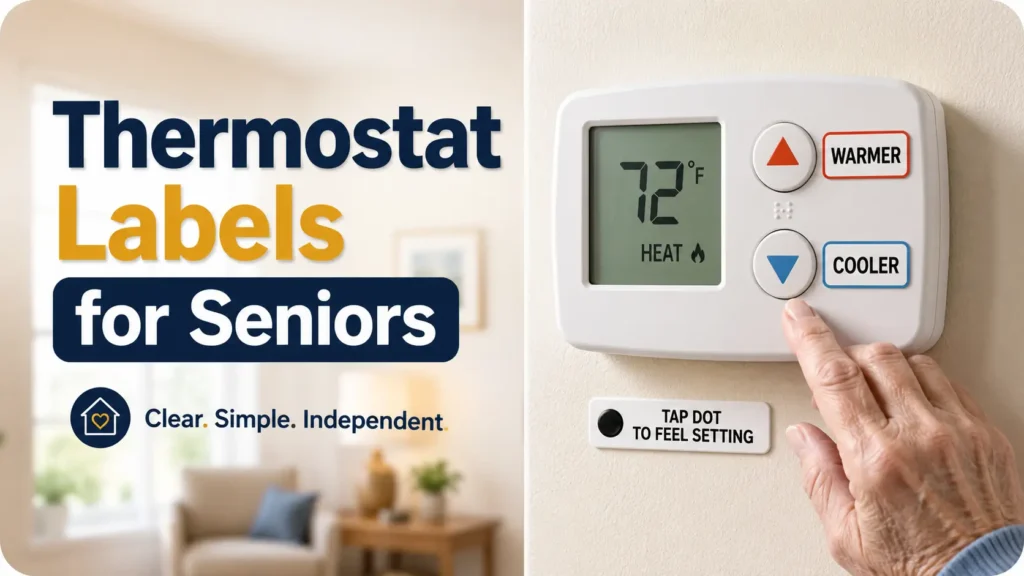
How to Label Thermostats for Seniors
Who Cannot See Small Numbers
A thermostat may be only a few inches wide, yet it can become a daily wall of tiny numbers, glowing menus, unexplained arrows, and buttons that all feel alike. For a senior with reduced near vision, glare sensitivity, or contrast loss, the problem is rarely a lack of intelligence. The interface simply stopped speaking clearly.
The best thermostat labels do not recreate the entire instruction manual. They reveal the two or three actions the resident actually needs: make the room warmer, make it cooler, and change the operating mode when necessary. Large action words, strong contrast, careful placement, and a small tactile cue can turn a hesitant guessing ritual into a familiar household routine.
This guide shows caregivers, families, senior-living staff, renters, and aging-in-place households how to build that simpler system without covering the display, confusing the controls, damaging the thermostat, or creating false confidence when the heating or cooling system needs professional attention.
See the right control
Choose words, contrast, and spacing that remain clear in ordinary household light.
Avoid costly mistakes
Keep adhesive away from sensors, vents, touch areas, seams, and removable covers.
Test real independence
Watch the senior complete actual tasks before making the labels permanent.
A good label does not decorate the thermostat. It removes a moment of uncertainty. 🌡️
Snapshot
Who this is for: Seniors who can still operate a thermostat but struggle to see its small numbers or identify similar controls. What it solves: Hesitation, accidental button presses, glare, and label clutter. What you can do next: Create a removable WARMER and COOLER system, test it in ten minutes, and decide whether tactile markers or a simpler thermostat are needed.
Table of Contents
Before You Label: Know What This Fix Can and Cannot Do
Who this labeling method helps
Thermostat labeling works best when the senior understands what the thermostat does and can make sensible temperature decisions, but cannot comfortably read the display or distinguish the controls. The obstacle is visual access, not a complete loss of understanding.
A simple labeling system may be useful for an older adult with presbyopia, cataracts, macular degeneration, reduced contrast sensitivity, or another vision change. It may also help someone who uses the thermostat successfully during the day but struggles in a dim hallway at night.
- The resident recognizes large words, simple symbols, or tactile markers.
- The resident usually changes only the temperature and operating mode.
- The thermostat responds predictably when a control is pressed.
- The display is accurate enough to support ordinary household use.
- The senior can explain or demonstrate what warmer and cooler mean.
When labels may not be enough
Labels are not a substitute for working equipment, medical attention, or an individualized home-safety assessment. A beautifully labeled thermostat cannot correct a faulty sensor, a dead furnace, a disconnected smart thermostat, or a resident’s difficulty judging unsafe temperature changes.
- The senior repeatedly makes extreme adjustments and cannot explain why.
- Memory or judgment problems make the label meanings difficult to retain.
- Tremor, arthritis, numbness, or weakness prevents reliable button use.
- The room remains unusually hot or cold after the thermostat is adjusted.
- The system resets, loses power, disconnects from Wi-Fi, or gives inconsistent readings.
- The resident appears confused, dizzy, weak, unusually sleepy, or unwell.
Before You Act
This guide offers general home-accessibility and labeling ideas. It cannot assess a person’s vision, cognition, medical condition, HVAC equipment, or home environment. Confirm surface-care instructions with the thermostat manufacturer, ask an HVAC professional about equipment problems, and seek qualified health or emergency help when indoor conditions or symptoms appear unsafe.
Older adults may be more vulnerable during extreme heat and cold, so do not treat a label as the household’s only safety measure. A separate, easy-to-read room thermometer, regular check-ins, working smoke and carbon monoxide alarms, and a clear plan for equipment failure may all matter more than the sticker itself.
Key takeaway: Use thermostat labels to improve access to a known, working control system. Do not use them to hide a mechanical, medical, or decision-making problem.
Build Labels the Aging Eye Can Find Quickly
Use action words before technical terms
A thermostat often displays words such as MODE, MENU, HOLD, AUTO, AUX, SET, FAN, and SCHEDULE. These labels describe features from the manufacturer’s perspective. They do not always tell the resident what to do next.
Action words reduce that translation step. WARMER explains the result of pressing a control. COOLER does the same. By comparison, UP and DOWN may refer to temperature, menu movement, fan speed, or screen navigation.
| Less clear | Usually clearer | Why it helps |
|---|---|---|
| UP | WARMER | Names the result rather than the direction |
| DOWN | COOLER | Removes uncertainty about what decreases |
| MODE | HEAT / COOL / OFF | Shows the available household choices |
| POWER | OFF | Uses the familiar outcome when shutdown is appropriate |
| SET | PRESS TO SELECT | Explains the required action on ring-style controls |
Choose readable type, not merely large type
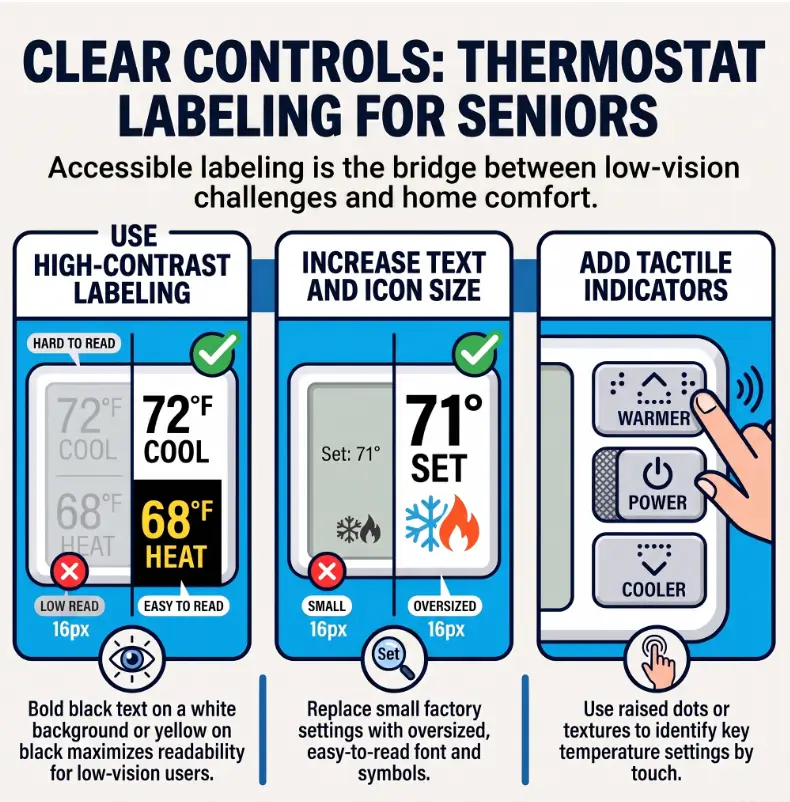
Font size matters, but it is only one piece of readability. A huge word printed in a thin decorative font can be harder to identify than a slightly smaller word in bold, plain lettering.
- Use bold sans-serif lettering.
- Prefer upper-case action words when the labels are short.
- Leave open space around each word.
- Avoid condensed, italic, outlined, or highly decorative fonts.
- Test the label from the senior’s normal standing position.
There is no universal label size that suits every person and thermostat. Make the word as large as the available space permits without crowding another control. The practical standard is not a particular point size. It is whether the resident can find and understand the label without leaning forward, squinting, or searching.
For more detailed type and spacing guidance, see this related guide to choosing the best font size for seniors.
Use strong contrast and control glare
Black lettering on a matte white background is a dependable starting point. White lettering on dark navy, charcoal, or black may also work well. What matters is a strong difference between the letters and their background.
Brightness alone is not enough. Fluorescent yellow tape may look vivid in the package yet become difficult to read when the surface reflects a ceiling light. Matte removable vinyl, matte label tape, or a small laminated card positioned away from glare is often easier to use than shiny transparent tape.
Do not depend on red for heat and blue for cooling as the entire system. Color can reinforce a word, but reduced contrast sensitivity, color-vision differences, dim lighting, and tinted glasses may weaken the cue. Print the word as well.
Key takeaway: The label should remain understandable when its color disappears. Words and tactile cues carry the meaning; color is the supporting actor.
Why bigger numbers can still fail
A senior may be able to read “72” and still hesitate. Is 72 the current room temperature or the requested setting? Does the number blink because it is changing? Must the user press another control to confirm it? A larger number solves visibility, but not necessarily interpretation.
That is why action labels often deserve priority over duplicate temperature numbers. Start with the decision the user is trying to make, then add a reference number only when it genuinely helps.

The Three-Label System Most Families Miss
Label only the daily controls
Many caregivers begin by labeling everything. Soon the thermostat resembles a suitcase after a very ambitious vacation: arrows, notes, temperatures, warnings, colors, initials, and tape competing for the same few inches.
A better starting point is a three-label system:
- WARMER
- COOLER
- HEAT / COOL / OFF, only when the senior needs to change modes
If a caregiver or building manager handles seasonal mode changes, the senior may need only WARMER and COOLER. Removing an unnecessary decision is often more useful than making that decision larger.
Add one orientation marker
An orientation marker helps the hand or eye find the control area before interpreting each label. This can be a bold vertical line beside the temperature buttons, a large dot near the first daily control, or a clearly bordered instruction card mounted beside the thermostat.
The marker should answer one question: “Where do I begin?” It should not carry a second or third meaning.
Separate occasional settings from daily tasks
Scheduling, fan programming, Wi-Fi pairing, humidity settings, filter reminders, and advanced menus may be useful, but they do not need equal visual weight. Place occasional instructions on a nearby caregiver card or keep them in a household binder.
A simple wall card might say:
ROOM TEMPERATURE
+ WARMER
− COOLER
If the room does not change after a reasonable period, call the caregiver or building office. Do not keep pressing the control.
Short Story: The label that disappeared at sunset
Mabel could use the thermostat perfectly during breakfast. Her daughter had printed large red and blue arrows, and everyone considered the problem solved.
At 8 p.m., Mabel still called for help. The thermostat sat in a hallway where a ceiling lamp reflected across the glossy labels. From her usual position, the arrows became two pale flashes. She leaned closer, pressed the wrong side twice, and stopped trusting herself.
They replaced the glossy arrows with matte black-on-white labels reading WARMER and COOLER. They also moved a small lamp so it lit the wall without shining into the display. Mabel completed both tasks without coaching.
The lesson was not that larger labels always work. The label had to survive the actual room, the actual hour, and the actual distance. Accessibility lives in those ordinary details.
Place Labels According to the Thermostat Design
Digital wall thermostats with physical buttons
Place each label beside its matching button, not directly on the button. Leave enough space for a fingertip to press the control without catching the edge of the label.
- Keep the display fully visible.
- Do not cover seams needed to open the thermostat.
- Leave vents and small openings clear.
- Avoid placing adhesive over printed model or safety information.
- Check that the label does not peel into the button area.
Touchscreen thermostats
A touchscreen changes according to the current menu, so a permanent label beside one screen position may become misleading on the next screen. Thick dots and tape can also activate or block interactive areas.
Use a large instruction card beside the device instead. Keep the sequence short, such as “Tap screen, choose WARMER, stop after one or two taps.” Test whether the screen wakes consistently and whether the senior can locate the same command after the display changes.
Smart thermostats with rotating rings
For a rotating ring, mark the direction of travel with two large curved arrows on the wall or mounting card. Write WARMER beside the warmer direction and COOLER beside the cooler direction.
If the ring must be pressed to confirm a choice, label that action separately: PRESS TO SELECT. Do not assume the resident will infer pressing from rotation.
Protective covers, remotes, and multiple zones
When a thermostat sits behind a protective cover, attach instructions to the cover exterior or nearby wall. Make sure the label does not prevent the cover from opening or closing properly.
For a portable remote, label the case rather than unstable rubber buttons, and give the remote one consistent storage location. A large label is less useful when the remote vanishes beneath a newspaper.
In homes with more than one thermostat, keep the language and tactile code identical. A marker that means warmer downstairs must never mean cooler upstairs.
The Clear-Control Path
STEP 1
Identify
Choose only the controls used in ordinary daily life.
STEP 2
Simplify
Write WARMER, COOLER, and necessary mode choices.
STEP 3
Place
Protect screens, seams, vents, sensors, and touch areas.
STEP 4
Observe
Ask for real tasks and revise the first point of hesitation.
Where One Raised Dot Can Beat Ten Printed Words
Create a simple warmer-and-cooler tactile code
Raised dots can help a person find a control without leaning close to the wall. They are especially useful when the buttons are physically identical or the hallway lighting changes throughout the day.
Choose a pattern that is easy to explain and difficult to confuse. One possible system is:
- One raised dot beside COOLER
- Two raised dots beside WARMER
Another household may prefer one dot on warmer because that is the most frequently used control. The exact code matters less than consistency, practice, and the resident’s preference.
Compare common tactile materials in this guide to bump dots versus tactile tape.
Keep markers distinguishable
Two dots pressed tightly together may feel like one wide bump. A soft foam marker may flatten over time. A very tall marker may catch on clothing, cleaning cloths, or the edge of a protective cover.
- Place dots beside controls rather than over moving buttons.
- Leave enough distance between markers to count them.
- Use textures the resident can feel comfortably.
- Avoid sharp, hard, or excessively raised materials.
- Check adhesion regularly and replace loose markers.
Pair touch cues with visible words
Tactile markers should usually reinforce the printed words rather than replace them immediately. A senior may rely on touch at night and vision during the day. A visiting relative, home aide, or maintenance worker may rely on the visible label.
Touch-only operation may be appropriate after the resident has practiced successfully and can verify the thermostat’s response. Flat touchscreens and changing menus may remain difficult even with tactile landmarks.
Key takeaway: Consistency beats cleverness. Use the same word, symbol, dot pattern, and direction everywhere that controls follow the same logic.
Thermostat Labeling Mistakes That Create New Confusion
Covering sensors, vents, screens, or seams
Thermostats may contain small openings or sensing areas that are easy to mistake for decorative details. Adhesive placed across them may interfere with airflow, servicing, removal, or operation.
Before attaching anything, inspect the front, sides, and underside. Review the manufacturer’s instructions when available. When the correct placement remains unclear, mount a separate instruction card beside the thermostat instead of attaching labels directly to it.
Relying on arrows or color alone
An upward arrow may mean warmer, increase, next, scroll, or raise fan speed. A red patch may indicate heat, danger, stop, or a low battery warning. The caregiver may consider the code obvious because the caregiver invented it.
Add the full word. The word may take a little more space, but it spends that space buying clarity.
Labeling every available button
Extra labels increase visual search. When ten elements compete for attention, the resident must inspect all ten before finding the two that matter.
Begin with temporary labels on the daily controls. Add another label only after observing a real task that requires it. “The thermostat has this button” is not a sufficient reason.
Making permanent changes too soon
Strong adhesive may leave residue, lift printed markings, discolor plastic, or complicate servicing. It may also preserve a poor design long after everyone has learned that the words are too small or the dots are reversed.
Use removable materials during the trial period. Take a photograph of the original control panel, and keep the thermostat’s model information accessible before adding anything.
| Common mistake | What can go wrong | Safer alternative |
|---|---|---|
| Label over a button | Button sticks or becomes harder to press | Place the label beside the control |
| Red and blue only | Meaning disappears when colors are hard to distinguish | Add WARMER and COOLER in bold text |
| Tiny instructions | The label recreates the original visibility problem | Move detailed instructions to a larger wall card |
| Permanent glue first | Damage or residue after an unsuccessful test | Trial removable matte labels |
| Different codes by room | The same cue triggers opposite actions | Standardize every thermostat and remote |
| Exact comfort number for everyone | The setting may not match health, season, building, or preference | Use household-approved reference points |
Show me the nerdy details
A thermostat label succeeds when it reduces several kinds of effort at once. The user must first locate the control, identify its meaning, predict the result, press it accurately, and confirm that the system responded.
Large type mainly improves identification. High contrast improves visual separation. White space reduces search competition. Action words reduce interpretation. Tactile markers support location and confirmation. Consistent placement helps the action become familiar through repetition.
A label can still fail when one link in that chain remains weak. That is why task-based observation is more informative than asking, “Can you read this?” The resident may read every word and still be unsure what action follows.
Compare DIY Labels, Tactile Kits, and Replacement Thermostats
A Good, Better, Best decision table
The best way to choose a thermostat accessibility setup is to match the solution to the barrier. A senior who needs two larger words may not benefit from a costly smart-home installation. Someone who cannot use a changing touchscreen may need more than a larger sticker.
| Setup | What it includes | Best for | What to verify |
|---|---|---|---|
| Good: Temporary DIY labels | Bold paper or removable matte labels for WARMER and COOLER | A clear visual problem on a working thermostat | Readability, residue risk, and safe placement |
| Better: Visual plus tactile system | Large labels, one orientation marker, raised dots, and a nearby instruction card | Low vision, changing light, or identical buttons | Marker spacing, adhesion, dexterity, and consistency |
| Best: Simpler accessible control | Large display, physical controls, predictable feedback, or carefully chosen voice access | Nested menus, inaccessible touchscreens, or repeated failure after testing | HVAC compatibility, installation, privacy, support, and ease of recovery after power loss |
When a free DIY fix is enough
A low-cost labeling fix is often enough when the senior already knows the thermostat, needs only two controls, and completes the task reliably after the labels are added. The setup may cost little more than paper, removable tape, and a few minutes of observation.
DIY work becomes less suitable when controls change by menu, adhesive placement is uncertain, equipment behaves unpredictably, or the resident’s vision and dexterity needs are complex.
What to compare before buying a replacement thermostat
- Physical controls: Can the buttons or ring be found and distinguished by touch?
- Display: Are the active temperature, mode, and status clearly separated?
- Contrast: Does the screen remain readable in the home’s actual lighting?
- Feedback: Does the device click, beep, speak, or visibly confirm an adjustment?
- Menu stability: Do important commands stay in predictable locations?
- HVAC compatibility: Will the device work with the home’s wiring and equipment?
- Power recovery: What happens after an outage or lost internet connection?
- Remote access: Can caregiver access be limited, reviewed, and agreed upon?
- Support: Is clear installation and troubleshooting help available?
- Manual use: Can the resident still control the temperature when an app or voice service fails?
Questions to ask an HVAC installer or accessibility professional
- Which thermostat models are compatible with this specific system?
- Can the essential controls be operated without opening a menu?
- Will changing the thermostat affect warranties or building-management rules?
- Can the installer demonstrate recovery after a power or internet outage?
- Can temperature limits or alerts be configured without removing ordinary resident control?
- Will the professional test the final setup with the resident rather than only with the caregiver?
Renters and senior-living residents should also confirm who owns the thermostat and who may modify or replace it. A removable wall card may solve the problem without changing building equipment.
Test the Labels With the Senior, Not for the Senior
Ask for real tasks, not an opinion
“Do these labels look okay?” often produces a polite yes. A real task produces useful evidence.
- Ask the resident to make the room warmer.
- Return the thermostat to its starting point.
- Ask the resident to make the room cooler.
- If appropriate, ask the resident to identify HEAT, COOL, and OFF.
- Ask how the resident would know that the thermostat accepted the change.
Do not coach during the first attempt. The first hesitation shows you where the design still asks too much.
Watch for quiet signs of difficulty
- Leaning close to the display
- Moving the head to escape glare
- Searching back and forth between labels
- Pressing the same control repeatedly
- Touching several buttons before choosing
- Asking for confirmation after every action
- Abandoning the task despite reading the words correctly
These signs do not mean the resident has failed the test. They mean the design has given you useful feedback.
Test morning, afternoon, evening, and nighttime conditions
Sunlight may wash out a screen in the afternoon. A hallway fixture may create a white reflection after dark. A shadow from the resident’s own body may fall across the controls when standing close.
Repeat the same two tasks under the lighting conditions in which the thermostat is normally used. Consider improving nearby lighting when the label is clear but the control remains hidden. Broader room-safety guidance is available in this home safety checklist for seniors with reduced vision.
Change one element at a time
If the senior hesitates, do not immediately replace the words, colors, dots, lighting, and thermostat. Change one feature, then repeat the task.
- First enlarge the word.
- Then improve contrast if needed.
- Then move the label closer to the matching control.
- Then add a tactile marker.
- Then simplify the number of visible choices.
Key takeaway: Measure success by an uncoached task, not by the caregiver’s confidence in the design.
Know When Thermostat Labels Are Not Enough
Consider a simpler thermostat
A large display does not automatically make a thermostat accessible. A model with stable physical buttons, clear mode status, and predictable feedback may be easier to use than a larger touchscreen with several changing menus.
Before paying for a replacement, ask the senior to try a demonstration unit or review an accessible mock-up. Confirm compatibility and installation requirements with a qualified HVAC professional.
Use voice and remote assistance carefully
Voice control may help a resident who cannot see the screen, while remote access may help a caregiver respond to a problem. Neither feature should quietly remove the resident’s privacy, ordinary control, or awareness of what the system is doing.
- Agree on who can view or change the thermostat.
- Keep manual controls available when possible.
- Explain alerts in plain language.
- Test what happens when internet service fails.
- Document seasonal schedules and temperature limits.
- Avoid unexplained remote changes that make the resident distrust the device.
Ask for professional help when the barrier is broader
An occupational therapist, low-vision specialist, aging-in-place professional, HVAC technician, landlord, or senior-living maintenance team may identify barriers that labels cannot solve. The right professional depends on whether the main problem involves vision, task performance, equipment, building rules, or household safety.
The National Eye Institute provides general information about low vision and vision rehabilitation. Families may also find it useful to prepare specific questions before an assessment, particularly when the resident has difficulty with several household controls.
Respond promptly to unsafe indoor conditions
Contact appropriate emergency, medical, building, utility, or HVAC assistance when the home becomes dangerously hot or cold, the heating system stops during severe weather, a carbon monoxide alarm activates, or equipment produces smoke, burning odors, gas odors, sparks, or unusual sounds.
Seek prompt help when the resident appears confused, faint, dizzy, weak, unusually sleepy, short of breath, or otherwise unwell. Do not spend valuable time redesigning a label while a person or building may be in danger.
During severe cold, the CDC also recommends special attention to older adults and frequent checks of indoor conditions. Review its winter weather preparation guidance before a storm rather than after the thermostat stops responding.

Thermostat Labeling FAQ
What size should thermostat labels be for seniors?
Use the largest bold lettering that fits beside the control without crowding nearby buttons, openings, or the display. Test it from the senior’s normal standing distance. If the word requires leaning, squinting, or searching, enlarge it or move the instruction to a larger wall card.
What colors are easiest for seniors to see?
Strong light-dark contrast is usually more dependable than bright color alone. Black on matte white and white on a dark background are practical starting points. Test the combination in the room’s morning, afternoon, and nighttime lighting.
Can labels go directly on a touchscreen thermostat?
Avoid placing labels or tactile dots over interactive screen areas. They may block information, activate commands, interfere with gestures, or become misleading when the display changes. Use a large nearby instruction card or consider a control with more stable physical features.
Are tactile dots useful for low-vision seniors?
Yes, when each dot pattern has one clear meaning and the senior can distinguish the markers comfortably. Pair tactile dots with visible action words during the learning period, and keep the same code on every similar thermostat or remote.
Should I label exact temperatures?
Exact reference points may help some residents, but they can also create false precision. A setting does not guarantee the same comfort in every room, season, building, or health situation. Use household-approved reference marks and include the Fahrenheit symbol, such as 72°F, when a number is genuinely useful.
How can I prevent label damage to the thermostat?
Begin with removable matte labels, low-tack tape, or a separate mounting card. Check the manufacturer’s surface-care instructions, avoid printed model information, and test a small noncritical area before using stronger adhesive.
What if the senior keeps changing the temperature too far?
First check whether the labels are unclear, the display is inaccurate, the room is genuinely uncomfortable, medications or health issues may be affecting temperature comfort, or the HVAC system is not responding. Consider professional assessment before restricting access or making unexplained remote changes.
Is a smart thermostat better for someone with poor vision?
Not automatically. Voice commands, alerts, and caregiver access may help, but touchscreens, apps, changing menus, internet dependence, and privacy settings may create new barriers. Compare the exact interface and test the ordinary daily tasks before buying.
What temperature should I mark as comfortable?
Avoid presenting one universal number as correct for every senior. Comfort and safety can depend on health, clothing, humidity, weather, building performance, and professional guidance. Agree on one or two household reference points and review them when seasons or health needs change.
Optional video: Open the video on YouTube (external site).
Run a 10-Minute Thermostat Label Test Today
You do not need a complete accessibility makeover to learn something useful. Begin with one thermostat, two temporary labels, and one uncoached task.
- Photograph the thermostat before making changes.
- Identify the exact controls that make the setting warmer and cooler.
- Write WARMER and COOLER in bold, high-contrast lettering.
- Place the labels beside the controls without covering the screen, buttons, seams, vents, or openings.
- Ask the senior to make the room warmer without coaching.
- Reset the control and ask the senior to make it cooler.
- Record the first moment of hesitation.
- Change only the wording, size, contrast, placement, or tactile cue responsible for that hesitation.
Stop there for the day. Do not add schedules, mode diagrams, warning notes, comfort ranges, and five kinds of dots merely because space remains. A clear thermostat is not the one with the most information. It is the one the resident can use calmly, correctly, and with less need to ask, “Is this the right button?”
Once the labels work, check the wider route to the control. Make sure the hallway is well lit, cords do not create a trip hazard, and the resident can approach the wall safely. These related guides to making light switches easier for seniors and extension cord safety for seniors can help complete that small circle of independence.
Your next 15-minute action
Make only the WARMER and COOLER labels. Test both actions in the light the senior normally uses. Let the first hesitation, not the remaining empty space, decide what you add next.
Last reviewed: 2026-09
PUT THIS GUIDE TO WORK · INTERACTIVE WORKSHEET
Thermostat label and readability test
Use this worksheet alongside the article: How to Label Thermostats for Seniors Who Cannot See Small Numbers. Use the fields provided to organize your notes and next actions, then save your worksheet.
Your entries stay in this page and are cleared when you reload. No account is needed. Saved files are downloaded only to your device.
How to use your result
Save the worksheet before leaving this page. Recheck any quote, date, or instruction with the relevant provider, pharmacist, manufacturer, or official organization. A completed checklist means you recorded the steps, not that an outcome is guaranteed.
Worksheet added October 20, 2026. Read the article above for context and its stated review scope.