

Organize your questions and next steps, then save your worksheet.
Summary and next steps
Let the parent choose the task and decide whether a proposed change is worth keeping.
- Ask permission before moving tools or changing settings.
- Try one reversible adjustment on a familiar activity.
- Ask whether to keep, alter or undo it.
Editorial maintenance: October 24, 2026. Summary layout, related links and technical metadata updated. This is not a full clinical review.

Caregiving without crowding
How to Help an Aging Parent with Presbyopia
Without Taking Over
Presbyopia can turn ordinary moments into small negotiations: a medicine label held at arm’s length, a restaurant menu tilted toward the lamp, a phone code that disappears before anyone can read it. For an aging parent, the frustration is rarely just about tiny print. It is about privacy, competence, and the quiet fear of becoming “managed.”
The best help does not march in with a clipboard and rearrange life by noon. It works more like good lighting: present, useful, and not shouting for attention. This guide shows how to support near-vision problems with better routines, safer labels, smarter tools, and respectful scripts that keep your parent in the decision seat.
You will learn where simple DIY fixes are enough, when paid help may be worth the cost, and how to avoid the expensive trap of buying gadgets before you understand the actual task. The goal is not to take over. The goal is to make daily life easier while leaving dignity fully intact.
Protect independence
Offer help in ways that reduce friction without making your parent feel inspected.
Fix the real bottleneck
Match glasses, lighting, labels, and phone settings to the task, not the gadget shelf.
Know when to escalate
Spot changes that deserve an eye exam, pharmacist review, or low-vision evaluation.
A calmer home can begin with one brighter lamp, one larger label, and one better sentence. 👓
Snapshot
This article is for adult children, spouses, relatives, and caregivers helping an aging parent with presbyopia, the age-related difficulty of focusing up close. You will learn how to make reading, labels, phones, paperwork, shopping, and daily routines easier while preserving choice, privacy, and confidence.
Table of Contents
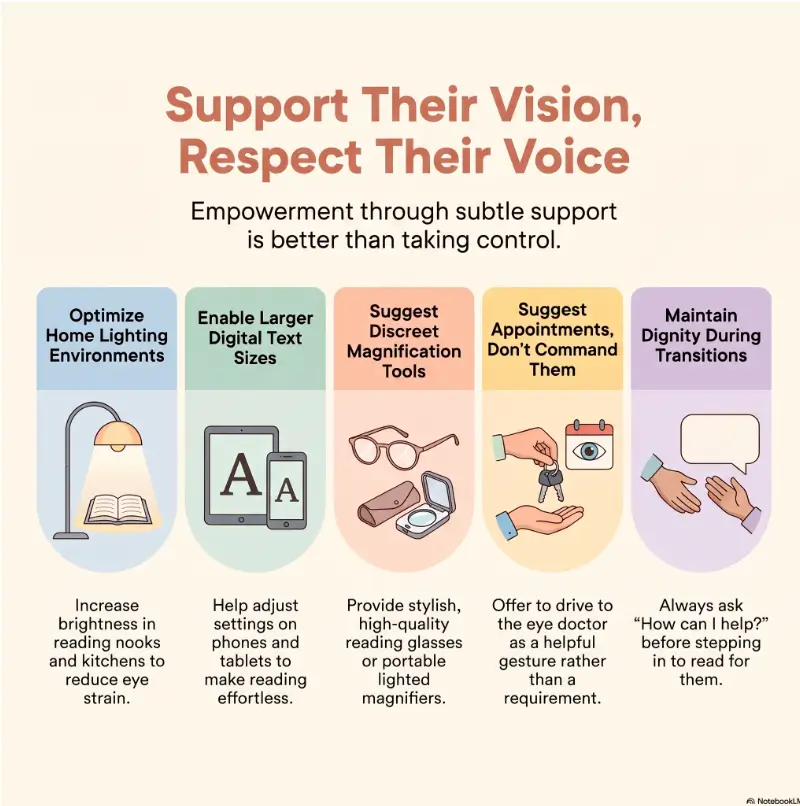
Before You Act: Help With Vision, Not Control
Presbyopia is a normal age-related change, but the way families respond to it can either preserve independence or quietly erode it. The practical goal is simple: reduce unnecessary strain while letting your parent remain the main author of daily life.
This article is general education, not medical advice. It can help you compare household fixes, plan a respectful conversation, and decide what to ask an eye care professional. It cannot diagnose vision changes, choose a prescription, or replace an exam.
If your parent has sudden vision loss, new double vision, eye pain, flashes, a curtain-like shadow, sudden severe headache, or rapid changes in sight, do not treat it as ordinary aging. Ask a qualified professional or urgent care service what to do next.
Key takeaway
Support should pass the “chair test”: if your parent were sitting beside you, would your plan sound respectful, useful, and specific? If not, soften the wording before touching the lamp, phone, labels, or medicine cabinet.
The dignity rule: ask before you optimize
Adult children often notice problems in clusters. The menu is hard to read. The phone font is tiny. The pill bottle looks like it was printed for a hawk. The temptation is to “fix everything” during one visit.
That usually feels efficient to the helper and invasive to the parent. A better approach is to ask for one small target: “Would it help if we made one thing easier today, maybe the medicine labels or the phone text?”
That sentence changes the room. It turns a takeover into a collaboration.
What this guide can help with
This guide is strongest for everyday friction: reading glasses setup, lighting, labels, restaurant menus, pharmacy print, phone settings, paperwork, appliance controls, and small home adjustments. These are the little hinges that swing big doors.
For deeper medical questions, such as whether cataracts, glaucoma, macular degeneration, diabetic eye disease, medication side effects, or dry eye are also involved, use this article as a conversation starter rather than an answer key.
Two common family situations
One reader is the nearby adult child who visits weekly and notices the cereal box, phone, and appointment letters have become tiny obstacle courses. Another is the long-distance caregiver trying to help over calls without turning every conversation into a remote inspection.
Both can help. The nearby helper can adjust the physical setup. The long-distance helper can build routines, create large-print reference sheets, and ask better questions before buying tools.
What Presbyopia Changes at Home, and What It Does Not
Presbyopia makes close-up focusing harder. Many people first notice it when they hold a book, phone, receipt, or label farther away. The arms become the first “adjustable lens,” until the arms run out of geography.
It is common after midlife, but common does not mean trivial. Small print controls money, medication, food safety, passwords, forms, appointments, and independence. When near vision gets harder, daily confidence can shrink in very practical ways.
For a clear medical overview, the National Eye Institute has a helpful plain-English page on presbyopia and near vision changes.
Normal presbyopia vs. other vision problems
Presbyopia mainly affects near tasks. A parent may see the television well but struggle with a medicine insert. They may read road signs but dislike restaurant menus. That mismatch can confuse families.
Still, not every reading problem is presbyopia. Glare, cataracts, dry eye, low contrast, tremor, memory changes, poor lighting, and medication side effects can all make near tasks harder. If reading glasses “stop working,” the answer is not always stronger readers.
For more context on that exact problem, you may want to pair this guide with why reading glasses stop working and near-vision problems in seniors.
Why small print feels like a bigger problem
Tiny print carries emotional static. A parent who once handled bills, recipes, maps, school forms, tax letters, and travel plans may suddenly need help with a jar label. That can feel embarrassingly out of proportion to the task.
The family may see “just a label.” The parent may feel a little door closing. Good support recognizes both realities.
Tasks that presbyopia quietly disrupts
- Reading medicine labels, eye drop instructions, and pharmacy leaflets
- Entering verification codes before they expire
- Checking expiration dates on food, cosmetics, and prescriptions
- Reading restaurant menus, receipts, and price tags
- Using appliance panels, remotes, thermostats, and keypads
- Reviewing mail, insurance notices, bank letters, and appointment instructions
- Seeing phone text, keyboard buttons, app menus, and contact names
The Gentle Support Framework
1. Ask
Pick one task your parent wants to improve.
2. Observe
Notice lighting, distance, glare, contrast, and timing.
3. Adjust
Try the smallest useful fix first.
4. Review
Keep what helps. Remove what annoys.

Start With Permission: The Script That Keeps Your Parent in Charge
The best way to help an aging parent with presbyopia is not to begin with tools. Begin with language. The right sentence can keep your parent from feeling studied, corrected, or quietly demoted.
Many families accidentally turn vision help into a performance review. “You can’t see that anymore” lands differently from “This print is ridiculous. Want me to help make it easier?” The second sentence puts the blame where it belongs: on the tiny print, not the person.
The three-question script
Use three questions before you change anything:
- “What near-vision task has been most annoying lately?”
- “Do you want a quick fix, or do you want to compare a few options?”
- “Would you rather I set it up with you, or show you and leave it alone?”
These questions work because they offer control over the task, the pace, and the level of help. That is the whole melody.
Sentences that help instead of hover
| Instead of saying | Try saying | Why it works |
|---|---|---|
| “You need bigger glasses.” | “Do these work for this distance, or is the print still fighting back?” | It focuses on the task, not the person. |
| “Let me do it.” | “Want me to read it aloud, or would you rather I adjust the lighting?” | It gives options. |
| “You can’t read that?” | “That label is painfully small.” | It removes shame. |
| “I fixed your phone.” | “I changed the text size. Try it for a day and we can undo it.” | It protects ownership. |
When your parent refuses help
Refusal is not always denial. Sometimes it is fatigue. Sometimes it is pride. Sometimes the suggested solution is simply not the problem they care about.
Do not argue over the entire category of “vision help.” Shrink the request. Try: “No big changes. Can we just make the prescription label easier to read today?”
If the answer is still no, leave the door open. A gentle “Fair enough. I’m here if the tiny-print goblins get annoying” can do more than a lecture with perfect bullet points.
Key takeaway
The most respectful help sounds temporary, reversible, and specific. “Let’s test this for one week” feels safer than “You need a new system.”
Build a Reading Setup That Makes Small Print Less Hostile
Before buying magnifiers, apps, or premium glasses, improve the reading environment. A poor setup can make even the right glasses feel wrong.
Think of near vision as a small stage. The text is the actor. Light, contrast, distance, glare, posture, and timing are the crew backstage. If the crew is a mess, the performance suffers.
The four-part reading station
- A steady surface: A table, tray, or lap desk keeps bills and labels from sliding around.
- Adjustable lighting: A lamp that can aim at the page without shining into the eyes is often more useful than a brighter room.
- The right glasses nearby: Reading glasses should live where reading happens, not in a mythical drawer in another room.
- A simple backup: A handheld magnifier, phone magnifier, or large-print copy can prevent the “I’ll deal with it later” pile.
If your parent reads mostly at a kitchen table, build the setup there. If they read mail from a recliner, start there. The best system is not the neatest system. It is the one that meets the actual habit.
Lighting without glare
More light is not always better. A bare bright bulb can make glossy mail, pill bottles, and phone screens harder to read. Aim for focused, adjustable light that lands on the object, not directly into the eyes.
Try a small experiment: place the lamp to the side of the stronger hand, then move it until shadows from the hand stop covering the page. For many people, that one change is more useful than buying a new magnifier.
Where reading glasses should live
One pair of readers in one location creates a scavenger hunt. A better setup places glasses at the point of use: kitchen, bedside, favorite chair, purse or bag, and desk.
For a deeper home setup, see best places to keep reading glasses and reading glasses setup for seniors.
Short Story: The Menu at the Window Table
Claire took her father to lunch every Thursday. He always chose the window table, then squinted at the menu as if it had personally insulted him.
For weeks, Claire read the specials aloud too quickly. He nodded, ordered the same soup, and changed the subject. One day she slowed down and asked, “Is it the print, the light, or the menu glare?”
He tapped the shiny page. “That thing flashes at me.”
The fix was small: they moved one table away from the window, used his slim readers from the car, and asked for the paper menu instead of the laminated one. He ordered salmon, teased her about her coffee, and read the dessert list himself.
The lesson was not that Claire became a better helper by doing more. She became better by asking what, exactly, was making the task hard.
Choose the Right Tools Without Buying a Drawer Full of Almost-Useful Things
Presbyopia tools are easy to buy and easy to misuse. A stronger pair of readers may help one task and cause headaches for another. A magnifier may enlarge text but narrow the field of view. A phone app may be powerful but too fiddly under pressure.
The best way to choose is to match the tool to the task, distance, hand steadiness, lighting, and patience level. A tool that requires a tiny instruction manual to read tiny print has missed its calling.
Reading glasses vs. magnifiers vs. phone tools
| Option | Best for | Watch out for | Good first test |
|---|---|---|---|
| Reading glasses | Books, mail, recipes, tablets, everyday near tasks | Wrong strength can cause strain or awkward distance | Try with normal reading material for 10 minutes |
| Task-specific readers | Computer distance, crafts, piano music, kitchen work | May not work well for every distance | Measure the usual working distance before buying |
| Handheld magnifier | Labels, receipts, price tags, expiration dates | Can be hard with tremor or poor lighting | Test on a pill bottle and a grocery label |
| Stand magnifier | Longer reading, tremor, steady tabletop use | Less portable | Try at the kitchen table or bill-paying spot |
| Phone magnifier or camera zoom | Menus, labels, quick checks while out | Battery, glare, app clutter, small controls | Set up a shortcut and practice once at home |
If your parent has hand tremor, arthritis, or fatigue, a stand magnifier may beat a handheld one. If they mostly need help while shopping, the phone camera may be enough once text size and shortcuts are set up.
For a more direct comparison, see reading glasses vs magnifiers.
Good / Better / Best tool setup
| Setup level | What it includes | Best for | Budget note |
|---|---|---|---|
| Good | Clean readers, one bright adjustable lamp, larger phone text | Early presbyopia and mostly independent readers | Low cost, often enough |
| Better | Multiple readers at task locations, glare control, large-print labels, simple magnifier | Frequent small-print frustration at home and errands | Moderate cost, strong daily payoff |
| Best | Eye exam, task-specific prescription discussion, low-vision tools if needed, pharmacist label support | Complex vision needs, medication risk, falls risk, persistent strain | Higher cost, worth comparing when safety is involved |
Try before you upgrade
Before buying a premium device, test the task with what you already own. Use a phone camera to enlarge a label. Move the lamp. Print one bill in larger type. Put the readers exactly where the task happens.
If the low-cost fix works reliably, do not decorate the problem with more technology. If it works only sometimes, note when it fails. That failure pattern tells you what to compare before spending money.
Helpful official resource
The American Academy of Ophthalmology explains presbyopia symptoms and treatment options in plain language. It is a useful page to read before discussing choices with an eye care professional.
Read AAO’s Presbyopia OverviewKey takeaway
Do not buy the “best” magnifier first. Identify the task, distance, lighting, and hand-control needs. Then choose the simplest tool that solves that task reliably.
Make Labels, Phones, and Paperwork Easier Without Becoming the Family Scanner
The danger zone is not always reading for pleasure. It is the tiny print attached to consequences: medication timing, food safety, door codes, banking letters, insurance forms, appointment instructions, and phone verification messages.
Your job is not to become the only person who can read everything. Your job is to build readable systems that reduce dependence.
Medication and eye drop labels
Medicine labels deserve extra care because the cost of confusion can be high. Ask the pharmacy about larger print labels, easy-open caps if appropriate, medication synchronization, talking labels, or printed medication lists. Availability varies, so ask before assuming.
At home, avoid relabeling prescription containers in a way that hides the original pharmacy instructions. Instead, add supportive cues: large-print schedule sheets, high-contrast storage bins, or a one-page medication list reviewed with the pharmacist or clinician.
Related guides that may help: eye drop labels for seniors, medication labels too small for seniors, and senior eye drop safety.
Phone settings that actually matter
Phones are where presbyopia meets modern impatience. Codes expire. Menus hide. Text shrinks. A parent may seem “bad with technology” when the real culprit is a font size designed by someone with microscope eyes.
- Increase text size and display size.
- Pin essential contacts to favorites.
- Move rarely used apps away from the home screen.
- Set up magnifier or camera shortcuts.
- Turn on voice reading tools if your parent likes audio support.
- Practice verification codes calmly before an urgent login.
For a focused phone setup, see best phone font size for seniors and senior verification codes.
Paperwork without privacy loss
Presbyopia can make private paperwork awkward. A parent may need help reading an insurance letter but not want a family member studying every financial detail.
Offer layered help. First, improve the environment: lighting, reading glasses, magnifier, large-print copy, or phone camera zoom. Second, ask whether they want you to read only headings, dates, and action items. Third, agree on what you will not read unless invited.
A useful phrase: “I can help find the deadline and the phone number without reading the whole letter.” That sentence has hinges. It opens trust.
Daily task readability checklist
15-minute readability check
- Pick one task: medication, phone, mail, appliance, menu, or shopping label.
- Ask your parent where the task usually happens.
- Check lighting, glare, font size, contrast, and distance.
- Try one low-cost fix before buying anything.
- Ask, “Is this easier, annoying, or about the same?”
- Write down what worked in plain language.
Budget Choices: Free Fixes, Paid Tools, and When Spending More Makes Sense
Helping a parent with presbyopia can cost almost nothing or become a parade of purchases. The difference is not love. It is diagnosis of the task before spending.
Start with free adjustments, then add low-cost tools, then consider professional help when the risk, complexity, or frustration justifies it. This protects your budget and your parent’s patience.
Free and low-cost fixes
- Move reading tasks to a better-lit table.
- Clean existing glasses and replace scratched readers.
- Increase phone text and display size.
- Use larger labels on pantry, freezer, and appliance controls.
- Print a large-type medication schedule.
- Use the phone camera to enlarge quick labels while shopping.
- Place readers where tasks happen instead of where they look tidy.
These fixes are humble, but humble often wins. A clean pair of readers next to the pill organizer may outperform an expensive gadget stored in a drawer like a sleeping dragon.
When paid tools are worth comparing
Paid tools may be worth considering when the same task fails repeatedly, when safety is involved, or when your parent avoids activities they used to enjoy. Examples include medication reading, cooking controls, mail sorting, hobbies, banking paperwork, or independent shopping.
Before buying, compare return policies, weight, battery needs, ease of cleaning, setup complexity, contrast options, warranty, and whether the tool works at the exact distance your parent needs.
Cost tier comparison
| Budget tier | Typical choices | Best use case | Question to ask before paying |
|---|---|---|---|
| Free | Lighting changes, phone settings, moving glasses, decluttering reading spots | Early frustration and inconsistent habits | Have we tried the task in better light? |
| Low cost | Extra readers, bold labels, simple magnifier, matte folders, large-print calendar | Daily small-print friction | Will this live where the task happens? |
| Mid-range | Task lamp, stand magnifier, talking clock, larger-button remote, organized medication station | Repeated problems with one important routine | Can my parent use it without me there? |
| Professional | Eye exam, prescription update, pharmacist consultation, low-vision occupational therapy evaluation | Safety concerns, persistent strain, complex vision needs | What specific daily task should we bring to the appointment? |
Key takeaway
The best presbyopia tool is not the most expensive one. It is the one your parent can find, understand, use, and tolerate on an ordinary Tuesday.
Show me the nerdy details
Show me the nerdy details
Near-vision comfort is influenced by working distance, print size, contrast, glare, accommodation demand, lens strength, binocular vision, hand stability, and cognitive load. That is why “stronger readers” can solve one problem and create another.
For example, stronger readers often require holding text closer. That may help a pill label but feel awkward for a cookbook, tablet, sheet music, or computer screen. A task-specific pair for the actual working distance may be more comfortable than one all-purpose pair.
A practical testing method: choose one task, measure the usual distance, improve lighting first, then test the tool for at least five real minutes. If your parent changes posture, lifts the chin, rubs the eyes, loses the line, or quits early, the setup still needs work.
When to Get Professional Help Without Turning Every Problem Into a Crisis
Many presbyopia problems are ordinary and manageable. Still, professional help is worthwhile when near-vision difficulty is new, worsening, unsafe, or mixed with other symptoms.
The trick is to escalate calmly. You are not declaring an emergency every time a label is hard to read. You are noticing patterns and asking the right professional the right question.
When an eye exam is smart
- Reading glasses no longer help as expected.
- Your parent has frequent headaches or eye strain with near tasks.
- Vision changes seem sudden or uneven between eyes.
- Glare, halos, dimness, or low contrast are becoming major problems.
- Your parent avoids reading, cooking, medication labels, or going out because of vision.
- There are other conditions such as diabetes, glaucoma risk, cataracts, macular degeneration, or recent eye surgery.
The National Institute on Aging offers a helpful overview of aging and your eyes, including why some changes deserve professional attention.
What to bring to the appointment
Do not arrive with a vague complaint if you can bring useful evidence. Eye care professionals can help more when they know what is failing in real life.
- Current glasses and readers, including over-the-counter pairs
- A list of near tasks that are hard: phone, labels, computer, books, crafts, cooking, bills
- The usual working distance for key tasks, such as computer or music stand
- Medication list, including eye drops and over-the-counter medicines
- Examples of labels, mail, or print sizes that cause problems
- Questions about task-specific lenses, progressive lenses, bifocals, or magnification
When a pharmacist or low-vision specialist can help
If the main risk is medication confusion, involve a pharmacist. Ask about large-print labels, medication schedules, packaging options, refill synchronization, and whether any medicines could contribute to blurry vision, dryness, dizziness, or confusion.
If your parent has vision loss beyond ordinary presbyopia, a low-vision specialist or occupational therapist may help with lighting, contrast, magnification, reading strategies, home safety, and task-specific adaptations.
Useful official reading
For a broader look at age-related eye changes and when to seek help, the National Institute on Aging is a calm, practical place to start.
Visit NIA: Aging and Your EyesA 7-Day Support Plan That Keeps Your Parent in Charge
Big family “systems” often fail because they arrive like furniture that nobody ordered. A seven-day plan works better because it is small, observable, and reversible.
Use this plan as a menu, not a commandment. Your parent chooses the first task. You bring the tape, lamp, labels, patience, and snack diplomacy.
Days 1 to 2: observe and ask
- Ask which near-vision task is most annoying right now.
- Watch the task once without correcting.
- Notice lighting, glare, distance, posture, and whether glasses are nearby.
- Ask what your parent has already tried.
Do not begin by ordering supplies. Begin by locating the actual splinter.
Days 3 to 4: make one place easier
Choose one station: kitchen table, bedside tray, favorite chair, entry table, bathroom counter, or desk. Improve only that station first.
- Add or reposition light.
- Place the right glasses within easy reach.
- Remove visual clutter.
- Add one high-contrast label if needed.
- Create a simple tray or folder for items that need reading.
If the bedside area is the main pressure point, bedside tray setup for seniors can help you avoid creating a cluttered little island of good intentions.
Days 5 to 6: test tools
Test only one or two tools at a time. Too many new items can make the home feel like a showroom after a power outage.
- Try phone magnification on a food label.
- Test a handheld or stand magnifier on medication print.
- Compare reading glasses at the actual task distance.
- Print one large-type schedule or contact sheet.
- Ask which tool feels easiest when you are not there.
Day 7: review and remove
At the end of the week, ask three questions: What helped? What annoyed you? What should we undo?
Removing a failed fix is part of good care. It tells your parent the home is still theirs, not a laboratory where every experiment becomes permanent.
| Day | Action | Respectful wording |
|---|---|---|
| 1 | Pick one task | “What tiny-print problem is most annoying this week?” |
| 2 | Observe the task | “Show me how it usually happens.” |
| 3 | Improve lighting | “Let’s test this lamp position, not commit to it.” |
| 4 | Place glasses and tools | “Would this spot be useful or in the way?” |
| 5 | Try a label or magnifier | “Is this easier enough to keep?” |
| 6 | Adjust phone or paperwork setup | “You can undo this if you hate it.” |
| 7 | Review | “What should stay, change, or disappear?” |
Key takeaway
A successful support plan should leave your parent with more ability, not more objects. Keep the helpful pieces and politely retire the clutter.

FAQ
Is presbyopia the same as low vision?
No. Presbyopia is an age-related focusing change that makes near tasks harder. Low vision usually means vision loss that cannot be fully corrected with standard glasses, contacts, medication, or surgery. A person can have presbyopia and still have otherwise healthy eyes, or they can have presbyopia along with another eye condition.
Should I buy stronger reading glasses for my parent?
Not automatically. Stronger readers may help very close print, but they can make the comfortable reading distance too short. If your parent has headaches, uneven vision, persistent blur, or trouble at multiple distances, an eye exam is a better next step than guessing stronger and stronger powers.
How do I help with medication labels without making mistakes?
Keep the original pharmacy label visible. Ask the pharmacist about large-print labels, medication lists, packaging options, and safety checks. At home, use supportive tools such as a large-print schedule or clearly separated storage areas, but avoid covering or rewriting official instructions unless a qualified professional has confirmed the setup.
What if my parent gets angry when I offer help?
Step back and reduce the size of the offer. Instead of “Let’s organize your medicine,” try “Would you like me to make this one label easier to read?” Anger may be protecting independence. Respect that signal, then offer smaller, reversible help later.
Are phone magnifier apps good for seniors with presbyopia?
They can be useful for quick labels, menus, receipts, and price tags, especially if the shortcut is easy to find. They are less useful if the phone text is already too small, the app is hard to open, glare is strong, or your parent dislikes using the phone under pressure. Practice at home first.
When is professional low-vision help worth it?
Consider professional help when ordinary readers and lighting changes are not enough, when safety is involved, or when your parent is avoiding important tasks. A low-vision specialist or occupational therapist may suggest task-specific lighting, contrast, magnification, labeling, and home routines that are hard to design by guesswork.
Optional video: Open the video on YouTube (external site).
The 15-Minute Next Step: Fix One Task Today
The kindest way to help an aging parent with presbyopia is to make one real task easier without making life feel smaller. Do not begin with the whole house. Begin with one moment that keeps repeating.
Set a timer for 15 minutes. Ask your parent to choose one near-vision annoyance: a pill label, a phone code, a menu, a bill, a remote, a recipe, or a bedside note. Improve the light. Bring the right glasses to the task. Increase text size. Add one readable label. Then ask whether the change is worth keeping.
That is enough for today. Independence is not protected by grand speeches. It is protected by small designs that let someone keep doing ordinary things with less strain and more say.
Your one-task starter card
Task: Choose one small-print problem.
Question: “Would you like help making this one thing easier?”
Fix: Improve light, distance, contrast, font size, or tool placement.
Review: “Should we keep it, change it, or undo it?”
Last reviewed: 2026-08
PUT THIS GUIDE TO WORK · INTERACTIVE WORKSHEET
Agree on a helpful support plan
Use this worksheet alongside the article: How to Help an Aging Parent with Presbyopia Without Taking Over. Use the fields provided to organize your notes and next actions, then save your worksheet.
Your entries stay in this page and are cleared when you reload. No account is needed. Saved files are downloaded only to your device.
This card organizes a discussion or task. It does not provide diagnosis, treatment, medication timing, driving clearance, or professional approval. Copy clinical instructions exactly and ask the professional about uncertainty.
How to use your result
Save the worksheet before leaving this page. Recheck any quote, date, or instruction with the relevant provider, pharmacist, manufacturer, or official organization. A completed checklist means you recorded the steps, not that an outcome is guaranteed.
Worksheet added October 20, 2026. Read the article above for context and its stated review scope.