

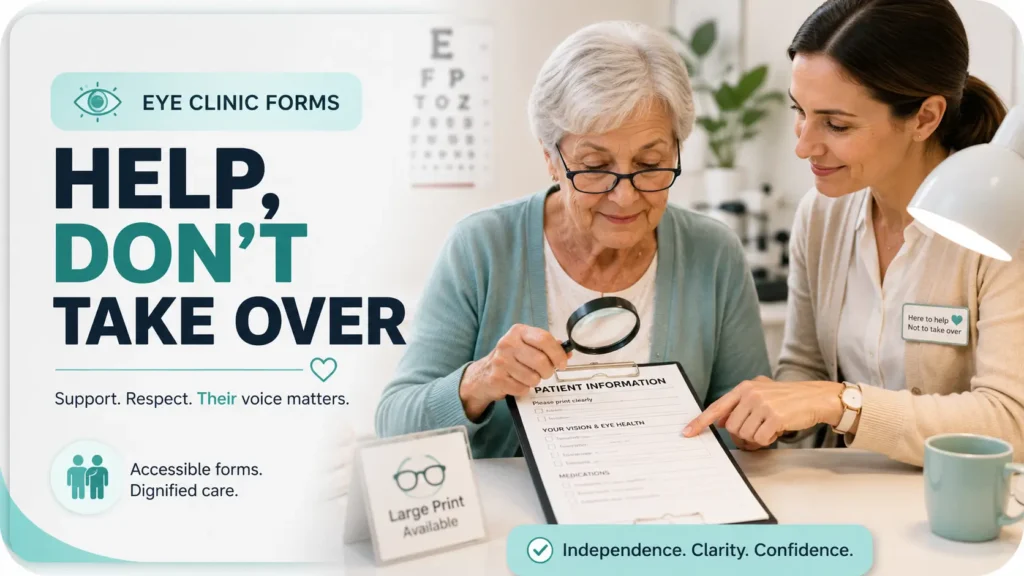
Accessible eye care paperwork guide
How to Help Seniors Read Eye Clinic Forms
Without Taking Over
An eye-clinic form can look harmless: a clipboard, a few checkboxes, a signature line. Yet small print, glossy paper, unfamiliar medical language, and a noisy waiting room can turn routine paperwork into a test of stamina. A well-meaning helper may reach for the pen, only to discover that assistance has quietly become substitution.
The safest approach is not to complete the form faster. It is to make the form easier for the older adult to see, hear, understand, and answer. That may mean moving away from glare, enlarging one section, reading a question exactly as written, or asking clinic staff to explain a consent clause.
This guide gives caregivers, volunteers, clinic staff, and older adults a practical way to protect accuracy, privacy, and independence. It also shows where ordinary help should stop and professional clarification should begin.
See the form
Reduce glare, improve contrast, and test the right magnification.
Preserve the meaning
Read precisely without steering answers or simplifying away key words.
Know when to pause
Bring medical, consent, insurance, and authority questions back to staff.
The goal is simple: improve access without borrowing the patient’s voice. 👁️
Snapshot
Who it helps: older adults, family caregivers, patient advocates, volunteers, and eye-clinic teams. What it solves: small print, glare, line loss, confusing wording, privacy concerns, and accidental answer-steering. What you can do next: set up a safer reading station, use a five-step assistance method, and prepare a one-page appointment packet.
Table of Contents

Before You Help: Keep Accessibility Separate From Authority
Helping someone see or read a form does not automatically give you permission to answer, sign, disclose, or decide on that person’s behalf. Those are different roles, even when everyone involved is family.
A daughter may read a medication question aloud. A spouse may hold a signature guide in place. A volunteer may point to the next blank line. None of those actions, by themselves, make the helper a legal personal representative or substitute decision-maker.
Before You Act
This article supports accessibility and communication. It cannot determine whether a person has decision-making capacity, explain the medical consequences of a procedure, interpret state authority documents, or replace advice from clinic staff or a qualified professional. Confirm unclear consent, privacy, insurance, and legal-authority questions before signing or submitting anything.
Use the “Access, Answer, Decide” Boundary
A useful mental model separates the task into three layers:
- Access: Improve lighting, magnify print, track the line, or read text aloud.
- Answer: Let the patient supply the information, even when the helper already knows it.
- Decide: Keep treatment, consent, privacy, and financial choices with the patient unless documented authority says otherwise.
The first layer is ordinary assistance. The second requires careful restraint. The third may involve clinic policy, applicable law, or formal documents.
Ask Permission Before Each Kind of Help
Do not assume that because someone accepted help carrying a clipboard, they also want every question read aloud. Privacy preferences can change from section to section.
Try brief, specific offers:
- “Would you like brighter light or larger print?”
- “Should I read this question aloud exactly as written?”
- “Would you prefer to answer privately with the staff member?”
- “Do you want me to point to the signature line, or ask the receptionist for help?”
A Family Member Is Not Always a Personal Representative
Under HIPAA, a personal representative generally has authority recognized under applicable law to act for the patient in health-care matters. Being a close relative or accompanying someone to an appointment does not necessarily create that authority. Clinics may need to verify the person’s role and the scope of any document presented.
Key takeaway
Make the paperwork accessible. Do not treat accessibility help as permission to choose answers, disclose private information, or sign for the patient.

Start With the Room: The Form May Not Be the Real Problem
When a senior says, “I cannot read this,” the print size may be only one part of the problem. Glare, poor contrast, dry eyes, fatigue, progressive lenses, visual-field loss, and a badly positioned light can each make otherwise readable text disappear.
Before reaching for a stronger magnifier, change the environment. This is the paperwork equivalent of cleaning a windshield before replacing the headlights.
Move Away From Window Glare and Glossy Surfaces
Seat the patient with bright windows to the side rather than directly in front or behind. Avoid balancing forms on glossy clipboards, polished counters, or plastic document sleeves that reflect overhead lights.
A matte folder, plain sheet of dark paper, or neutral tabletop can create a calmer viewing surface. The goal is not maximum brightness. It is even, controllable light with fewer reflections.
Position Task Lighting Over the Shoulder
Place the lamp so light falls onto the page without shining into the eyes. For a right-handed writer, light from the left often reduces hand shadows. For a left-handed writer, the reverse may work better.
Someone who is glare-sensitive may prefer softer, diffused lighting rather than a bare, intense bulb. Adjust one variable at a time and ask, “Is this clearer, or merely brighter?”
Check the Person’s Usual Reading Setup
Ask whether the patient normally uses reading glasses, a prescribed low-vision aid, a stand magnifier, or a particular viewing distance. A person who reads comfortably at home with a stand magnifier may struggle when handed a floating clipboard in a busy lobby.
For help comparing basic devices, see this guide to magnifiers for seniors. A magnifier should support the person’s normal posture and hand control rather than forcing the page and face into an awkward negotiation.
Key takeaway
Fix visibility before explaining vocabulary. A form that cannot be seen clearly cannot be understood reliably.
The Three-Minute Visibility Check Most Helpers Skip
Do not guess what the patient can see. Ask, test, and adjust. A quick visibility check often prevents twenty minutes of squinting, skipped lines, and rising frustration.
Minute One: Find the Comfortable Distance
Place the form on a stable surface and ask the patient to move it to the distance that feels most natural. Do not hold it at the helper’s preferred reading distance.
Check whether the person reads better with the page flat, tilted, or raised on a stand. Neck pain, tremor, and limited shoulder movement can make a technically readable setup unusable.
Minute Two: Compare Three Formats
- Try the original printed form under improved lighting.
- Try an enlarged paper copy or a photocopy with higher contrast.
- Try a secure clinic tablet, accessible electronic form, or careful camera zoom if permitted.
Larger text is not automatically better. Excessive enlargement can reduce the number of words visible at once, increase scrolling, and make line tracking harder. The best size is the smallest size the patient can read comfortably and accurately.
For a broader explanation of readable sizing, see how to choose a practical font size for older readers.
Minute Three: Watch for Effort Signals
- Repeatedly losing the line
- Squinting or closing one eye
- Tilting or turning the head
- Rubbing the eyes
- Moving the page closer and farther away
- Skipping checkboxes or short words
- Reading the same phrase several times
- Becoming unusually quiet, irritable, or fatigued
These signals do not tell you the diagnosis. They tell you the current setup is not working.
The five-step assistance flow
See → Read → Answer → Verify → Sign
1. See
Lighting, glare, print size, and viewing distance.
2. Read
Use exact wording and include every qualifier.
3. Answer
The patient supplies the response in their own words.
4. Verify
Check names, dates, medicines, blanks, and corrections.
5. Sign
Confirm understanding and the correct signer before ink.
Make the Form Legible Without Changing Its Meaning
Accessible formatting should reveal the original content, not edit it. That distinction matters when a form contains medical history, exclusions, authorizations, or financial terms.
Request an Accessible Copy Before Building a Workaround
Ask whether the clinic has a large-print version, accessible electronic copy, patient portal form, translated document, or staff member who can assist privately. Large-print materials and accessible electronic information are among the communication aids recognized in federal ADA guidance.
Calling before the appointment is often easier than improvising in the waiting room. Use plain language: “The patient has difficulty reading standard print. What accessible form options can you provide?”
Reduce Visual Crowding One Line at a Time
Dense forms can be difficult even when individual letters are visible. Cover surrounding text with a blank index card or sheet of paper, leaving only the current question exposed.
Use a second card beneath the active line as a reading guide. This is usually better than following with a finger, which can cover punctuation, checkboxes, or short words.
Use Digital Zoom With Privacy in Mind
A phone or tablet camera can enlarge print, but completed medical forms contain sensitive information. Ask the patient and clinic before photographing a document. Avoid saving images to personal photo libraries, cloud accounts, shared devices, or messaging apps.
When available, a clinic-owned device or secure patient portal may be a better option. Digital convenience is useful only when it does not create a second privacy problem.
Show me the nerdy details
Reading performance depends on more than visual acuity. Contrast sensitivity, glare sensitivity, visual-field loss, fixation stability, working distance, line spacing, and visual crowding can all affect how a form is read.
Magnification also creates tradeoffs. Enlarging text may improve letter recognition while reducing the visible reading area. A handheld magnifier may shake; a stand magnifier may be steadier but require a fixed focal distance. Electronic zoom can improve contrast but may introduce scrolling and orientation problems.
That is why “make it bigger” is a starting point, not a complete accessibility plan. The useful setup is the one that produces comfortable, accurate reading with the least physical and visual effort.
Read Aloud Without Quietly Taking Over
Reading aloud sounds simple until the form asks, “Have you ever experienced flashes, floaters, double vision, or sudden loss of vision, except during a previously diagnosed migraine?” One omitted word can change the answer.
Read Every Word That Changes the Scope
- Time words: ever, currently, within the last year, since your previous visit
- Frequency words: always, often, occasionally, once
- Exclusions: except, other than, not including
- Combination words: and, or, any, all
- Negative wording: no, never, none, not applicable
Read punctuation-sensitive lists slowly. After finishing, pause. Silence gives the patient room to think without the helper filling the gap.
Separate the Form’s Wording From Your Explanation
Use a verbal label so the patient knows when you are reading and when you are clarifying:
- “The form says: ‘Do you currently use anticoagulant medication?’”
- “In everyday language, that usually means a blood-thinning medicine, but staff should confirm which medicines they want included.”
This preserves the original question. It also prevents a casual explanation from becoming an unofficial medical interpretation.
For a broader communication method, see how to read important labels aloud without changing their meaning.
Replace Leading Prompts With Neutral Prompts
| Leading prompt | Safer neutral prompt |
|---|---|
| “You do not have any allergies, right?” | “What allergies or medication reactions would you like listed?” |
| “That eye drop is twice a day, isn’t it?” | “How often do you use that eye drop?” |
| “You want your daughter to receive everything?” | “Which information, if any, do you want the clinic to share with your daughter?” |
| “Just check no here.” | “The question asks whether this has ever happened. What answer should be recorded?” |
Short Story: The Checkbox That Was Not Routine
Marian brought her father to a retina appointment and offered to complete the intake form while he rested his eyes. She knew his address, insurance plan, and usual medications, so the first page moved quickly.
Then she reached a question about new flashes or shadows. She nearly checked “no.” Her father had not mentioned anything during the drive.
Instead, Marian read the question aloud. He paused and said he had noticed “a dark edge” the previous evening but assumed it was his glasses. She left the box blank and told the receptionist immediately.
The lesson was not that Marian lacked information. It was that the patient held information she did not have. Reading rather than answering preserved a symptom that might otherwise have vanished beneath an efficient-looking checkmark.
Key takeaway
Read the clinic’s words first. Explain separately. Then let the patient answer without supplying the ending.
Three High-Stakes Sections That Deserve Extra Time
Not every blank carries the same risk. A misspelled emergency contact can be corrected. An inaccurate allergy, broad privacy authorization, or misunderstood consent statement may have wider consequences.
1. Consent Forms: Explain Layout, Not Clinical Consequences
A helper can identify headings, point out where risks or alternatives are listed, and read the text aloud. Questions about the likelihood of complications, expected benefits, treatment alternatives, or what happens without treatment belong with the clinician.
A signature is not a substitute for understanding. When a patient says, “Just tell me where to sign,” respond calmly: “I can show you the signature area, but let’s ask the staff to explain anything that is unclear first.”
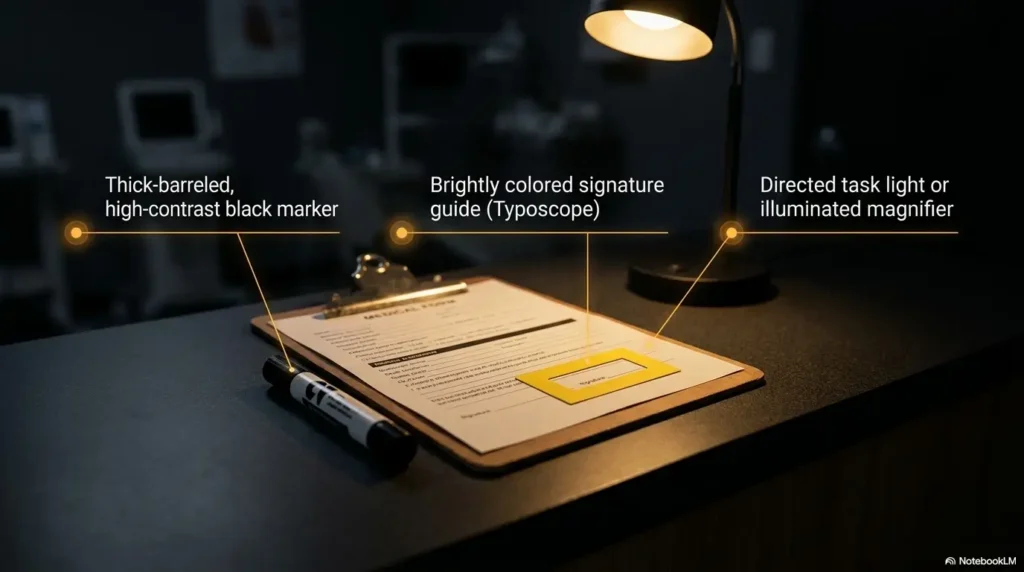
If the physical signature line is difficult to locate, a signature guide frame for seniors may help position the pen without signing for the person.
2. Medication and Allergy Fields: Use Source Documents
Bring a current list instead of reconstructing medicines from memory in the waiting room. Include prescription medicines, over-the-counter products, vitamins, supplements, injections, inhalers, and eye drops.
- Medicine name and spelling
- Strength, when known
- Dose or number of drops
- Frequency
- Which eye receives each drop
- Reason for use, when known
- Prescribing clinician or pharmacy, if useful
- Known allergies and the reaction experienced
Do not force every unpleasant effect into the “allergy” box. Nausea, sleepiness, rash, swelling, and breathing difficulty are not interchangeable. Record the patient’s description and let clinical staff classify or reconcile it.
A one-page medication list template can simplify preparation. For daily readability at home, a large-print medication schedule may also reduce transcription errors.
3. Privacy, Insurance, and Financial Forms: Slow Down
Dense language often appears in authorization-to-disclose forms, assignment-of-benefits forms, payment agreements, and notices of privacy practices. Do not assume that “standard paperwork” means every permission is mandatory or unlimited.
| Section | What the helper can do | What to ask staff |
|---|---|---|
| Privacy authorization | Read the named people, information categories, purpose, and expiration language | Can the permission be limited or declined? |
| Financial responsibility | Identify copay, deductible, noncovered-service, and balance language | What may the patient owe, and when? |
| Assignment of benefits | Read who may receive insurance payments | Is this required for today’s claim? |
| Insurance information | Copy details directly from the current card | Does the clinic verify network status or prior authorization? |
| Contact permission | Read which phone, email, portal, or voicemail permissions are selected | Can messages be limited to appointment details? |
Keep insurance cards, Social Security information, completed forms, and patient portal screens out of public view. Do not leave paperwork unattended on waiting-room chairs or photograph it without express permission.
Patients who are not comfortable reading or discussing medical information in English should ask the clinic about qualified language assistance. HHS guidance describes language access as an important means of reducing communication barriers in covered health programs.
Mistakes That Can Quietly Change the Medical Record
Most documentation errors are not dramatic. They arrive wearing comfortable shoes: a guessed date, a familiar medicine name, a box checked to save time. Small shortcuts can then be copied into future notes, claims, and medication lists.
Do Not Fill Blanks From Memory Without Asking
Even when the helper knows the patient well, ask each question. Symptoms may have changed. A medicine may have been stopped. The patient may prefer not to authorize a particular person this time.
When the answer is unknown, write “unknown” only if the form permits it, or leave the field for staff clarification. A blank with a question mark is often safer than a polished invention.
Do Not Paraphrase Away the Medical Meaning
“Do you have glaucoma?” is not the same question as “Do your eyes bother you?” Likewise, “Have you ever had eye surgery?” is broader than “Have you had cataract surgery?”
Plain-language explanation can help, but it should remain attached to the original wording rather than replace it.
Correct Errors Transparently
For paper forms, ask the clinic how corrections should be made. A common approach is a single line through the incorrect entry, followed by the corrected information and initials or date when requested. Do not use correction fluid or scribble until the original answer is unreadable unless staff specifically directs otherwise.
For electronic forms, review the confirmation screen before submission. If the form has already been sent, tell staff what needs correction rather than submitting conflicting duplicates without explanation.
Protect the Senior’s Presence and Voice
- Do not speak about the patient as though they are absent.
- Do not equate reduced vision with reduced understanding.
- Do not disclose private information to relatives without the patient’s permission.
- Do not rush because the waiting room is busy.
- Do not sign the patient’s name or imitate their signature.
- Do not choose a treatment, privacy permission, or payment option for convenience.
Offer a menu of help instead: read aloud, enlarge, point, pause, write down the patient’s stated answer, or ask staff. The article on offering help to someone with low vision provides additional language for doing this respectfully.
Red-flag phrase
“I know what they mean, so I’ll just fill it in” is the moment to slow down. Familiarity is useful for preparation, not permission to replace the patient’s answer.
Tools, Services, and Cost: What Level of Help Is Enough?
Many seniors need only a better chair, a matte surface, brighter task lighting, and a blank card for line tracking. Others may benefit from a steadier magnifier, accessible technology, or a professional low-vision assessment.
The best option is not the most expensive device. It is the least complicated setup that produces accurate, comfortable reading in the places where paperwork actually occurs.
Good, Better, Best: An Accessibility Setup Comparison
| Level | Typical setup | Best for | What to verify |
|---|---|---|---|
| Good: No-cost setup | Even lighting, matte surface, reading glasses, blank line guide, staff reading assistance | Occasional small-print difficulty or mild visual fatigue | The patient can read accurately without strain |
| Better: Low-cost tools | Stand magnifier, adjustable task lamp, signature guide, document stand, large-print copies | Repeated clinic visits, tremor, line loss, or difficulty holding forms | Working distance, stability, glare, portability, and return policy |
| Best: Specialist-supported plan | Low-vision evaluation, prescribed optical aid, electronic magnification, rehabilitation training | Ongoing vision loss affecting medication, mail, finances, or daily tasks | Training, follow-up, device fit, insurance rules, and real-world goals |
Questions to Ask Before Buying a Reading Aid
- Can the patient use it with their usual glasses?
- Does it stay in focus at a comfortable distance?
- Is it stable enough for tremor or arthritis?
- Does its built-in light create glare?
- Can it show an entire form field or only a few letters?
- Is the control layout simple enough to use in a clinic?
- Can the device be tested or returned?
- Will someone teach the patient how to use it?
Portable devices are convenient, but a larger stand model may be easier for paperwork. A device that performs beautifully in a product demonstration can become an expensive paperweight when the working distance, button layout, or glare does not suit the user.
When Professional Vision Rehabilitation May Be Worth Considering
Consider asking the eye-care team about vision rehabilitation when reading difficulty affects more than one appointment form. Warning signs include trouble reading medicine labels, handling mail, using appliances, signing checks, finding items, or moving safely through unfamiliar places.
Vision rehabilitation can include evaluation, assistive products, technology, skills training, and support designed around daily goals. The National Eye Institute recommends starting with the eye doctor or care team to discuss whether these services fit the person’s needs.
When to Stop the Form and Ask for Professional Help
Paperwork should pause when the problem is no longer merely print access. A waiting-room form is never more important than a potentially urgent symptom, a sudden cognitive change, or unresolved consent.
Urgent Eye Symptoms Come Before the Clipboard
- Sudden vision loss or a rapid decrease in vision
- New flashes of light
- A sudden increase in floaters
- A curtain, veil, shadow, or missing area of vision
- Severe eye pain
- Eye injury or chemical exposure
- New double vision accompanied by other concerning symptoms
New flashes, a sudden increase in floaters, reduced vision, or a curtain-like shadow can require prompt eye evaluation. Tell clinic staff immediately rather than finishing the form first.
New Confusion or Unusual Drowsiness Needs Attention
Stop if the patient suddenly cannot understand familiar questions, gives sharply inconsistent answers, becomes unusually drowsy, or seems markedly different from their normal baseline. Inform clinical staff rather than assuming the person is tired, stubborn, or “just getting older.”
Consent, Authority, or Language Disagreement
- The patient and helper disagree about an answer.
- The patient appears unsure about the procedure but is being urged to sign.
- No one knows who is legally authorized to act.
- A power-of-attorney document appears limited, expired, or unrelated to health care.
- The patient needs language assistance that the helper cannot provide accurately.
- The consent language, medication instruction, or financial obligation remains unclear.
Ask for the appropriate staff member, clinician, qualified interpreter, patient advocate, privacy officer, billing representative, or social worker. The right professional depends on the question.
Key takeaway
Stop paperwork when urgent symptoms, sudden confusion, unresolved consent, uncertain authority, or missing interpretation enters the room.
FAQ
Can a Family Member Complete Eye Clinic Forms for an Older Adult?
A family member can often assist with reading, writing down the patient’s stated answers, or gathering records when the patient agrees. The patient should remain involved and make their own choices unless the helper has verified authority to act on the patient’s behalf.
Is It Acceptable to Read Medical Forms Aloud in a Waiting Room?
Ask the patient first and protect privacy. Use a quiet voice, move to a more private area when possible, and avoid announcing medications, diagnoses, identification numbers, or financial information where others can hear.
Can an Eye Clinic Provide Large-Print Forms?
Ask the clinic about large-print materials, accessible electronic forms, staff reading assistance, or other communication aids. Availability and the best accommodation may depend on the patient’s needs and the clinic’s systems, so requesting support before the appointment is wise.
What Should I Do When the Patient Cannot See Where to Sign?
Improve lighting, enlarge the signature area, use a blank card or signature guide to frame the line, and describe the location. Confirm that the patient understands what is being signed. Do not move directly to signing for the person.
May a Helper Explain Medical Terms on a Consent Form?
A helper can read the term, identify where it appears, and offer limited everyday-language support without changing the meaning. Questions about diagnosis, procedure risks, benefits, alternatives, prognosis, or medication effects should go to qualified clinic staff.
What Information Belongs on the Medication List?
Include prescription medicines, over-the-counter products, vitamins, supplements, injections, inhalers, and eye drops. Add the name, strength, dose, frequency, and which eye receives a drop when known. Record allergies with the reaction the patient experienced.
How Should Mistakes on a Clinic Form Be Corrected?
Ask the clinic about its correction procedure. Avoid erasing or covering the original answer so completely that the change cannot be understood. For electronic submissions, notify staff promptly and identify the exact field that needs correction.
Can Clinic Staff Help When No Caregiver Is Available?
Ask when scheduling. The clinic may be able to provide accessible forms, staff assistance, language services, or another communication method. Explain the specific barrier, such as small print, glare, difficulty writing, or inability to use an online form.
What Accessibility Support Can a Patient Request Before an Appointment?
Possible requests include large print, an accessible electronic version, extra completion time, a private reading area, staff assistance, language interpretation, permission to bring an assistive device, or advance access to routine forms. Describe the communication need rather than merely stating a diagnosis.
Build a 15-Minute Eye Appointment Packet
The easiest clinic form is the one that does not require rebuilding a medical history under fluorescent lights. Spend fifteen minutes assembling a reusable packet before the next appointment.
Place These Items in One Folder
- Current medication and eye-drop list
- Medication allergies and reaction descriptions
- Insurance cards and identification
- Emergency contact information
- Names of current eye-care and primary-care clinicians
- Relevant surgery or procedure dates, if known
- A short symptom timeline
- Three questions the patient wants answered
- Reading glasses, preferred magnifier, or signature guide
- A pen that is easy to grip and produces dark ink
Add a One-Page Symptom Summary
Write the patient’s own description of what changed, when it began, whether it affects one or both eyes, and whether it is constant or intermittent. Do not translate a symptom into a diagnosis.
A simple doctor appointment note-taking system can keep questions, answers, and follow-up tasks together without crowding the clinic form itself.
Call the Clinic With One Specific Request
Use a direct script:
“The patient has difficulty reading standard-size printed forms because of low vision and glare. Could you provide a large-print or accessible electronic version, or arrange staff assistance in a private area?”
Specific requests are easier to act on than “We may need some help.” They also give the clinic time to prepare rather than improvise at check-in.
Your next 15-minute action
Create one folder, print one current medication list, add one symptom note, and place the preferred reading aid inside. Then call the clinic with one concrete accessibility request.
That small packet turns the next appointment from a memory test into a conversation. The senior still holds the pen, the answers, and the final word.
Last reviewed: 2026-08