

Organize your questions and next steps, then save your worksheet.
Summary and next steps
Use a calm sequence: verify the vehicle and zone, select time, confirm payment and keep proof.
- Read the posted parking rules and official payment options.
- Check plate, location and duration before payment.
- Wait for confirmation and keep the receipt or reference.
Editorial maintenance: October 24, 2026. Summary layout, related links and technical metadata updated. This is not a full clinical review.

Senior-friendly parking help
How to Help Seniors Use Parking Payment Machines
Without Stress or Tickets
A parking payment machine should be a small errand, not a public exam under fluorescent sunlight. Yet for many older adults, the moment can feel oddly high-stakes: a small screen, a line forming behind them, a license plate to remember, a card to tap, and the quiet worry that one wrong button may turn into a ticket.
The best way to help is not to swoop in like a heroic raccoon with a credit card. It is to make the process visible, slow, and repeatable. When the order of steps becomes familiar, the machine stops feeling like a tiny metal judge and starts behaving like what it is: a tool for buying time.
This guide is for adult children, caregivers, senior living teams, clinic staff, libraries, churches, local businesses, and parking teams who want to reduce confusion without reducing dignity. We will build a simple parking routine that helps older adults pay correctly, save proof, avoid common mistakes, and feel more confident the next time they park alone.
Reduce ticket risk
Check plate, zone, time, payment, and proof before walking away.
Protect dignity
Use calm prompts instead of taking over the screen.
Build a repeatable habit
Create a tiny card: Plate. Zone. Time. Pay. Proof.
One calm routine can turn a stressful parking lot moment into a small act of independence. 🅿️
Snapshot
This article helps families, caregivers, senior centers, medical offices, local businesses, and city parking teams teach older adults a safer routine for parking payment machines. You will learn how to prepare before reaching the kiosk, coach without embarrassing someone, avoid ticket-triggering mistakes, compare machine, app, QR, and attendant options, and make a simple pocket cheat sheet for real-world use.
Table of Contents

Before You Act: Parking Help Is About Safety, Money, and Dignity
Helping an older adult use a parking payment machine sounds simple until you are both standing in glare, with a screen timing out, a card reader blinking, and someone behind you breathing impatience into the air.
This guide offers practical education, not legal, medical, financial, or accessibility advice. Parking rules, payment systems, disability parking requirements, dispute deadlines, and enforcement policies can vary by city, garage, campus, hospital, airport, and private operator. Always check posted signs, official parking instructions, and local rules before relying on a routine.
If an older adult has major vision loss, memory changes, mobility limits, confusion around payment cards, or repeated tickets, the safer answer may not be more coaching at the machine. It may be accessible drop-off, a caregiver-paid app account, garage validation, paratransit, ride services, or another transportation plan.
Key takeaway
The goal is not to make seniors faster at confusing machines. The goal is to reduce mistakes, preserve independence, and know when a different parking option is safer.
For official accessibility context, the ADA’s parking guidance is useful for understanding accessible spaces, routes, and parking design expectations. It will not tell you how every local kiosk works, but it gives helpful background for families, businesses, and public-facing teams.
The 90-Second Parking Problem: Why Machines Feel Harder Than They Should
Parking payment machines create a strange kind of pressure. The task is small, but the consequence feels large. A mistake may mean a fine, a long dispute, an appointment delay, or the embarrassment of asking a stranger for help.
Small screens, big consequences
The problem often begins with the physical design. Text may be tiny. The screen may be washed out by sun. Buttons may be stiff. The payment slot may be hard to identify. The machine may ask for a plate number, a stall number, a zone code, or a phone number, and each system has its own little dialect.
Then there is the social pressure. A person who reads perfectly well at the kitchen table may struggle when a line forms behind them. Rushing makes the eyes jump. The hands fumble. The brain starts trying to answer three questions at once.
The real barrier is not age
It is easy, and unfair, to say, “Seniors just do not like technology.” Many older adults use phones, online banking, smart TVs, and medical portals. Parking machines are different because they combine payment, local rules, public pressure, weather, small text, and enforcement risk in one quick transaction.
A better phrase is design friction. The machine may be usable in theory but hard to use in the real parking lot, where glare, wind, noise, unread signs, and time limits all join the committee.
Here is what no one tells you
Many older adults understand the task once the order of steps is stable. The trouble is that every kiosk seems to invent its own tiny kingdom. One asks for your plate first. Another asks for your space. A third wants a zone code from a sign you passed twenty feet ago.
That is why the solution is not a long lecture about technology. It is a short routine that can survive different machines: identify, choose time, pay, confirm, save proof.
Parking pressure checklist
- Bright glare on the screen
- People waiting nearby
- Unclear zone or plate requirement
- Fear of a ticket or tow
- Card reader confusion
- Receipt or confirmation uncertainty
Who This Guide Helps, And Who Needs a Different Solution
The best parking help depends on the person, the place, and the risk. A confident older driver who dislikes kiosks needs a different plan than someone with advanced vision loss, memory changes, or repeated payment errors.
Best fit: independent seniors who can still follow a routine
This guide works well for older adults who still drive, shop, attend appointments, visit downtown areas, go to church, use libraries, or meet friends, but feel uneasy with newer parking machines.
They may not need someone to manage their whole errand. They need a clear sequence, a written reminder, and permission to slow down. That small difference matters.
Also useful for caregivers and local businesses
Adult children can use this guide to coach a parent without sounding like a frustrated IT department. Senior living staff can use it as a mini-training script before outings. Clinics, pharmacies, libraries, churches, and local shops can use it to reduce front-desk stress when visitors arrive worried about parking.
City parking teams and parking operators can also learn from it. If many older drivers are making the same mistakes, the issue may be signage, payment flow, machine placement, or receipt clarity, not user stubbornness.
Not for every situation
Some situations call for more support. If a senior cannot read the screen even with glasses, cannot remember whether payment was completed, cannot safely stand at the machine, or is at risk of sharing card information with strangers, use a different parking plan.
That may mean using a staffed garage, arranging curbside drop-off, paying through a caregiver’s phone, using a clinic validation desk, choosing a lot with attendants, or avoiding locations with app-only payment. Independence is not measured by how long someone can wrestle with a kiosk.
| Reader situation | Best first option | When to upgrade support |
|---|---|---|
| Independent senior who dislikes kiosks | Teach a five-step routine and practice once | Repeated tickets or payment uncertainty |
| Adult child helping a parent | Coach beside them and create a pocket card | Parent becomes anxious or gives up driving to avoid parking |
| Clinic, library, or local business | Post a plain-language parking note near entrance or front desk | Frequent visitor complaints, missed appointments, or ticket disputes |
| Senior with vision, mobility, or memory limits | Use attended parking, validation, drop-off, or caregiver payment | Any safety concern near traffic or payment confusion |
Start Before the Machine: The Three Details Seniors Need First
The most useful parking help happens before anyone touches the screen. A machine cannot be simple if the person arrives without the information it asks for.
License plate, space number, or zone code
Most confusion begins here. Some machines ask for the vehicle license plate. Others ask for a numbered space. Many city systems use zone codes, usually posted on signs or stickers near the lot, curb, or garage.
Before walking away from the car, pause and ask: “What does this place use: plate, space, or zone?” That one question prevents a surprising number of wrong payments.
Parking time needed
Older adults often underpay because they estimate only the errand, not the full trip. A 20-minute appointment may actually need 50 minutes once you include walking, check-in, waiting, elevators, bathroom stops, checkout lines, and getting back to the car.
A safer rule is to ask, “What time do we need to be back at the car?” rather than “How long is the appointment?” The machine sells parking time, not appointment time.
Payment method ready
Prepare one card before leaving the car, if the senior is comfortable using cards. Avoid opening a full wallet at the kiosk. If cash is accepted, keep small bills ready, but do not assume cash will work.
For seniors who use phones confidently, a parking app or mobile browser option can be useful, especially when it allows time extensions. For others, a physical machine may be calmer because it avoids passwords, app downloads, stored cards, and popups.
Before leaving the car
- Take a photo of the license plate or keep a written plate note in the wallet.
- Look for a space number or zone code on the sign.
- Estimate return time, not just appointment length.
- Prepare one payment method instead of the whole wallet.
- Bring reading glasses, sunglasses, or a small magnifier if used.
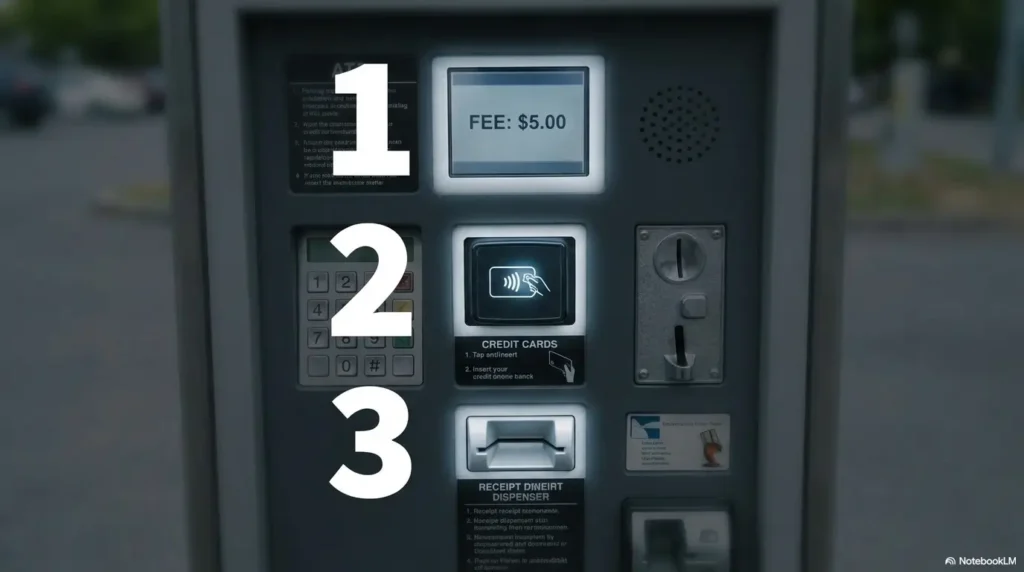
Do Not Grab the Screen: How to Help Without Taking Over
The machine is not the only thing being tested. Dignity is in the parking lot too.
When a helper takes over too quickly, the payment may get done, but the older adult may leave feeling smaller. The better approach is guided independence: stand beside them, read together, and let them press the buttons when possible.
Narrate, do not hijack
Instead of saying, “Here, let me do it,” try, “Let’s see what it asks for first.” That tiny shift changes the emotional weather.
You are still helping. You are simply helping in a way that teaches the next attempt instead of replacing it.
Use calm prompts
Good prompts slow the process without sounding childish. They also help the person look at the screen in order rather than scanning every button at once.
- “What does the screen ask for first?”
- “Do you see the license plate option?”
- “Let’s check the zone number before paying.”
- “How much time do you want, including walking back?”
- “Let’s wait for the paid message before leaving.”
Avoid the embarrassment trap
Do not announce mistakes loudly. Do not compare the person to other seniors. Do not say, “It’s easy.” That phrase often lands like a pebble in the shoe.
A better sentence is, “This machine is not very clear. Let’s take it step by step.” Now the problem belongs to the interface, not the person.
Key takeaway
The best helper acts like a calm co-pilot: eyes on the screen, voice low, hands off unless safety or payment security requires stepping in.
The Simple Script: A Repeatable Parking Machine Routine
A parking routine should be short enough to remember under pressure. The five-word version is: Plate. Zone. Time. Pay. Proof.
That routine works because it puts the most ticket-sensitive details before the payment step. Once money is charged, errors become harder to fix.
Step 1: Read the first screen aloud
The first screen usually tells you the machine’s logic. It may say enter plate, enter space, select zone, choose rate, or press start. Reading it aloud makes the instruction shared and reduces guessing.
If the senior has trouble seeing the screen, the helper can read without touching: “It says, enter your license plate.” Then pause. Let the person decide the next action.
Step 2: Enter plate, space, or zone carefully
This is the highest-risk step. One wrong letter in a license plate may make a valid payment appear unpaid. A wrong zone can pay for a different block. A wrong space number can pay for someone else’s stall.
Build in one double-check. Say, “Before we go on, let’s match it to the car or sign.” Slow here, save time later.
Step 3: Choose time before payment
Choose enough time before inserting, tapping, or swiping a card. Many parking tickets happen not because the person failed to pay, but because they paid for too little time.
For appointments, add a practical buffer. For errands, include the walk back. For medical offices, assume delays. A few extra minutes may cost less than the emotional paperwork of a dispute.
Step 4: Pay, confirm, and save proof
Do not walk away the moment the card beeps. Wait for the final confirmation screen. Look for words such as paid, approved, valid until, receipt, text confirmation, or session started.
If the machine offers a printed receipt, take it. If it offers text confirmation, use a phone number the senior can check easily. If neither works, take a photo of the final paid screen when local rules and privacy considerations allow.
Infographic: The parking payment loop
Plate. Zone. Time. Pay. Proof.
1. Plate
Confirm the vehicle plate or space number.
2. Zone
Match the machine to the sign or lot.
3. Time
Add walking, waiting, and return time.
4. Pay
Use one prepared card or accepted method.
5. Proof
Save receipt, text, email, or screen photo.
Related guides
Why “Just Scan the QR Code” Can Backfire
QR codes can be convenient, but they are not always senior-friendly. They move the payment from a public machine to a personal phone, which adds a new layer of tasks: camera, browser, signal, payment page, card entry, possible app download, and confirmation.
QR codes are not always easier
For some older adults, scanning a QR code is smooth. For others, it is a fog machine. The phone camera may not focus. The link may open in a tiny browser. The page may ask for account creation. The lot may have weak signal. The senior may not want to store a card online.
When someone says, “Just scan it,” they may be skipping six invisible steps.
Scam caution without panic
QR codes can also create payment-security worries. A fake sticker placed over a real parking code can send drivers to a look-alike payment page. That does not mean every QR code is dangerous. It means seniors should slow down before entering payment information.
- Check that the QR code is printed on official signage, not only on a loose sticker.
- Compare the location, lot name, zone number, or parking operator name on the payment page.
- Avoid links that ask for unusual personal information unrelated to parking.
- When unsure, use the physical machine, posted phone number, attendant, or official parking website.
The Federal Trade Commission offers plain-language consumer guidance on avoiding scams. It is a helpful resource for caregivers building a safer digital-payment routine with older adults.
When a machine is safer than a phone
A physical kiosk may be the better choice when the senior does not use smartphone payments, dislikes entering card details online, has limited data service, or struggles with passwords. The machine keeps the task in one place.
On the other hand, a parking app may be better when the senior can use it confidently and wants to extend time without walking back. The right answer is not “apps good, machines bad.” The right answer is the option the person can complete accurately.
| Payment option | Good for | Watch out for | Best helper move |
|---|---|---|---|
| Parking machine | Seniors who prefer a visible, one-location process | Glare, small text, card reader confusion, receipt failure | Read first screen aloud and wait for final confirmation |
| Parking app | Seniors comfortable with phone payments and time extensions | Password problems, stored cards, app updates, weak signal | Set up and practice at home before using it in public |
| QR code | Occasional parking when the code is official and clear | Fake stickers, browser popups, tiny text, payment-page confusion | Confirm the location and operator before entering card details |
| Attendant or front desk | Hospitals, garages, campuses, event venues, clinics | Limited hours or unclear validation rules | Ask about validation before the appointment begins |
Common Mistakes That Lead to Parking Tickets
Parking tickets often come from tiny mistakes, not wild irresponsibility. The senior may have paid, tried to pay, or believed the payment worked. The enforcement system simply sees a mismatch.
Paying for the wrong zone
One block may have different zones on opposite sides of the street. A surface lot next to a garage may use a separate payment system. A sign near the curb may not apply to a private lot behind it.
Before paying, match the zone on the screen to the zone on the sign closest to the parked car. If the machine is far away, take a quick photo of the sign before walking over.
Entering one wrong plate character
License plates invite small errors: O and zero, I and one, B and eight, S and five. If the senior has a plate photo, compare before pressing confirm.
A written plate card in the wallet can help, but make sure it is updated if the vehicle changes. Old plate notes are little ticket seeds.
Walking away before confirmation
A beep does not always mean the session is active. It may mean the card was read, the payment is processing, or the machine is asking for one more confirmation.
Teach the phrase: “We leave after proof.” That means final screen, receipt, text, email, or a clear session-started message.
Assuming cash is accepted, or buying too little time
Many modern machines are card-only or app-only. Some accept coins but not bills. Some no longer print receipts. Do not let yesterday’s parking habits become today’s parking ticket.
Time is another trap. A checkout line, slow elevator, restroom stop, or long walk back to the car can turn a valid payment into an expired session.
Mistake checklist
- Wrong zone or wrong side of the street
- One incorrect license plate letter or number
- Space number entered from a nearby stall
- Payment card removed too early
- Final confirmation skipped
- Receipt ignored or lost
- No buffer time for walking, waiting, or checkout
The Hidden Panic Point: Receipts, Proof, And “Did It Work?”
The most stressful moment often comes after payment. The senior looks at the machine and wonders, “Did it actually work?”
This is where a proof habit becomes valuable. It gives the person a way to leave the machine calmly and creates a record if a ticket arrives later.
Printed receipt vs digital confirmation
A printed receipt is still useful because it is visible and simple. Seniors can place it in a wallet, purse pocket, glove compartment, or appointment folder. Some locations may ask the driver to display a receipt on the dashboard, while others track payment digitally by plate or space.
Digital confirmations can also work well. A text message is often easier than email because many seniors already check texts from family, clinics, pharmacies, and banks.
Take a photo of the final screen
If the machine does not print a receipt and the senior knows how to use the phone camera, a photo of the final paid screen can be a helpful backup. Include the time, amount, zone, or plate if visible.
Avoid photographing other people’s cards, faces, or personal information. The goal is proof of payment, not a tiny documentary about everyone in the parking lot.
What if a ticket arrives anyway?
If a senior paid but still gets a ticket, gather the proof before calling or filing a dispute. Look for the receipt, text message, email, app session, bank charge, plate photo, zone photo, and ticket details.
Each city, campus, garage, or private operator may have its own dispute process and deadline. Read the instructions on the ticket carefully and respond through official channels only.
Show me the nerdy details
Most parking-payment disputes are easier to organize when you can match four fields: vehicle, location, time, and payment. The vehicle field may be the license plate or space number. The location field may be the zone, garage, lot, or block. The time field should show when the session began and when it expired. The payment field should show the amount charged or approved.
A mismatch in any one field can trigger trouble. For example, a driver may pay for Zone 104, while the car is in Zone 140. Or the payment may show plate ABC123 when the car is ABC128. The payment exists, but the enforcement system cannot connect it to the parked vehicle.
For caregivers, the practical lesson is simple: proof is not just a receipt. Good proof connects the car, place, time, and payment in one tidy packet.
Accessibility Fixes: Make the Machine Physically Easier
Good coaching helps, but the body still has to stand there and use the machine. Physical setup matters: lighting, distance, glare, footing, glasses, reach, and hand strength can all change the outcome.
Choose the easiest machine, not the closest one
If there are multiple machines, choose the one with shade, less glare, safer footing, better lighting, and fewer people waiting. The closest kiosk may not be the easiest kiosk.
At night, choose well-lit payment areas and avoid isolated machines when possible. If the lot feels unsafe, paying correctly is not the only concern.
Bring reading glasses before leaving the car
Reading glasses should be part of the parking routine, not an afterthought. Many seniors leave them in the car, walk to the machine, squint at the screen, and then feel rushed.
A practical setup is to keep a backup pair in the car console or in a small “parking pouch” with a plate note and one payment card.
Use tap-to-pay when possible
Contactless payment can reduce fumbling with card slots, but it does not remove the need to check the screen. Seniors should still verify the amount, time, plate, zone, and final confirmation.
If a senior is nervous about using cards in public, consider whether an attended garage, prepaid parking, clinic validation, or caregiver-assisted app payment is safer.
Ask staff before the meter eats the moment
Hospitals, clinics, universities, municipal buildings, libraries, and garages may have validation, discounted parking, accessible drop-off, senior-friendly payment options, or staff who can explain the system.
Ask early, not after the session expires. “Is there parking validation?” is a small sentence with excellent knees.
For broader older-driver safety considerations, the National Highway Traffic Safety Administration has information for older drivers and families. Parking machine help should be part of a larger conversation about safe, confident travel.
Teach Once, Then Build a Tiny Parking Cheat Sheet
A parking cheat sheet works because it removes memory pressure. The senior does not need to remember the whole lesson while standing outside. They only need to follow a small order.
One card-sized instruction note
Keep the note short. Too much detail turns into fog. The best version fits on a wallet card, phone note, or dashboard reminder.
Parking payment card
Plate. Zone. Time. Pay. Proof.
Check plate or space. Match the zone. Buy enough time. Pay once. Wait for proof before leaving.
Add local details
The second side of the card can include local information: city parking app name, common zone format, garage validation reminder, clinic parking desk phone number, or caregiver phone number.
Do not include full payment card numbers, passwords, or sensitive account information on the card. Convenience should not become a security leak in a coat pocket.
Practice when nobody is waiting
The first lesson should not happen in the theater of honking SUVs. Choose a familiar location during a calm time. Practice the routine slowly, even if you do not need to park for long.
The point of practice is not only payment. It is building confidence while the stakes are low.
Short Story: The card in the sun visor
Margaret could drive across town without a second thought, but the new clinic garage machine made her feel as if the alphabet had been rearranged overnight. Her son used to pay for her, quickly, with the tight smile people wear when they are trying not to be late.
One Tuesday, they arrived twenty minutes early. Instead of taking over, he stood beside her and read the first screen aloud. She entered the plate. He pointed to the zone sign. She chose extra time. They waited for the receipt.
Before leaving, he placed a small card in her sun visor: Plate. Zone. Time. Pay. Proof.
Two weeks later, she parked alone. The machine was still annoying. The card was still plain. But this time, she had a script, and the errand stayed hers.
| Setup level | What it includes | Best for | Cost mindset |
|---|---|---|---|
| Good | Written plate note, reading glasses, five-step parking card | Independent seniors who need a basic reminder | Mostly free or very low cost |
| Better | Phone photo of plate, saved parking app, SMS receipt habit, caregiver contact note | Seniors who use a phone but need structure | May require data plan, phone storage, or app setup time |
| Best | Practice run, preferred lots, validation plan, accessible route, backup transportation option | Seniors with appointments, mobility needs, or repeated parking stress | May cost more, but can reduce ticket risk and missed appointments |
FAQ
How can I explain parking payment machines to an older parent?
Use a calm step-by-step script. Start by finding the zone, space, or plate requirement, then choose time, pay, and wait for confirmation. Avoid taking over too quickly unless there is a safety, privacy, or payment-security concern.
What should seniors check before paying for parking?
They should check the license plate number, zone or space number, parking time limit, payment method, and whether the screen shows the correct amount before confirming. The final check should happen before money is charged.
Is it safer for seniors to use a parking app or a machine?
It depends on the person. Apps can be convenient for extending time, but machines may feel simpler for seniors who dislike downloads, passwords, QR codes, or stored payment cards. The safer option is the one the senior can complete accurately and confidently.
What if a senior pays but still gets a parking ticket?
They should keep the receipt, text confirmation, email confirmation, app session, bank charge, or photo of the final paid screen. That proof may help when disputing a ticket. Follow the instructions and deadline shown on the ticket or official parking website.
How do I help without embarrassing them?
Stand beside them, read the screen together, ask guiding questions, and let them press the buttons. Use language that puts the problem on the unclear machine, not on the person. The goal is confidence, not speed.
What if the machine will not accept payment?
Try another machine, check signage for app-only payment, call the posted parking support number, ask a nearby attendant, or move the car if payment cannot be confirmed. Do not assume the attempt alone prevents a ticket.
Should seniors keep a photo of their license plate?
Yes, if they are comfortable using the phone camera. A phone photo or written note can help prevent plate-entry mistakes at parking kiosks. Keep it simple and avoid storing unnecessary sensitive information with it.
What is the easiest routine for seniors parking downtown?
Park, photograph the sign or zone, note the plate or space number, walk to the machine, choose enough time, pay, save proof, and check the confirmation before leaving. The short memory version is: Plate. Zone. Time. Pay. Proof.
Optional video: Open the video on YouTube (external site).
Next Step: Make One Parking Practice Run This Week
The cleanest next step is not buying a gadget or downloading three apps. It is one calm practice run at a familiar location.
Choose a grocery store lot, downtown meter, clinic garage, library, senior center, or church parking area with a payment machine. Go when there is no appointment deadline. Bring reading glasses, one payment method, and a small note card.
Then walk through the routine slowly: plate, zone, time, pay, proof. Let the senior press the buttons when possible. Read the screen aloud. Take the receipt or confirmation. Leave only after the paid message appears.
15-minute action
Make the parking card today.
Write five words on a wallet-sized card: Plate. Zone. Time. Pay. Proof. Add the caregiver phone number or clinic validation reminder if useful. Place it in the car, wallet, or sun visor before the next outing.
A parking machine may never become charming. It may remain a squat little box with too many buttons and the personality of a vending machine after a long winter. But with a repeatable routine, older adults can approach it with less panic, fewer mistakes, and more of their independence intact.
Last reviewed: 2026-07
PUT THIS GUIDE TO WORK · INTERACTIVE WORKSHEET
Prepare a parking-payment reference card
Use this worksheet alongside the article: How to Help Seniors Use Parking Payment Machines Without Stress or Tickets. Use the fields provided to organize your notes and next actions, then save your worksheet.
Your entries stay in this page and are cleared when you reload. No account is needed. Saved files are downloaded only to your device.
This card organizes a discussion or task. It does not provide diagnosis, treatment, medication timing, driving clearance, or professional approval. Copy clinical instructions exactly and ask the professional about uncertainty.
How to use your result
Save the worksheet before leaving this page. Recheck any quote, date, or instruction with the relevant provider, pharmacist, manufacturer, or official organization. A completed checklist means you recorded the steps, not that an outcome is guaranteed.
Worksheet added October 20, 2026. Read the article above for context and its stated review scope.